


Security News
Scaling Socket from Zero to 10,000+ Organizations
Socket CEO Feross Aboukhadijeh shares lessons from scaling a developer security startup to 10,000+ organizations in this founder interview.
By Sarah Gooding - Dec 02, 2025
@zubridge/tauri
Advanced tools
A streamlined state management library for Tauri applications using Zustand.

Cross-platform state without boundaries: Zustand-inspired simplicity for Tauri


tldr: I want to seamlessly interact with my Rust backend state using Zustand-inspired hooks.
Zustand provides a simple and effective state management pattern. In Tauri applications, managing state consistently between the Rust backend (where the authoritative state often resides) and multiple frontend windows can be complex.
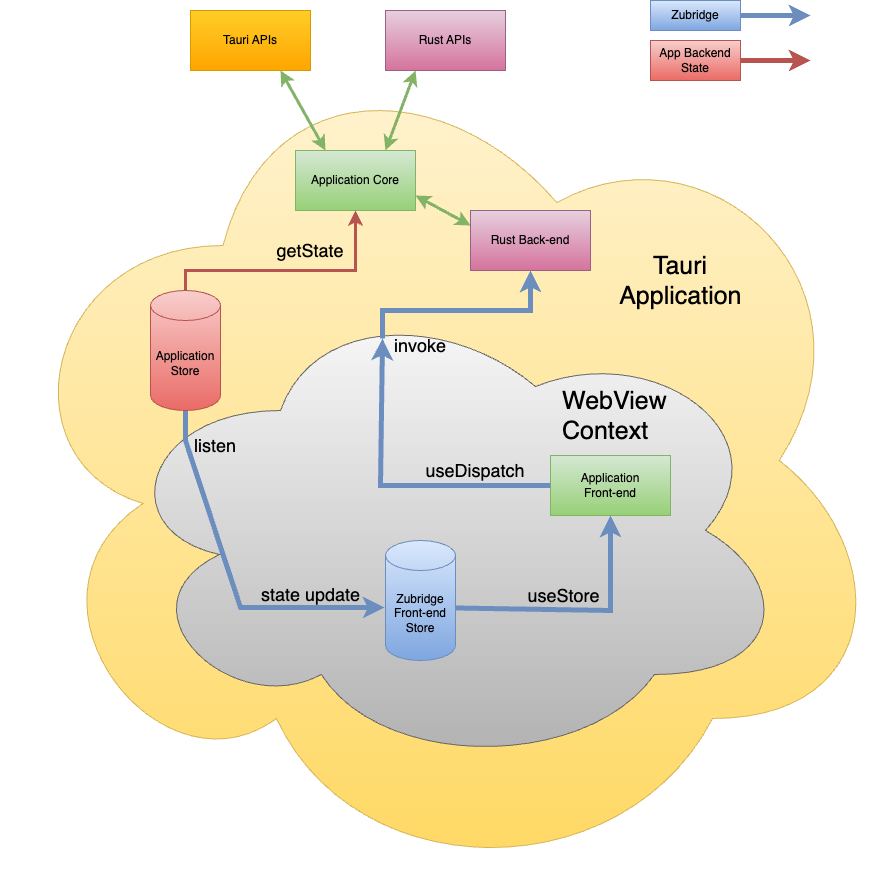
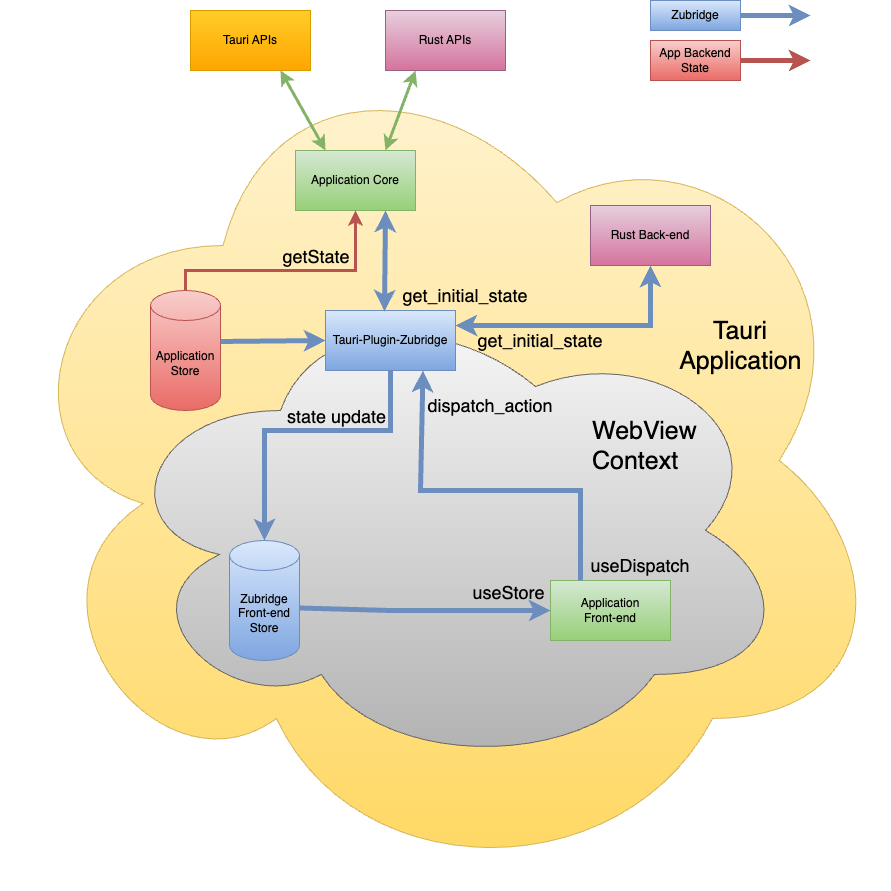
Zubridge @zubridge/tauri simplifies this by providing hooks (useZubridgeStore, useZubridgeDispatch) that connect your frontend components to your Rust backend state, abstracting away the necessary Tauri command invocations and event listening.
Zubridge creates a bridge between your Rust backend state and your frontend JavaScript. Your Rust backend holds the source of truth, while the frontend uses hooks to access and update this state.
tauri-plugin-zubridge plugin with your app stateStateManager trait to handle state changes@zubridge/tauriuseZubridgeStore and dispatch actions with useZubridgeDispatch# Cargo.toml
[dependencies]
tauri-plugin-zubridge = "0.1.0"
serde = { version = "1.0", features = ["derive"] }
# Using npm
npm install @zubridge/tauri @tauri-apps/api
Or use your dependency manager of choice, e.g. pnpm, yarn.
StateManager trait in your Rust backendtauri-plugin-zubridge plugin in your Tauri applicationinitializeBridge({ invoke, listen })useZubridgeStore and dispatch actions with useZubridgeDispatchFor detailed implementation examples, see our Getting Started Guide.
For more detailed documentation, see:
Complete example applications demonstrating the use of @zubridge/tauri:
MIT
FAQs
A streamlined state management library for Tauri applications using Zustand.
We found that @zubridge/tauri demonstrated a healthy version release cadence and project activity because the last version was released less than a year ago. It has 1 open source maintainer collaborating on the project.
Did you know?

Socket for GitHub automatically highlights issues in each pull request and monitors the health of all your open source dependencies. Discover the contents of your packages and block harmful activity before you install or update your dependencies.
Security News
Socket CEO Feross Aboukhadijeh shares lessons from scaling a developer security startup to 10,000+ organizations in this founder interview.

Research
Socket Threat Research maps a rare inside look at OtterCookie’s npm-Vercel-GitHub chain, adding 197 malicious packages and evidence of North Korean operators.

Research
Socket researchers identified a malicious Chrome extension that manipulates Raydium swaps to inject an undisclosed SOL transfer, quietly routing fees to an attacker wallet.