@qzlcorp/typed-i18n-react
React bindings for @qzlcorp/typed-i18n with full TypeScript support.
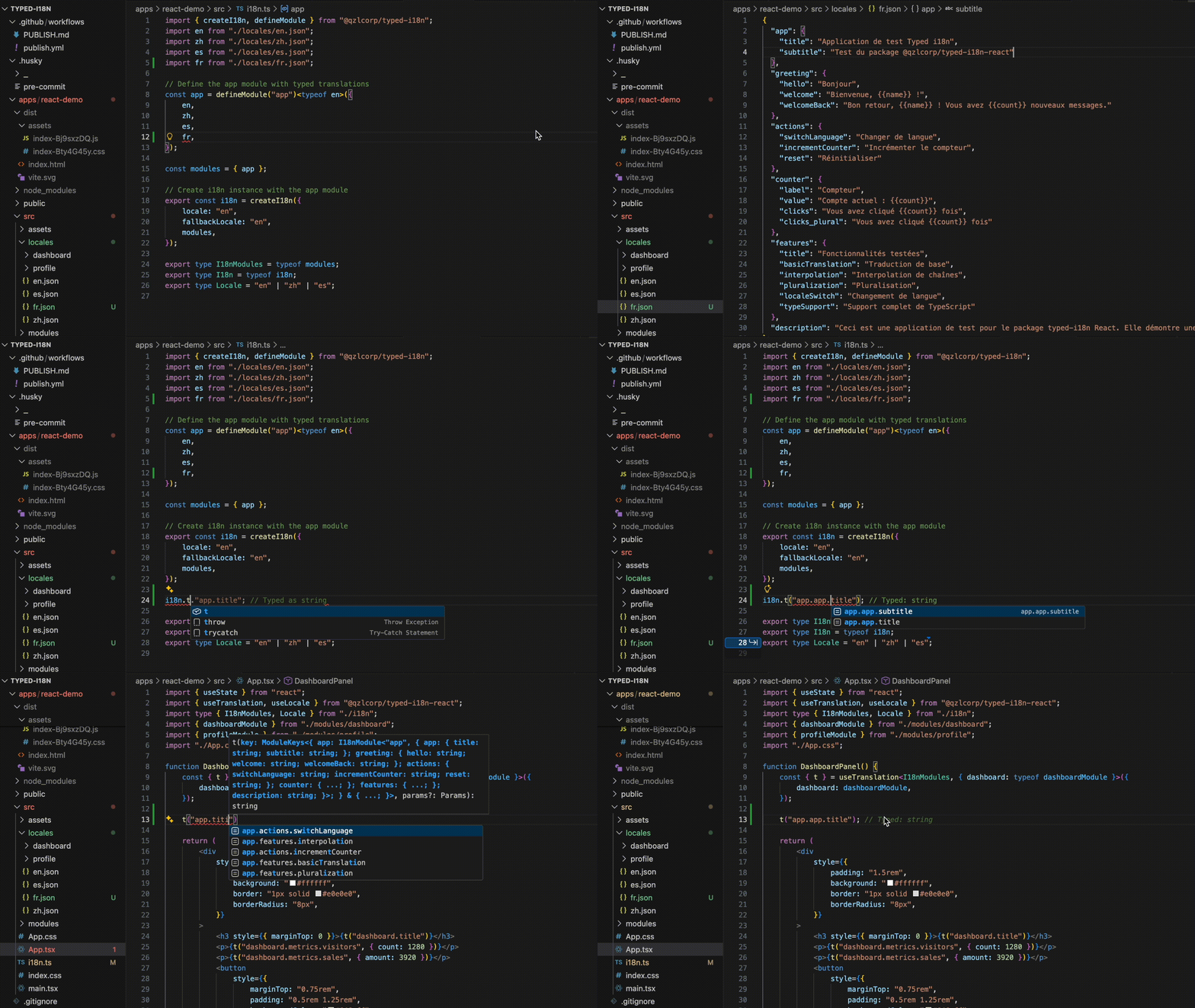
See how TypeScript ensures type-safe translations in React apps with full autocomplete and compile-time validation.
Live Demo
🚀 View Live Demo - See dynamic module loading, locale switching, and type-safe translations in action.
Used By
Installation
pnpm add @qzlcorp/typed-i18n @qzlcorp/typed-i18n-react
Usage
Important: Preserve Key Type Safety
To get static type errors for incorrect translation keys you MUST pass your module type (or use a pre-bound wrapper hook). Without the generic, t() falls back to a loose pattern like ${string}.${string} and invalid keys will not error at compile time.
const app = defineModule('app')<typeof enApp>({ en: enApp, fr: frApp });
export const i18n = createI18n({ locale: 'en', fallbackLocale: 'en', modules: { app } });
export type I18nModules = { app: typeof app };
const { t } = useTranslation<I18nModules>();
t('app.title');
t('app.missing');
const { t: tLoose } = useTranslation();
tLoose('app.missing');
Recommended ergonomic wrapper so you never forget the generic:
export const useAppTranslation = () => useTranslation<I18nModules>();
export const useAppLocale = () => useLocale<I18nModules>();
export const useAppI18n = () => useI18n<I18nModules>();
const { t } = useAppTranslation();
If you later add modules dynamically, you can widen the type:
const dashboard = defineModule('dashboard')<typeof enDashboard>({ en: enDashboard });
const updated = useAppI18n().addModule(dashboard);
const { t: tWithDashboard } = useTranslation<I18nModules & { dashboard: typeof dashboard }>();
Dynamic Modules (Page-Level Splitting)
Load only the namespaces a feature needs by passing a modules object to useTranslation. Each module is registered once and cached by namespace, so repeated renders stay cheap.
import { dashboardModule } from "./modules/dashboard";

const { t } = useTranslation<
  I18nModules,
  { dashboard: typeof dashboardModule }
>({
  dashboard: dashboardModule,
});

console.log(t("dashboard.title"));
Keep the modules object stable (imported or memoized) to avoid unnecessary effect churn. After the hook registers a module, the provider widens the shared i18n instance so other components can access the new namespace without reloading it.
Setup Provider
import { createI18n, defineModule } from '@qzlcorp/typed-i18n';
import { I18nProvider } from '@qzlcorp/typed-i18n-react';
const common = defineModule('common')<typeof enCommon>({
en: enCommon,
fr: frCommon,
});
const i18n = createI18n({
locale: 'en',
fallbackLocale: 'en',
modules: { common },
});
function App() {
return (
<I18nProvider i18n={i18n}>
<YourApp />
</I18nProvider>
);
}
Use in Components
import { useTranslation, useLocale } from '@qzlcorp/typed-i18n-react';

function MyComponent() {
  const { t, locale } = useTranslation();
  const { setLocale, locales } = useLocale();

  return (
    <div>
      <h1>{t('common.hello')}</h1>
      <p>Current locale: {locale}</p>

      <select value={locale} onChange={(e) => setLocale(e.target.value)}>
        {locales.map((loc) => (
          <option key={loc} value={loc}>{loc}</option>
        ))}
      </select>
    </div>
  );
}
API
I18nProvider
Provider component that makes i18n instance available to all child components.
Props:
i18n - The i18n instance created with createI18n()children - React children
useTranslation()
Returns translation function and current locale.
Returns:
t(key, params?) - Translate function with parameter interpolationt(key, options?) - Translate function with options (supports returnObjects)locale - Current active locale
function MyComponent() {
const { t, locale } = useTranslation();
const title = t('common.title');
const greeting = t('common.greeting', { name: 'React' });
const config = t('app.config', { returnObjects: true });
const data = t('dashboard.stats', {
params: { count: 5 },
returnObjects: false
});
return <div>{title}</div>;
}
⚠️ Pass your module type generic (e.g. useTranslation<I18nModules>()) for strict key unions.
Optional argument: useTranslation<I18nModules, ExtraModules>({ ...ExtraModules }) dynamically registers more namespaces (e.g. page-level modules) and widens t to cover them.
useLocale()
Returns locale management functions.
Returns:
locale - Current active localesetLocale(locale) - Change locale (triggers re-renders)locales - Array of all available locales
useI18n()
Returns the full i18n instance for advanced use cases.
Returns:
- Full
I18nInstance with all methods
<Trans> Component
Component for translating JSX with embedded HTML tags and React components. Safer than dangerouslySetInnerHTML - parses translation strings and builds React elements.
Props:
i18nKey - Translation key (optional - if not provided, uses children)children - Can be used as the translation source instead of i18nKey (optional)values - Interpolation parameters (optional)components - Custom React components to use for tags (optional)defaults - Include default HTML components like <strong>, <em>, etc. (default: true)
Note: Either i18nKey or children should be provided. If both are present, i18nKey takes precedence.
Default supported tags (when defaults={true}):
<strong>, <b> - Bold text<em>, <i> - Italic text<u> - Underlined text<br/> - Line break<p>, <span> - Block/inline containers
{
"welcome": "Hello <strong>{{name}}</strong>!",
"action": "Click <link>here</link> to continue"
}
<Trans i18nKey="common.welcome" values={{ name: "John" }} />
<Trans values={{ name: "John" }}>
Hello <strong>{{name}}</strong>!
</Trans>
const description = (
<>
Check the <a href="/docs">documentation</a> for more info
</>
);
<Trans components={{ a: <a /> }}>{description}</Trans>
<Trans
i18nKey="common.action"
components={{
link: <a href="/next" className="btn" />
}}
/>
<Trans components={{ link: <a href="/next" className="btn" /> }}>
Click <link>here</link> to continue
</Trans>
<Trans i18nKey="common.formatted" />
<Trans i18nKey="common.nested" />
<Trans i18nKey="common.text" defaults={false} components={{ custom: <CustomComponent /> }} />
Safety note: The <Trans> component does NOT use dangerouslySetInnerHTML. It safely parses the translation string and builds React elements using React.cloneElement(), preventing XSS vulnerabilities.
Features
✅ Automatic Re-renders - Components re-render when locale changes
✅ Full Type Safety - All translation keys are typed
✅ Trans Component - Safe HTML/JSX translation without XSS risks
✅ React 18 Ready - Built with modern React patterns
✅ Small Bundle - Minimal overhead
✅ Tree Shakeable - Only import what you use
Support

License
MIT © Q.Z.L Corp.





