React TreeMap Component
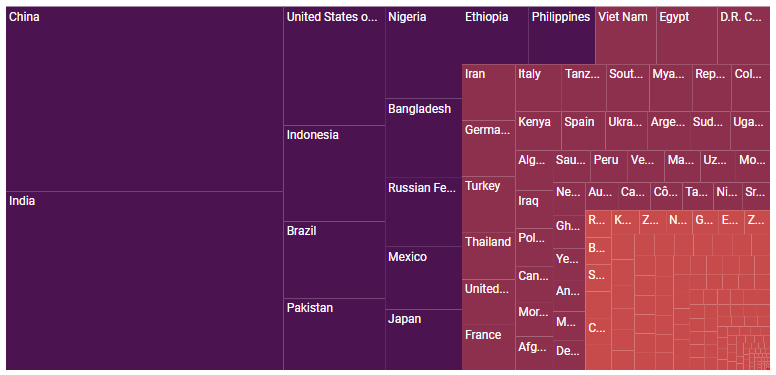
The React TreeMap component provides a simple and effective way to visualize flat or hierarchical data as clustered rectangles with a specific, weighted attribute determining the size of each rectangle.
Getting started .
Online demos .
Learn more
Trusted by the world's leading companies

Setup
Create a React Application
You can use create-react-app to setup applications. To create React app, use the following command.
npx create-react-app my-app --template typescript
cd my-app
npm start
Add Syncfusion® TreeMap package
All Syncfusion® React packages are published in the npmjs.com registry. To install the React TreeMap package, use the following command.
npm install @syncfusion/ej2-react-treemap --save
Add TreeMap Component
In the src/App.tsx file, use the following code snippet to render the Syncfusion® React TreeMap component.
import { React } from 'react';
import { TreeMapComponent } from '@syncfusion/ej2-react-treemap';
function App() {
    let data: any = [
    { State: 'Brazil', Count: 25 },
    { State: 'Colombia', Count: 12 },
    { State: 'Argentina', Count: 9 },
    { State: 'Ecuador', Count: 7 },
    { State: 'Chile', Count: 6 },
    { State: 'Peru', Count: 3 },
    { State: 'Venezuela', Count: 3 },
    { State: 'Bolivia', Count: 2 },
    { State: 'Paraguay', Count: 2 },
    { State: 'Uruguay', Count: 2 },
    { State: 'Falkland Islands',Count: 1 },
    { State: 'French Guiana', Count:1 },
    { State: 'Guyana', Count: 1 },
    { State: 'Suriname', Count: 1 },
  ];
   return (<TreeMapComponent height='350px' dataSource={data} weightValuePath='Count'
     leafItemSettings={{ labelPath: 'State' }}></TreeMapComponent>);
}
export default App;
Supported frameworks
TreeMap component is also offered in the following list of frameworks.
Showcase samples
Key features
- Data sources: Binds the treemap component with an array of JSON objects or DataManager. Both hierarchical and flat collection data sources are supported.
- Levels: Renders with any number of levels and items.
- Layout: Supports four types of layouts: square, horizontal, vertical, and auto.
- Drill-down: Provides drill-down option to have a closer look at the lower level of a hierarchy.
- Data label: Provides additional information about the nodes.
- Header template: Uses any custom HTML element to customize the header of each item.
- Label template: Uses any custom HTML element to customize the data label for each node.
- Color mapping: Applies colors to the nodes based on various conditions. Treemap supports three types of color mapping: range, equal, and desaturation.
- Legend: Provide useful information for conveying what the treemap showcases.
- Selection and highlight: Support selecting or highlighting the nodes to bring center of attraction.
- Tooltip: Provides additional information about the node on hover.
- Print and Export: Prints or exports the rendered treemap to a desired format. Exporting supports four formats: PDF, PNG, JPEG and SVG.
- Globalization: Personalize the treemap component with different languages, as well as culture-specific number, date and time formatting.
- Accessibility: Provides with built-in accessibility support which helps to access all the treemap component features through the keyboard, screen readers, or other assistive technology devices.
Resources
Support
Product support is available through the following mediums.
Changelog
Check the changelog here. Get minor improvements and bug fixes every week to stay up to date with frequent updates.
License and copyright
This is a commercial product and requires a paid license for possession or use. Syncfusion’s licensed software, including this component, is subject to the terms and conditions of Syncfusion's EULA. To acquire a license for 140+ React UI components, you can purchase or start a free 30-day trial.
A free community license is also available for companies and individuals whose organizations have less than $1 million USD in annual gross revenue and five or fewer developers.
See LICENSE FILE for more info.
© Copyright 2026 Syncfusion® Inc. All Rights Reserved. The Syncfusion® Essential Studio® license and copyright applies to this distribution.






