pgAPI - Database as a service
pgAPI is a "Database as a service" application that automatically creates the REST API endpoint for the given URL. The endpoint is designed to call a Postgres Database Function which is configured at the time of API endpoint creation. This application automates the URL routing while the developers must have to just focus on the database method creation. No Coding is required.
Installation
Using Docker
Prerequisites
Start the Postgres Container
$ docker run --name postgres -p 5430:5432 -e POSTGRES_DATABASE=pgapi -e POSTGRES_USER=pgapi -e POSTGRES_PASSWORD=pgapi -e POSTGRES_ROOT_PASSWORD=postgres -d postgres
Start the pgAPI Container
$ docker run --name pgapi --link postgres:postgres -p 5001:3000 -e PG_USER=pgapi -e PG_HOST=postgres -e PG_PASSWORD=pgapi -e PG_DATABASE=pgapi -e PG_PORT=5432 pgapi
Open the link in the Browser. http://localhost:5001/admin
username: admin
password: admin
Using GIT
Prerequisites
- Must have node installed. https://nodejs.org/en/download/
- Must have cURL installed or any other REST API Client like Postman
- Must have Postgres Database installed. You can install Postgres
Start the Application
$ git clone https://github.com/thrinz/pgapi-starter-template
$ cd pgapi-starter-template
$ vi config.env from the terminal (linux or Mac) or open the config.env in a text editor. Modify the config.env file with the postgres database Information
DB_HOST=Postgres Hostname
DB_USER=Postgres username
DB_PASSWORD=Postgres Database Password
DB_NAME=Postgres Database Name
DB_PORT=Port Number
$ npm install
$ node index.js
The console must display log of the server to be running on port 5001
Open the link in the Browser. http://localhost:5001/admin
username: admin
password: admin
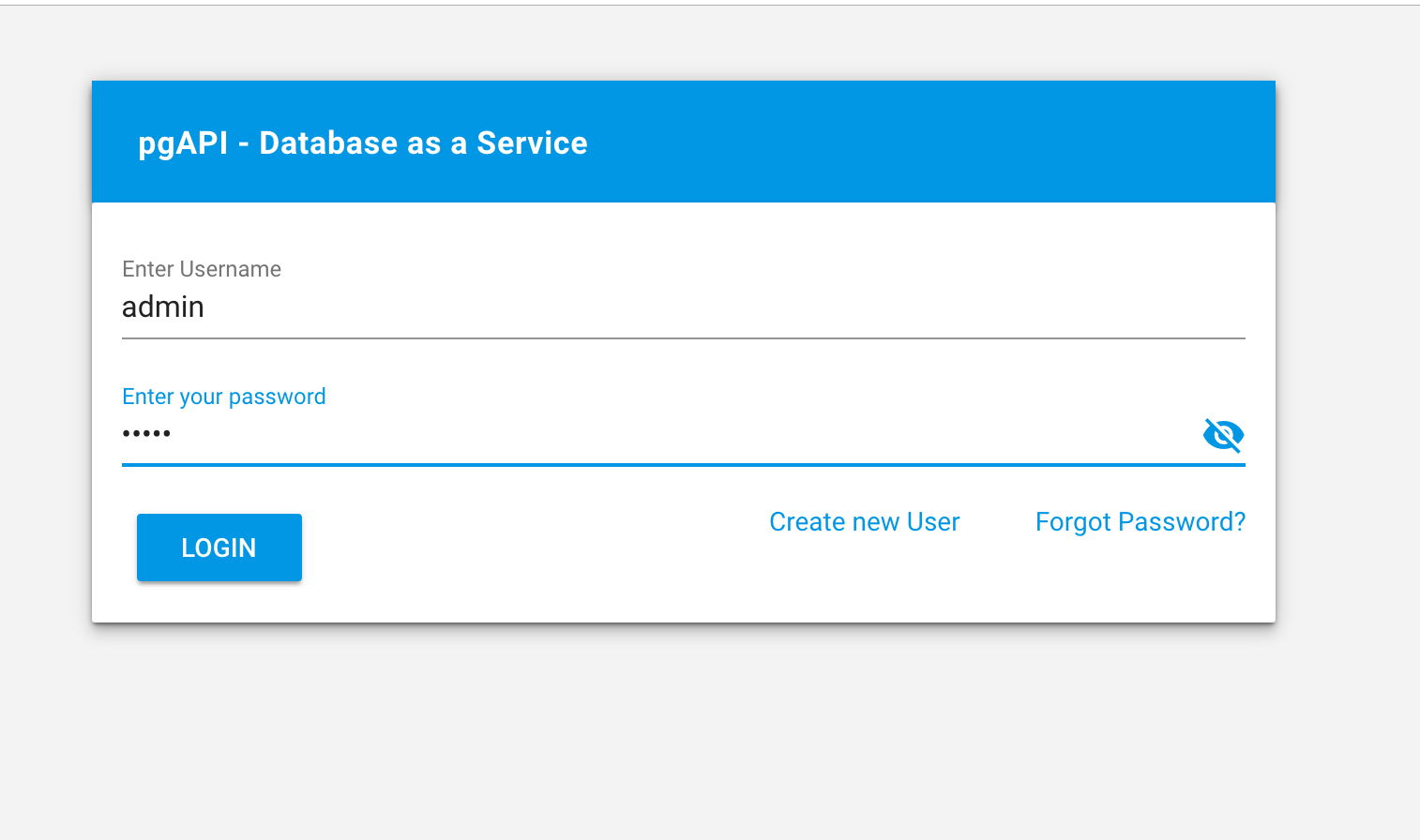
Login to the Admin Portal
Open the link in the Browser. http://localhost:5001/admin
username: admin
password: admin
Getting Started
Step 1: Create a Database Connection
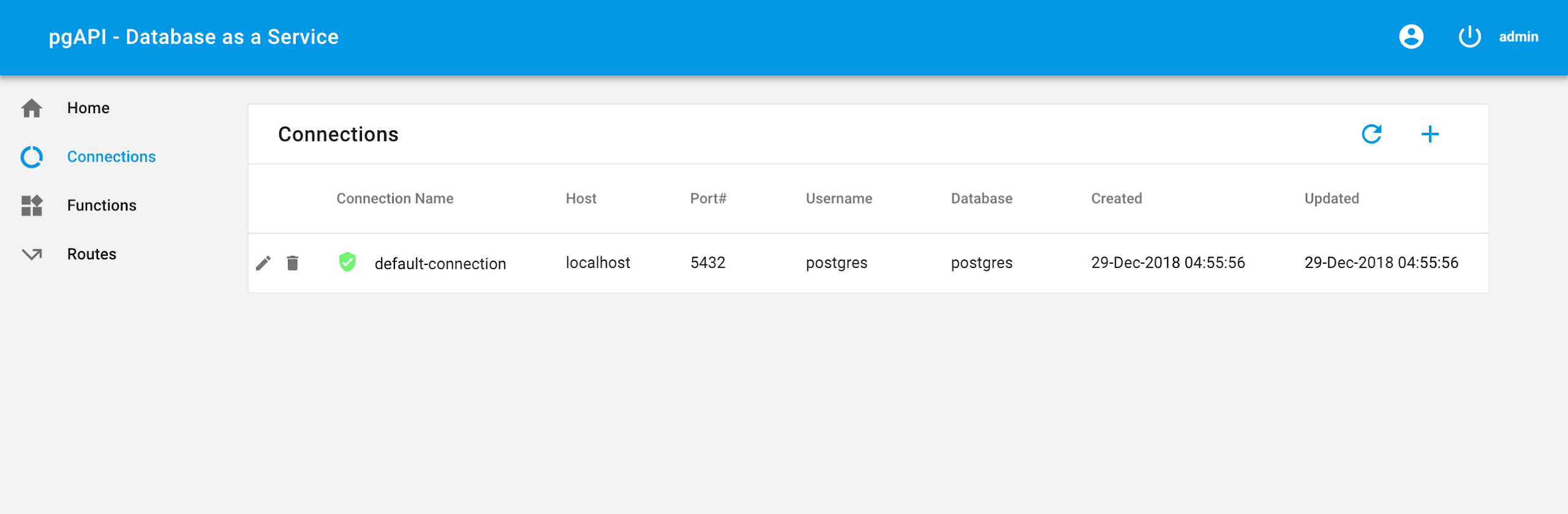
You must already have a “default-connection” Connection entry. This connection can be used for the next steps. However, if you decide to use a different database connection, then follow the below instructions
- Navigate to the Connection menu
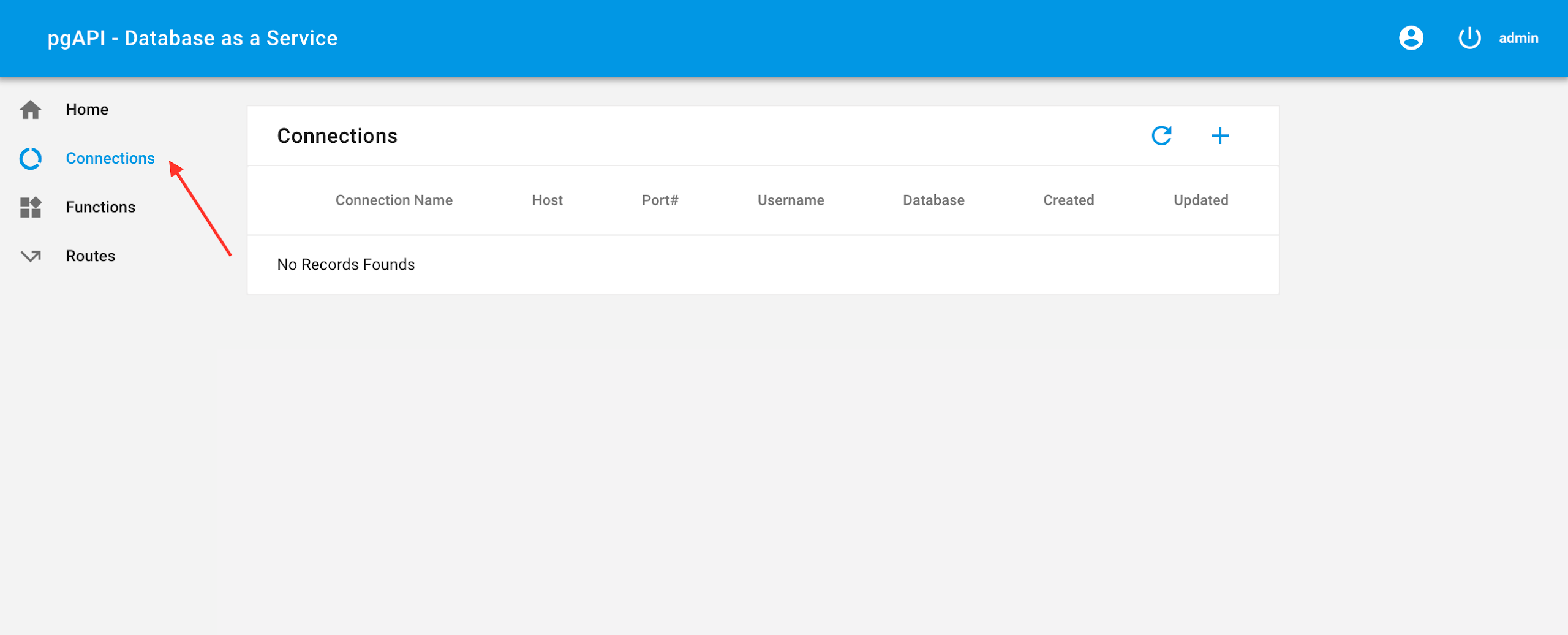
- Click on the + icon, a popup will appear

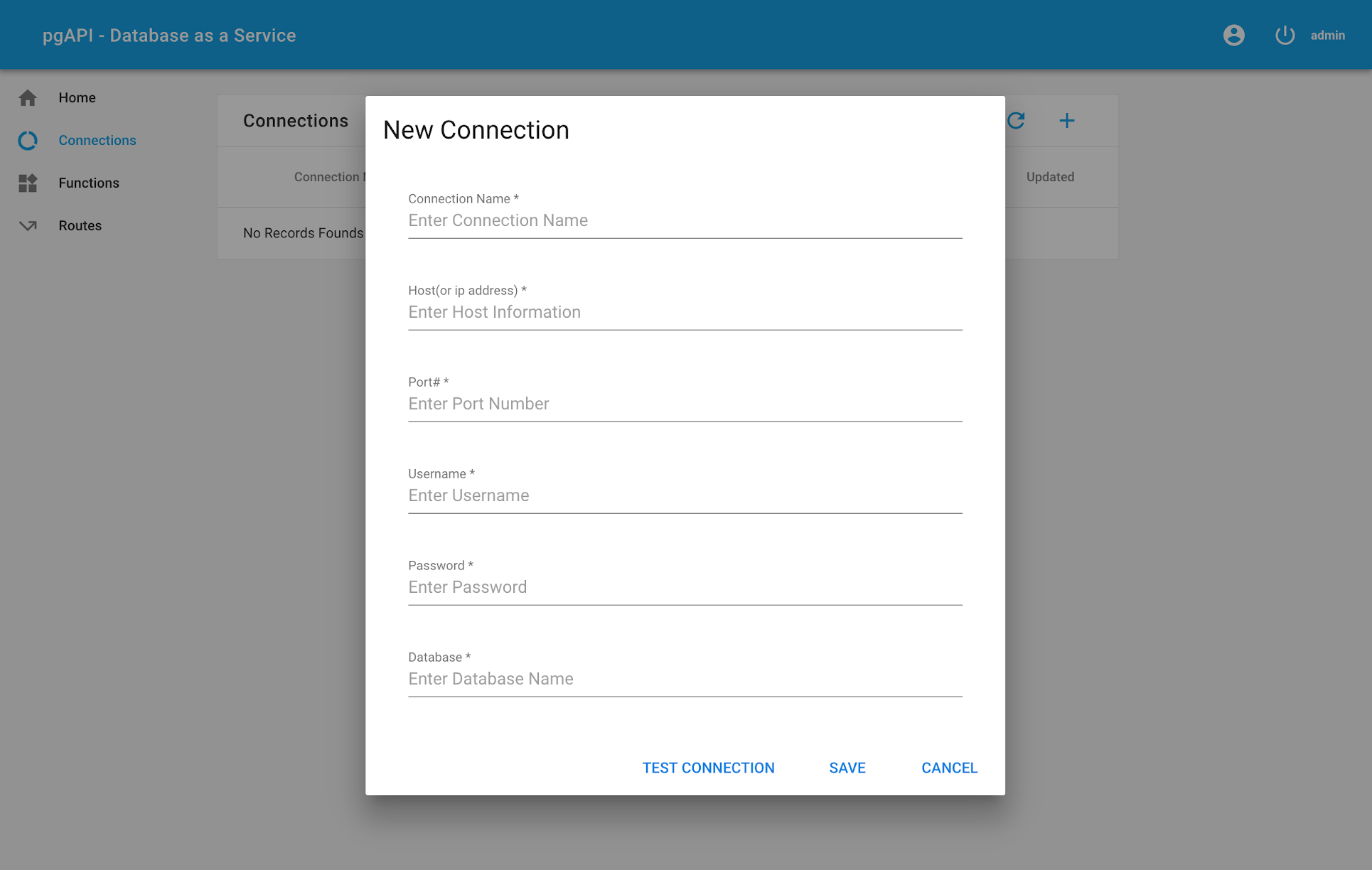
- Fill the connection postgres connection information. If you do not have database connection then you can obtain the database connection by
- Click on Save. This action will validate the database connection information for connectivity. If there is an issue with connecting to the postgres database, you will see an error message. Otherwise you will see the new connection entry added.
Step 2: Create a Database Function
This step is not performed in this application. You would need a database client like pgAdmin to start developing the database function
Note : the database function must have only one input parameter with datatype JSON and the return type must be a JSON datatype . See sample database function.
Sample Database Function
CREATE OR REPLACE FUNCTION create_task ( p_data json)
RETURNS json AS
$BODY$
DECLARE
l_out json;
l_message_text text;
l_exception_detail text;
l_exception_hint text;
l_id uuid;
l_name text;
l_description text;
l_start_date timestamp;
l_due_date timestamp;
l_priority integer;
BEGIN
l_id := md5(random()::text || clock_timestamp()::text)::uuid;
l_name := (p_data->>'name')::text;
l_description := (p_data->>'description')::text;
l_start_date := NOW();
l_due_date := (p_data->>'due_date')::timestamp;
l_priority := (p_data->>'priority')::integer;
INSERT INTO tasks
(
id,
name,
description,
start_date,
due_date,
priority,
created,
updated
)
VALUES
(
l_id,
l_name,
l_description,
l_start_date,
l_due_date,
l_priority,
NOW(),
NOW()
);
l_out := '{"status" : "S" , "message" : "OK" , "id" : "' || l_id || '"}';
RETURN l_out;
EXCEPTION WHEN OTHERS THEN
GET STACKED DIAGNOSTICS l_message_text = MESSAGE_TEXT,
l_exception_detail = PG_EXCEPTION_DETAIL,
l_exception_hint = PG_EXCEPTION_HINT;
l_out := '{ "status" : "E" , "message" : "' || REPLACE(l_message_text, '"', E'\\"') || '" }';
return l_out;
END
$BODY$
LANGUAGE plpgsql;
Step 3: Create a Function
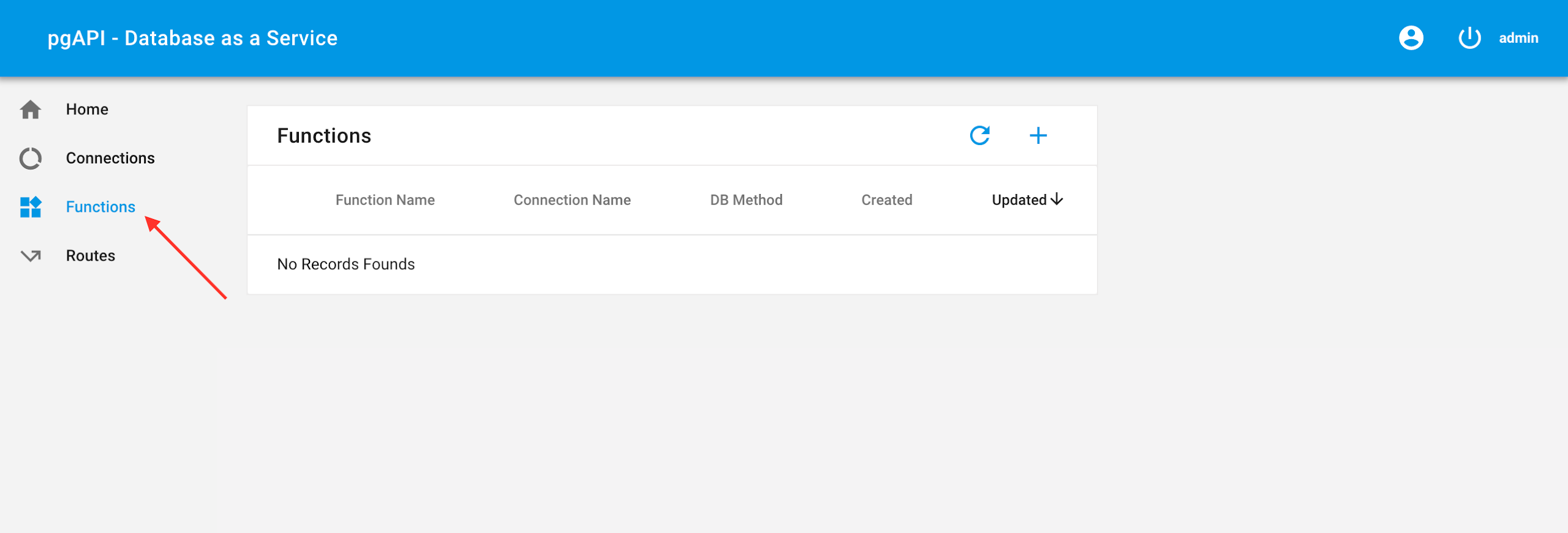
- Navigate to the Functions menu
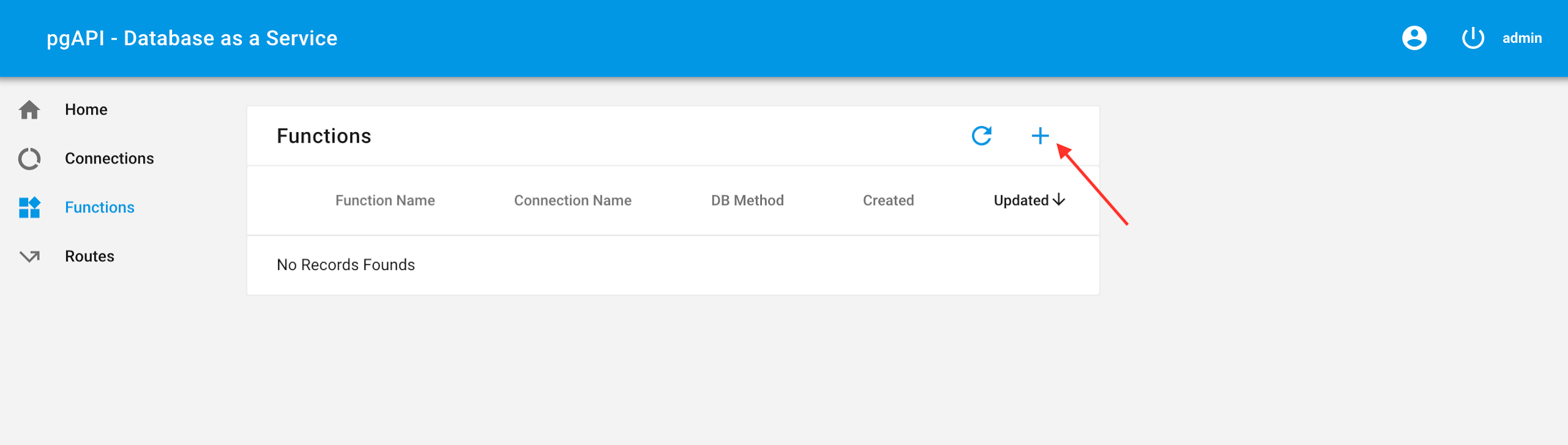
- Click on the + icon, a popup will appear
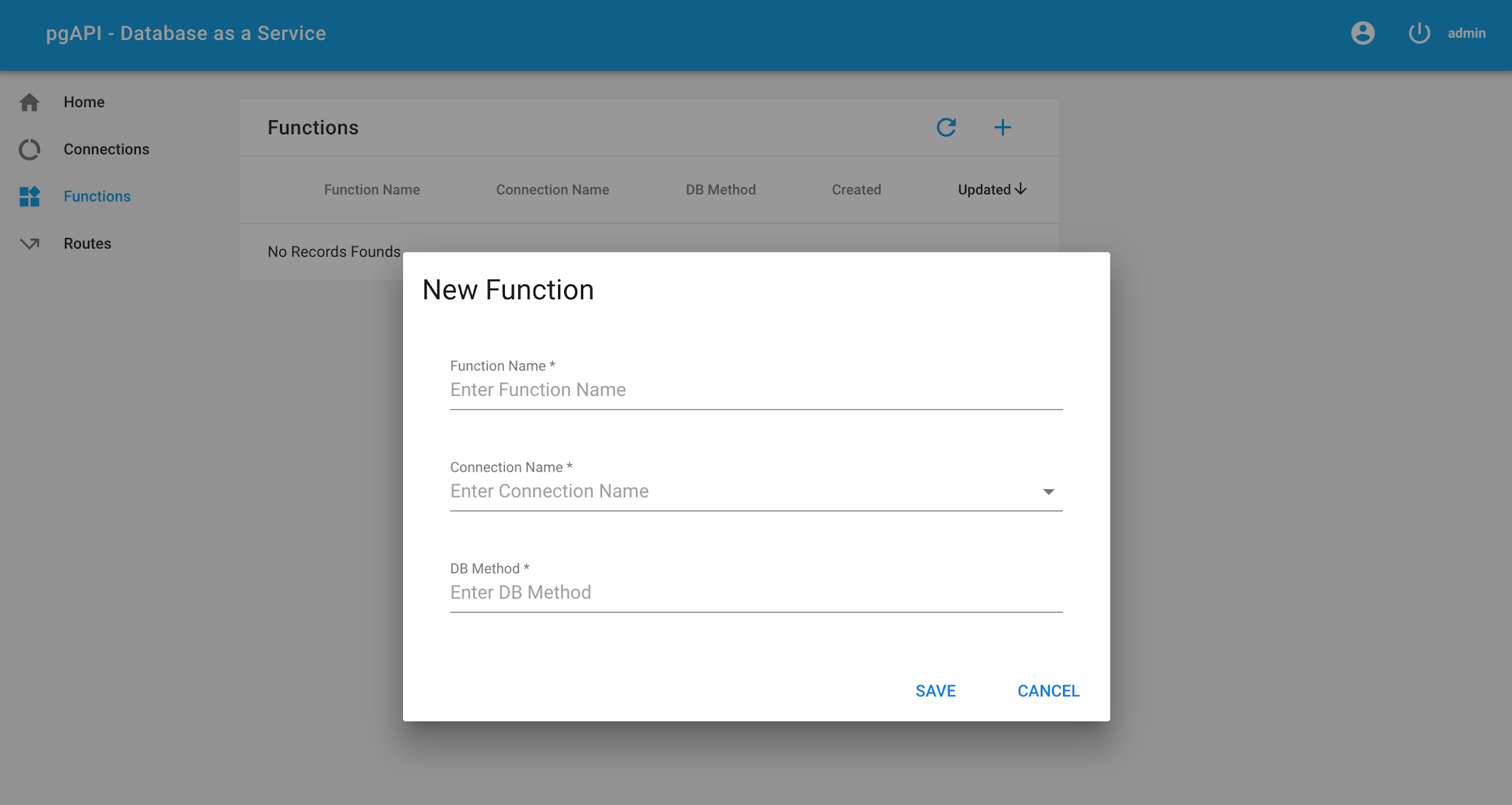
- Fill the Function information
- Function Name - Unique name
- Connection Name - Dropdown with the list of Connections created in Step 1
- DB Method - Database Function created in Step 2
- Click on Save. This action will validate the DB Method. If there is an issue with validation then the error message will appear as a popup. Otherwise a new function entry is added
Step 4: Create a Route
- Navigate to the Routes menu
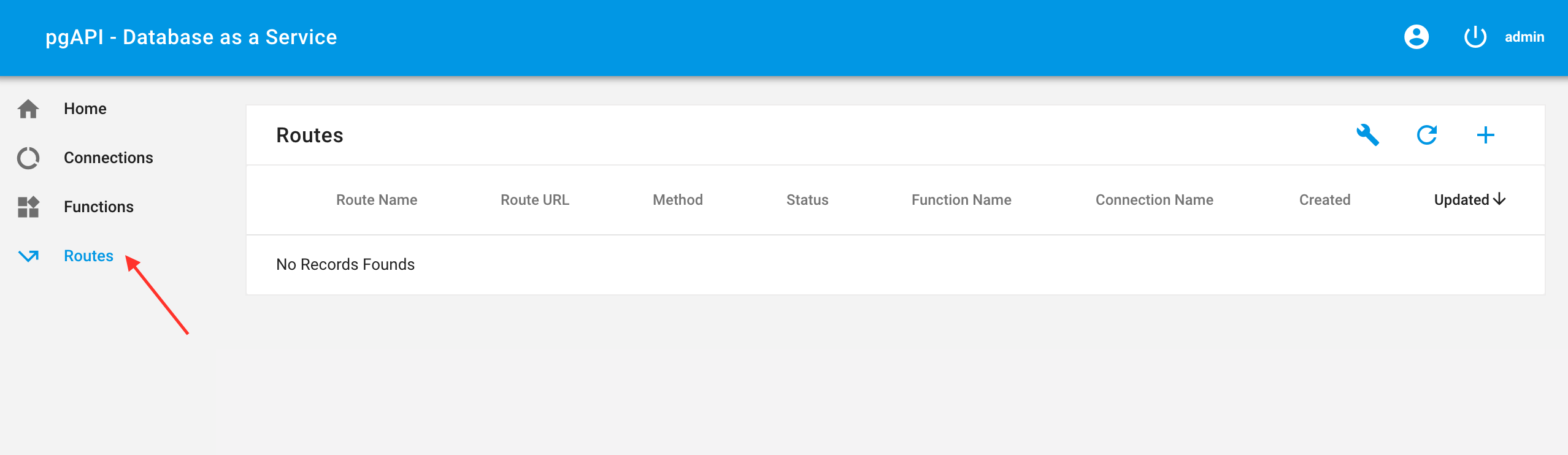
- Click on the + icon, a popup will appear
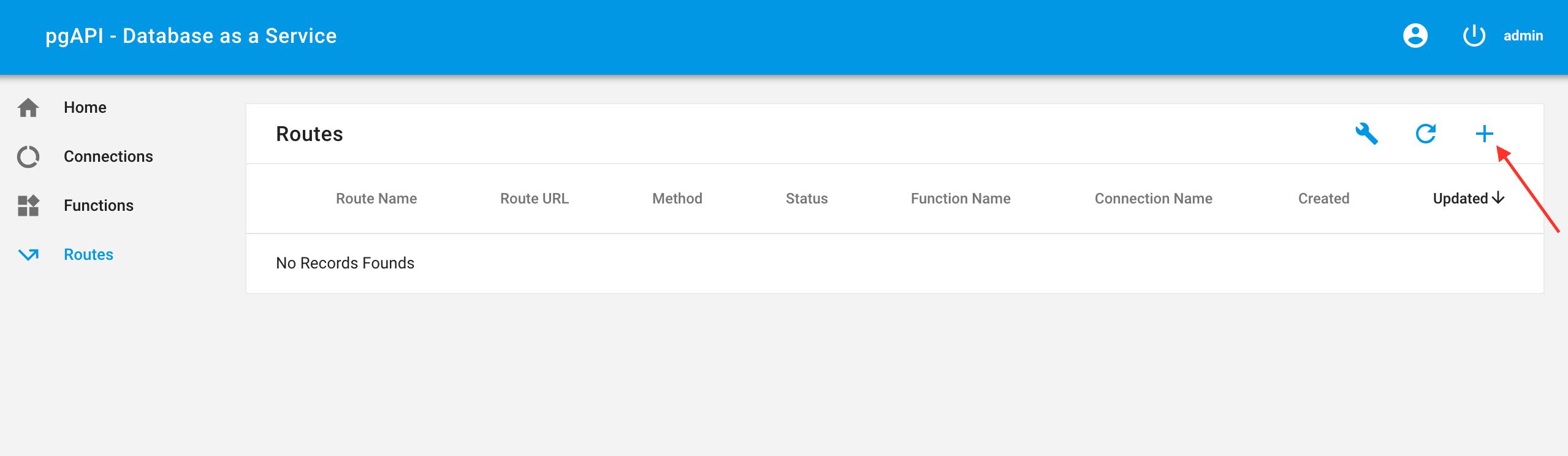

- Fill the Routes information
- Route Name - Unique Route Name
- Description - Description of the route
- Route Method - URL Route Method [GET,POST]
- Route URL - Route URL [Ex. /api/tasks , /api/tasks/:id]
- Function Name - Name of the function created in Step 3
- Sample Request (tab)(optional) - Sample input JSON value
- Sample Response (tab)(optional) - Sample response expected in JSON
- Click on Save. This action will validate the input values to the route form. If there is an issue with validation then the error message will appear as a popup. Otherwise a new route entry is added.
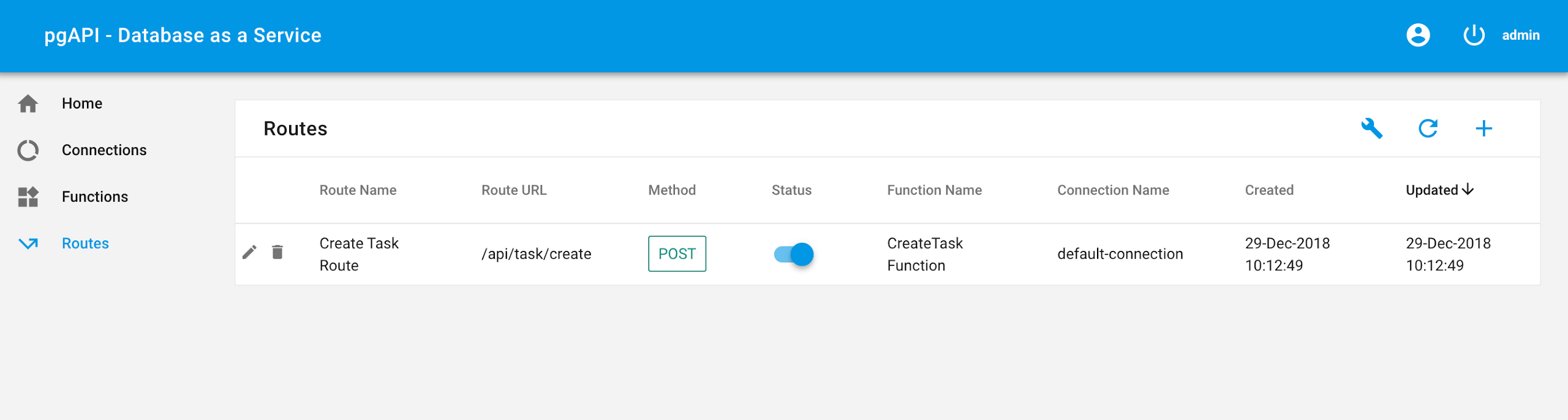
Step 5: Testing the Route
For POST Routes:
curl --header "Content-Type: application/json" --request POST --data 'JSON Data' http://localhost:5001/**route url created in Step 4**
Example:
curl --header "Content-Type: application/json" --request POST --data '{"name":"Task1" ,"description":"Task Description 1", "priority": 1, "start_date":"2018-12-08 02:41:17","due_date":"2018-12-12 01:31:10"}' http://localhost:5001/api/task/create
For GET Routes:
curl http://localhost:5001/**route url created in Step 4**
Example
curl http://localhost:5001/api/tasks
Sample Demo Application[Tasks]
Let us create a Tasks Demo Application
- Create a Connection – Instruction to Create Function is description in Step 3
- Connection Name – Unique Connection Name (Ex: default-connection)
- Host(or ip address) - host or ip address of the database
- Port# - database port number
- Username - database username
- Password - database password
- Database - database name
- Create the Database Functions and Tables using Postgres Client like pgAdmin 4. Make sure to use the same database crendentials as mentioned in Step 1
-
Table Creation Script
  CREATE TABLE IF NOT EXISTS tasks (
  id uuid NOT NULL,
  name text NOT NULL,
  description text NOT NULL,
  start_date timestamp with time zone NOT NULL,
  due_date   timestamp with time zone NOT NULL,
  priority   integer NOT NULL,
  created timestamp with time zone NOT NULL,
  updated timestamp with time zone NOT NULL
  );
-
Create_Task
  CREATE OR REPLACE FUNCTION create_task ( p_data json)
  RETURNS json AS
  $BODY$
  DECLARE
  l_out json;
  l_message_text text;
  l_exception_detail text;
  l_exception_hint text;
  l_id uuid;
  l_name text;
  l_description text;
  l_start_date timestamp;
  l_due_date timestamp;
  l_priority integer;

  BEGIN
  l_id := md5(random()::text || clock_timestamp()::text)::uuid;
  l_name := (p_data->>'name')::text;
  l_description := (p_data->>'description')::text;
  l_start_date := NOW();
  l_due_date := (p_data->>'due_date')::timestamp;
  l_priority := (p_data->>'priority')::integer;

  INSERT INTO tasks
  (
   id,
   name,
   description,
   start_date,
   due_date,
   priority,
   created,
   updated
   )
   VALUES
   (
   l_id,
   l_name,
   l_description,
   l_start_date,
   l_due_date,
   l_priority,
   NOW(),
   NOW()
   );

  l_out :=  '{"status" : "S" , "message" : "OK" , "id" : "' || l_id || '"}';
  RETURN l_out;
  EXCEPTION WHEN OTHERS THEN
  GET STACKED DIAGNOSTICS l_message_text = MESSAGE_TEXT,
                          l_exception_detail = PG_EXCEPTION_DETAIL,
                          l_exception_hint = PG_EXCEPTION_HINT;
  l_out := '{ "status" : "E" , "message" : "' || REPLACE(l_message_text, '"', E'\\"') || '" }';
  return l_out;
  END
  $BODY$
  LANGUAGE plpgsql;
-
Create_Bulk_Tasks
CREATE OR REPLACE FUNCTION create_bulk_tasks ( p_data json)
RETURNS json AS
$BODY$
DECLARE
l_out json;
l_message_text text;
l_exception_detail text;
l_exception_hint text;
l_id uuid;
l_name text;
l_description text;
l_start_date timestamp;
l_due_date timestamp;
l_priority integer;
l_task_record json;
l_tasks_c CURSOR FOR SELECT json_array_elements(p_data->'tasks');
BEGIN
OPEN l_tasks_c;
LOOP
FETCH l_tasks_c INTO l_task_record;
EXIT WHEN NOT FOUND;
l_id := md5(random()::text || clock_timestamp()::text)::uuid;
l_name := (l_task_record->>'name')::text;
l_description := (l_task_record->>'description')::text;
l_start_date := NOW();
l_due_date := (l_task_record->>'due_date')::timestamp;
l_priority := (l_task_record->>'priority')::integer;
INSERT INTO tasks
(
id,
name,
description,
start_date,
due_date,
priority,
created,
updated
)
VALUES
(
l_id,
l_name,
l_description,
l_start_date,
l_due_date,
l_priority,
NOW(),
NOW()
);
END LOOP;
CLOSE l_tasks_c;
l_out := '{"status" : "S" , "message" : "OK" }';
RETURN l_out;
EXCEPTION WHEN OTHERS THEN
GET STACKED DIAGNOSTICS l_message_text = MESSAGE_TEXT,
l_exception_detail = PG_EXCEPTION_DETAIL,
l_exception_hint = PG_EXCEPTION_HINT;
l_out := '{ "status" : "E" , "message" : "' || REPLACE(l_message_text, '"', E'\\"') || '" }';
return l_out;
END
$BODY$
LANGUAGE plpgsql;
-
Delete_Task
CREATE OR REPLACE FUNCTION delete_task ( p_data json)
RETURNS json AS
$BODY$
DECLARE
l_out json;
l_message_text text;
l_exception_detail text;
l_exception_hint text;
l_id uuid;
l_cnt int;
BEGIN
l_id := (p_data->>'id')::uuid;
DELETE FROM tasks
WHERE id = l_id;
GET DIAGNOSTICS l_cnt = row_count;
l_out := '{"status" : "S" , "message" : "OK" , "rows_affected" : "' || l_cnt || '"}';
RETURN l_out;
EXCEPTION WHEN OTHERS THEN
GET STACKED DIAGNOSTICS l_message_text = MESSAGE_TEXT,
l_exception_detail = PG_EXCEPTION_DETAIL,
l_exception_hint = PG_EXCEPTION_HINT;
l_out := '{ "status" : "E" , "message" : "' || REPLACE(l_message_text, '"', E'\\"') || '" }';
return l_out;
END
$BODY$
LANGUAGE plpgsql;
-
Select_Task
CREATE OR REPLACE FUNCTION select_task ( p_data json)
RETURNS json AS
$BODY$
DECLARE
l_out json;
l_message_text text;
l_exception_detail text;
l_exception_hint text;
l_data text;
l_id uuid;
l_params json;
BEGIN
l_params := (p_data->>'urlparams')::json;
IF l_params IS NOT NULL THEN
l_id := (l_params->>'id')::uuid;
END IF;
IF l_id IS NULL THEN
SELECT array_to_json(array_agg(row_to_json(t.*))) INTO l_data
FROM (SELECT * FROM tasks) t;
ELSE
SELECT array_to_json(array_agg(row_to_json(t.*))) INTO l_data
FROM (SELECT * FROM tasks WHERE id = l_id) t;
END IF;
l_out := '{"status" : "S" , "message" : "OK" , "data" : ' || l_data || '}';
RETURN l_out;
EXCEPTION WHEN OTHERS THEN
GET STACKED DIAGNOSTICS l_message_text = MESSAGE_TEXT,
l_exception_detail = PG_EXCEPTION_DETAIL,
l_exception_hint = PG_EXCEPTION_HINT;
l_out := '{ "status" : "E" , "message" : "' || REPLACE(l_message_text, '"', E'\\"') || '" }';
return l_out;
END
$BODY$
LANGUAGE plpgsql;
-
Update_Task
CREATE OR REPLACE FUNCTION update_task ( p_data json)
RETURNS json AS
$BODY$
DECLARE
l_out json;
l_message_text text;
l_exception_detail text;
l_exception_hint text;
l_id uuid;
l_name text;
l_description text;
l_due_date timestamp;
l_priority integer;
l_cnt int;
BEGIN
l_id := (p_data->>'id')::uuid;
l_name := (p_data->>'name')::text;
l_description := (p_data->>'description')::text;
l_due_date := (p_data->>'due_date')::timestamp;
l_priority := (p_data->>'priority')::integer;
UPDATE tasks
SET name = COALESCE(l_name,name)
, description = COALESCE(l_description, description)
, due_date = COALESCE(l_due_date, due_date)
, priority = COALESCE(l_priority, priority)
, updated = NOW()
WHERE id = l_id;
GET DIAGNOSTICS l_cnt = row_count;
l_out := '{"status" : "S" , "message" : "OK" , "rows_affected" : "' || l_cnt || '"}';
RETURN l_out;
EXCEPTION WHEN OTHERS THEN
GET STACKED DIAGNOSTICS l_message_text = MESSAGE_TEXT,
l_exception_detail = PG_EXCEPTION_DETAIL,
l_exception_hint = PG_EXCEPTION_HINT;
l_out := '{ "status" : "E" , "message" : "' || REPLACE(l_message_text, '"', E'\\"') || '" }';
return l_out;
END
$BODY$
LANGUAGE plpgsql;
- Create Functions – Instruction to Create Function is description in Step 3
- Create Task
- Function Name – Create Task Function
- Connection Name – Default Connection
(Or any other connection that has been created using Step 1 . Make sure to use the same database credentials as used in Step 2)
- DB Method – create_task
- Update Task
- Function Name – Update Task Function
- Connection Name – Same as used in Create Task Function (above step)
- DB Method – update_task
- Delete Task
- Function Name – Delete Task Function
- Connection Name – Same as used in Create Task Function (above step)
- DB Method – delete_task
- Create Bulk Tasks
- Function Name – Update Task Function
- Connection Name – Same as used in Create Task Function (above step)
- DB Method – create_bulk_tasks
- Select All Tasks
- Function Name – Select All Tasks Function
- Connection Name – Same as used in Create Task Function (above step)
- DB Method – select_task
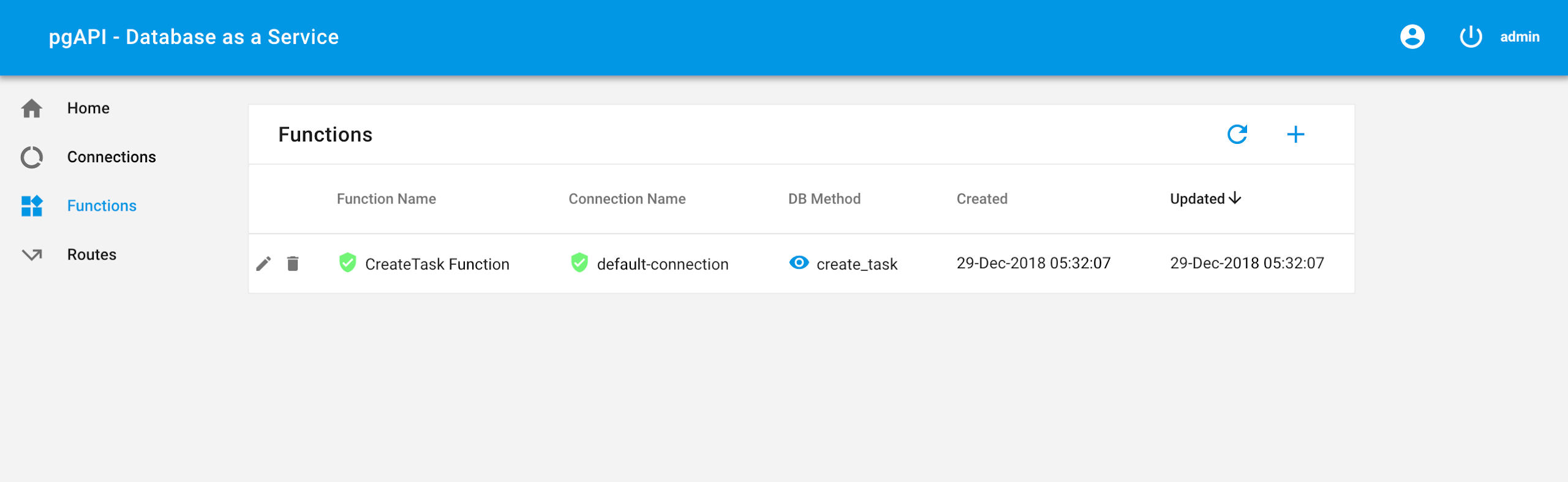
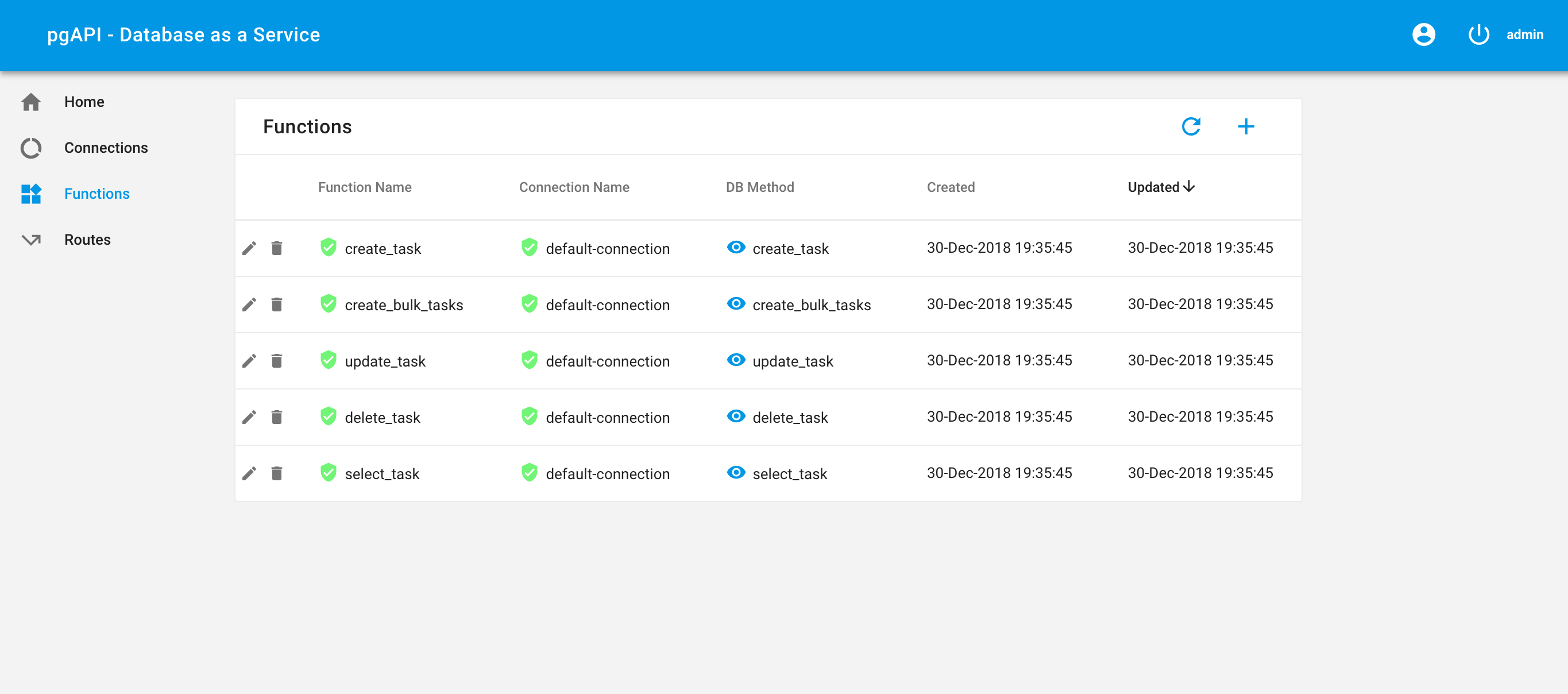
After setting up all the functions , the UI must look something like the below image. The green icon next to the Connection Name indicates that the connection is valid and the green icon next to the Function Name indicates that the database function is defined in the postgres database specified.
- Create Routes – Instruction to Create Routes is description in Step 4
- Create Task
- Route Name - Create Task Route
- Description – API used to create Task
- Route Method – POST
- Route URL - /api/task/create
- Function Name – Create Task Function
- Update Task
- Route Name - Update Task Route
- Description – API used to update Task
- Route Method – POST
- Route URL - /api/task/update
- Function Name – Update Task Function
- Delete Task
- Route Name - Delete Task Route
- Description – API used to delete Task
- Route Method – POST
- Route URL - /api/task/delete
- Function Name – Delete Task Function
- Create Bulk Tasks
- Route Name - Create Bulk Tasks Route
- Description – API used to create Bulk Tasks
- Route Method – POST
- Route URL - /api/tasks/bulk/create
- Function Name – Create Bulk Tasks Function
- Select All Tasks
- Route Name - Select ALl Tasks Route
- Description – API used to fetch all tasks
- Route Method – GET
- Route URL - /api/tasks
- Function Name – Select Task Function
- Select Task by Id
- Route Name - Select Task Route
- Description – API used to fetch all task by Id
- Route Method – GET
- Route URL - /api/task/:id
- Function Name – Select Task Function
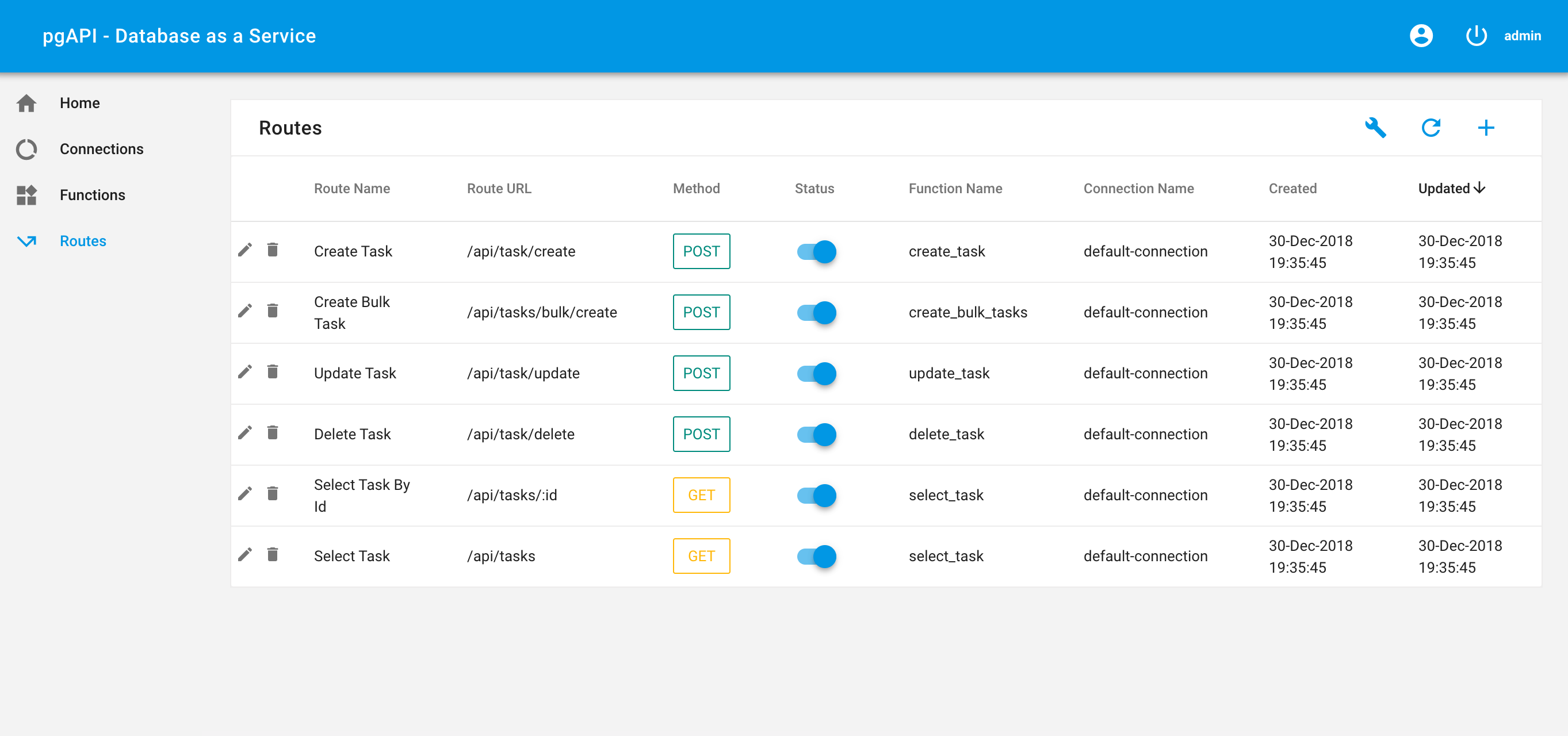
After setting up all the routes , the UI must look something like the below image.
- Testing the Routes
- Create Task
- Request
curl --header "Content-Type: application/json" \ --request POST \ --data '{"name":"Task1" , "description":"Task Description 1", "priority": 1, "start_date":"2018-12-08 02:41:17", "due_date":"2018-12-12 01:31:10"}' \ http://localhost:5001/api/task/create
- Response
{"status":"S","message":"OK","result":[{"result":{"status":"S","message":"OK","id":"8003c392-d89a-e577-be11-5f42808cf28b"}}]}
- Update Task
- Request
curl --header "Content-Type: application/json" \ --request POST \ --data '{"id":"8003c392-d89a-e577-be11-5f42808cf28b","name":"Task2"}' \ http://localhost:5001/api/task/update
- Response
{"status":"S","message":"OK","result":[{"result":{"status":"S","message":"OK","rows_affected":"1"}}]}
- Delete Task
- Request
curl --header "Content-Type: application/json" \ --request POST \ --data '{"id":"8003c392-d89a-e577-be11-5f42808cf28b"}' \ http://localhost:5001/api/task/delete
- Response
{"status":"S","message":"OK","result":[{"result":{"status":"S","message":"OK","rows_affected":"1"}}]}
- Create Bulk Tasks
- Request
curl --header "Content-Type: application/json" \ --request POST \ --data '{"tasks": [{"name":"Task4" , "description":"Task Description 4", "priority": 2, "start_date":"2018-12-08 02:41:17", "due_date":"2018-12-12 01:31:10"}, {"name":"Task5" , "description":"Task Description 5", "priority": 2, "start_date":"2018-12-08 02:41:17", "due_date":"2018-12-12 01:31:10"}]}' \ http://localhost:5001/api/tasks/bulk/create
- Response
{"status":"S","message":"OK","result":[{"result":{"status":"S","message":"OK"}}]}
- Select All Tasks
- Request
curl http://localhost:5001/api/tasks
- Response
{"status":"S","message":"OK","result":[{"result":{"status":"S","message":"OK","data":[{"id":"d716a072-be43-2301-1d9e-80998bb0c95e","name":"Task4","description":"Task Description 4","start_date":"2018-12-22T23:56:29.495069+05:30","due_date":"2018-12-12T01:31:10+05:30","priority":2,"created":"2018-12-22T23:56:29.495069+05:30","updated":"2018-12-22T23:56:29.495069+05:30"},{"id":"4ee0bec0-f5df-e75e-9180-25dc216bd021","name":"Task5","description":"Task Description 5","start_date":"2018-12-22T23:56:29.495069+05:30","due_date":"2018-12-12T01:31:10+05:30","priority":2,"created":"2018-12-22T23:56:29.495069+05:30","updated":"2018-12-22T23:56:29.495069+05:30"}]}}]}
- Select Task by Id
- Request
curl http://localhost:5001/api/task/d716a072-be43-2301-1d9e-80998bb0c95e
- Response
{"status":"S","message":"OK","result":[{"result":{"status":"S","message":"OK","data ":[{"id":"d716a072-be43-2301-1d9e- 80998bb0c95e","name":"Task4","description":"Task Description 4","start_date":"2018-12-22T23:56:29.495069+05:30","due_date":"2018-12- 12T01:31:10+05:30","priority":2,"created":"2018-12- 22T23:56:29.495069+05:30","updated":"2018-12-22T23:56:29.495069+05:30"}]}}]}
Built With
- vuejs - JavaScript framework
- vuetify - Material Component Framework for Vue.js
- nodejs - Server environment
Authors
- Praveen Muralidhar - Initial work - thrinz
License
This project is licensed under the GPLv3 License - see the LICENSE file for details





