Schematic
A lightweight Fabric.js library for working with canvas objects on an interactive coordinate grid.
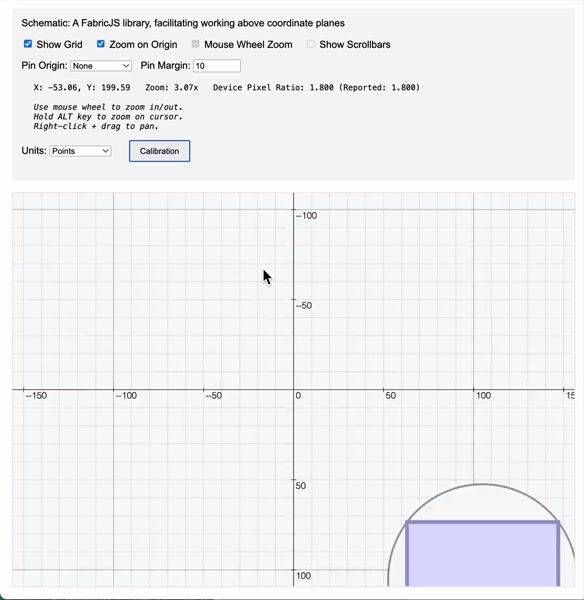
Features
- Interactive coordinate grid with pan, zoom, and configurable units (points, imperial, metric)
- Built on Fabric.js v6+ – full access to Fabric's powerful canvas API
- Mouse/touch interactions – wheel zoom, right-click panning, optional origin pinning
- TypeScript support with full type definitions
- Flexible architecture – use high-level
Schematic or low-level Map API
- Debug system with granular logging categories
- Zero dependencies (except Fabric.js peer dependency)
Architecture
Your App → Schematic → Map → Fabric Canvas
                       ↓
                     Grid (renders behind objects)
Core Components
Schematic – Main entry point with event system and interaction controls
Map – Manages Fabric canvas lifecycle and grid synchronization
Grid – Renders coordinate grid, axes, and labels beneath Fabric objects
Base – Shared configuration foundation for all components
Installation
npm install @ajoslin103/schematic fabric
yarn add @ajoslin103/schematic fabric
Requirements:
- Fabric.js
^6.7.1 (peer dependency)
- Modern browser with ES6+ support
Package exports:
- ESM:
dist/schematic.esm.js
- CommonJS:
dist/schematic.cjs.js
- UMD:
dist/schematic.umd.js
- TypeScript types:
dist/types/index.d.ts
Quick Start
Basic Usage
import { Schematic } from '@ajoslin103/schematic';
import * as fabric from 'fabric';
const container = document.getElementById('canvas-container');
const schematic = new Schematic(container, {
gridEnabled: true,
units: 'points',
zoomDebounceDelay: 200
});
const canvas = schematic.fabricCanvas;
schematic.setZoomLimits(0.1, 10);
schematic.setZoom(1);
const rect = new fabric.Rect({
left: 100,
top: 100,
width: 200,
height: 150,
fill: '#4CAF50'
});
canvas.add(rect);
TypeScript
import { Schematic, SchematicOptions } from '@ajoslin103/schematic';
import { Rect } from 'fabric';
const container = document.getElementById('canvas-container');
if (!container) throw new Error('Container not found');
const options: SchematicOptions = {
gridEnabled: true,
units: 'imperial',
mouseWheelZoom: true,
zoomOnCenter: false
};
const schematic = new Schematic(container, options);
schematic.setZoomLimits(0.1, 10);
schematic.setShowGrid(true);
schematic.setUnits('metric');
const rect = new Rect({
left: 50,
top: 50,
width: 100,
height: 100,
fill: 'rgba(255, 99, 71, 0.8)'
});
schematic.fabricCanvas.add(rect);
Event Handling
schematic.on('zoom:change', (data) => {
console.log('Zoom changed:', data.zoom);
});
schematic.on('zoom:completed', (data) => {
console.log('Zoom completed:', data.zoom);
});
schematic.on('pan:completed', (data) => {
console.log('Pan completed:', data);
});
schematic.on('grid:change', (data) => {
console.log('Grid visibility:', data.enabled);
});
Advanced Configuration
schematic.setOriginPin('TOP_LEFT', 15);
schematic.resetView();
schematic.setShowGrid(false);
schematic.setUnits('metric');
schematic.setZoomOnCenter(true);
API Reference
Schematic Class
Constructor:
new Schematic(container: HTMLElement, options?: SchematicOptions)
Properties:
fabricCanvas – Fabric.js Canvas instancemapInstance – Underlying Map instancegridEnabled – Grid visibility statezoomOnCenter – Zoom around center vs mouseunits – Current unit system
Methods:
setZoom(zoom: number) – Set zoom levelsetZoomLimits(min: number, max: number) – Clamp zoom rangesetShowGrid(enabled: boolean) – Toggle grid visibilitysetOriginPin(pin: string, margin: number) – Pin origin to cornersetUnits(units: 'points' | 'imperial' | 'metric') – Change unitssetZoomOnCenter(enabled: boolean) – Control zoom anchorresetView() – Reset to initial viewon(event: string, callback: Function) – Subscribe to eventoff(event: string, callback?: Function) – Unsubscribeemit(event: string, data: any) – Emit custom event
Events:
zoom – Zoom in progresszoom:change – Zoom changedzoom:completed – Zoom finishedpan:move – Pan in progresspan:completed – Pan finishedgrid:change – Grid visibility changedview:reset – View reset triggered
Map Class (Low-level)
Constructor:
new Map(container: HTMLElement, options?: BaseOptions)
Methods:
setZoom(zoom: number) – Set zoomonResize(width: number, height: number) – Handle resizeupdate() – Force grid syncreset() – Reset viewport
Grid Class
Properties:
visible – Grid visibilityunits – Unit systemstep – Grid step sizescale – Grid scale
Methods:
setUnits(units: string) – Change unitsshow(visible?: boolean) – Show/hide gridrender() – Force redraw
Debug Logging
The library includes a centralized debug system that allows you to control console output by category. By default, all debug logging is disabled for production use.
Enable all debug output
const schematic = new Schematic(container, {
debug: true
});
Enable specific categories
const schematic = new Schematic(container, {
debug: {
schematic: true,
events: true,
grid: false,
map: false,
units: false,
calibration: false
}
});
Runtime control
schematic.debug.enable('events');
schematic.debug.disable('grid');
schematic.debug.enable('all');
if (schematic.debug.isEnabled('units')) {
console.log('Units debug enabled');
}
Interactions
Mouse:
- Scroll wheel – Zoom in/out (with configurable limits)
- Alt/Option + scroll – Zoom around cursor position
- Right-click + drag – Pan canvas (or Ctrl+Left on macOS)
- Left-click – Select/interact with Fabric objects
Programmatic:
setZoom(), setZoomLimits() – Control zoomsetOriginPin() – Lock origin to viewport cornerresetView() – Return to initial state
Development
Setup:
git clone https://github.com/ajoslin103/schematic.git
cd schematic
npm install
Scripts:
npm run dev – Start dev server with live reloadnpm run build – Build all bundles (CJS, ESM, UMD) + typesnpm run watch – Watch mode for developmentnpm run serve – Serve demo files
Project Structure:
src/
├── core/          # Schematic, Base, Debug, Constants
├── map/           # Map class
├── grid/          # Grid rendering
├── geometry/      # Point utilities
├── components/    # Calibration tools
└── lib/           # Helper functions
Notes
- Grid renders in Fabric's
before:render phase and never mutates Fabric objects
- Grid Y-axis is inverted for display; Fabric world coordinates remain standard
- Integer snapping enabled by default for object positioning
- TypeScript definitions included for full IDE support
Credits
Built on the foundation of IndoorJS by Mudin.
License
MIT © Allen Joslin





