New Research: Supply Chain Attack on Axios Pulls Malicious Dependency from npm.Details →
Socket
Book a DemoSign in
Socket

@alliedpayment/tabapayjs

Package Overview
Dependencies
Maintainers
2
Versions
87
Alerts
File Explorer

Advanced tools

Socket logo

Install Socket

Detect and block malicious and high-risk dependencies

Install

@alliedpayment/tabapayjs

Client library to access Allied's SSO with tabapay

latest
Source
npmnpm
Version
11.0.3
Version published
Maintainers
2
Created
Source

@alliedpayment/tabapayjs

Client library to access Allied's SSO with tabapay

Setup

  • Install

    npm install --save @alliedpayment/tabapayjs
    
  • Load JS

    <script src="node_modules/@alliedpayment/tabapayjs/tabapayjs.js"></script>
    

Usage

  • TabaPay SSO Options
interface ITabaPayConfig{
  // Allied's client shardkey **required** throws  Error("domain is required but is missing")
  domain: string;

  // production is used if options or sandbox are "falsy"
  sandbox?: boolean;

  // provide a logo url to provide a logo header ( displayed only with modal; not visible in inline)
  logo?: string;

  // provide an API root for card validation (e.g. Allied's API url for Dev, QA, Demo, or Production)
  // Allied's Production API is used if options or sandbox are "falsy"
  api?: string;

  // additional options
  options?: IGetTokenOptions;
}

interface IGetTokenOptions {
  // defaults true; reject promise on error? 
  rejectOnError?: boolean;
  
  // defaults false; hide success button? ( best used with inline form )
  hideSuccessButton?: boolean;
  
  // defaults false; stay open when cancel is clicked? ( best used with inline form )
  stayOpenOnCancel?: boolean;
}

Open TabaPay SSO

// ES2015
const tabapay = new TabaPay({ domain: 'myDomain' });
tabapay.modal(); // open modal

// get card token using async/await
try{
  const token = await tabapay.getToken(); 
  // use token card token to authorize transactions with TabaPay
  console.log({ token });
}catch(error){
  console.error(error);
}

// OR

// get token using then/catch
tabapay
  .getToken()
  .then(token => { 
    // use token card token to authorize transactions with TabaPay
    console.log({ token });
  })
  .catch(error => {
    console.error(error);
  });
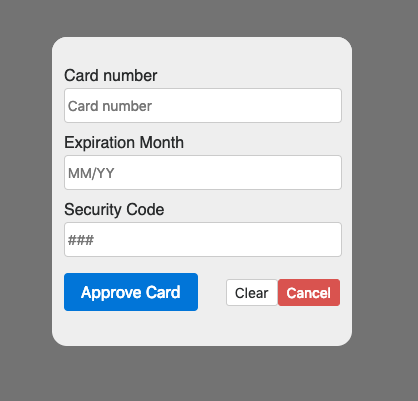
tabapay without logo

Open TabaPay SSO using options

// ES2015
const options = {
  domain: 'myDomain',
  sandbox: true,
  logo: 'LOGO_URL',
  api: 'ENDPOINT_URL'
};

const tabapay = new TabaPay(options);
tabapay.modal(); // open modal

// get card token using async/await
try{
  const token = await tabapay.getToken(); 
  // use token card token to authorize transactions with TabaPay
  console.log({ token });
}catch(error){
  console.error(error);
}

// OR

// get token using then/catch
tabapay
  .getToken()
  .then(token => { 
    // use token card token to authorize transactions with TabaPay
    console.log({ token });
  })
  .catch(error => {
    console.error(error);
  });
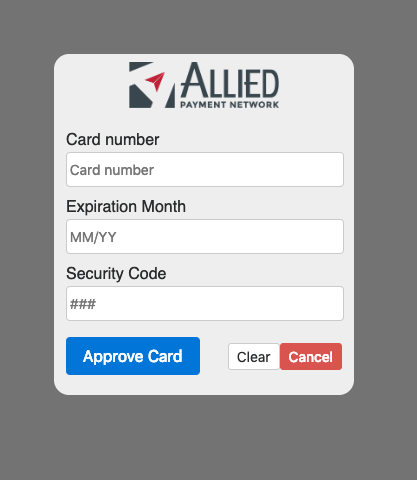
tabapay with logo

Open TabaPay SSO with inline form

// index.html
<div id="tabapay-container-id"></div>

// ES2015
const options = {
  domain: 'myDomain',
  sandbox: true,
  logo: 'LOGO_URL',
  api: 'ENDPOINT_URL'
};

const tabapay = new TabaPay(options);
tabapay.inline('tabapay-container-id'); // append inline form as child of element who's ID is provided

try{
  const token = await tabapay.getToken({
    rejectOnError: false,
    hideSuccessButton: true,
    stayOpenOnCancel: true,
    });
  // use token card token to authorize transactions with TabaPay
  console.log({ token });
}catch(error){
  console.error(error);
}

// OR 

// open tabapay using then/catch
tabapay.getToken({
    rejectOnError: false,
    hideSuccessButton: true,
    stayOpenOnCancel: true,
  })
  .then(token => {
    // use token card token to authorize transactions with TabaPay
    console.log({ token });
  })
  .catch(error => {
    console.error(error);
  });
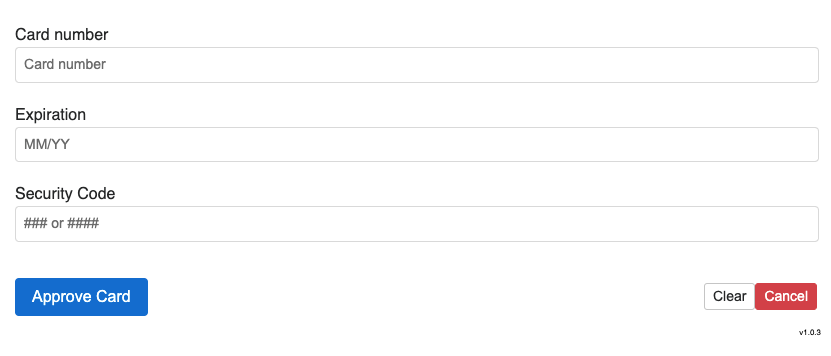

inline

Keywords

credit

FAQs

Package last updated on 10 May 2022

Did you know?

Socket

Socket for GitHub automatically highlights issues in each pull request and monitors the health of all your open source dependencies. Discover the contents of your packages and block harmful activity before you install or update your dependencies.

Install

Related posts




