


Security News
Crates.io Users Targeted by Phishing Emails
The Rust Security Response WG is warning of phishing emails from rustfoundation.dev targeting crates.io users.
By Sarah Gooding - Sep 12, 2025
@aredridel/fractal-svelte-adapter
Advanced tools
An adapter for fractal styleguide (1.x) to use svelte components
Allows the use of svelte components as templates in a fractal 1.x styleguide.
In your fractal.js configuration:
fractal.components.engine("@aredridel/fractal-svelte-adapter");
fractal.components.set("ext", ".svelte");
The connection between how Fractal conceives of templates and how Svelte thinks of the world in components has some small friction for which this library provides some workarounds.
Context data from the styleguide is passed to components as properties.
A component.config.json such as this
{
  "context": {
    "text": "Hello, World"
  }
}
Informs a component.svelte such as this:
<script>
  export let text;
</script>

<h2>{text}</h2>
Will render <h2>Hello, World</h2>.
For static generation, knowing the root path is important for generating links to assets properly.
As we can't use a handlebars helper such as {{ path "filename" }}, a similar
tool is injected into the Svelte context. To use it, fetch it from the context:
<script>
  import { getContext } from "svelte";
  const { assetPath } = getContext("fractal");
</script>

<img src={assetPath("/assets/some-image.png")} />
Assuming you've configured public/ as your static assets path with
fractal.web.set("static.path", __dirname + "/public");, this will link to the
asset in public/assets/some-image.png.
The overall HTML output is wrapped in an <html> element with an html5 doctype.
Layouts are handled as svelte components, which provide a <body>:
layout.svelte:
<script>
  import SomeComponent from "./some-component.svelte";
  import { getContext } from "svelte";
  const { assetPath } = getContext("fractal");
</script>

<svelte:head>
  <meta charset="UTF-8" />
  <meta name="viewport" content="width=device-width, initial-scale=1.0" />
  <link rel="stylesheet" href={assetPath("/css/app.css")} />
  <script defer type="module" src={assetPath("/js/app.js")}></script>
  <title>Preview</title>
</svelte:head>

<body>
  <SomeComponent />

  <p>Lorem ipsum dolor sit amet miss Bacon sic amundiam</p>
  <slot />
  <p>Lorem ipsum dolor sit amet miss Bacon sic amundiam</p>

</body>
The component being previewed is inserted into the default slot in the component.
FAQs
An adapter for fractal styleguide (1.x) to use svelte components
We found that @aredridel/fractal-svelte-adapter demonstrated a not healthy version release cadence and project activity because the last version was released a year ago. It has 1 open source maintainer collaborating on the project.
Did you know?

Socket for GitHub automatically highlights issues in each pull request and monitors the health of all your open source dependencies. Discover the contents of your packages and block harmful activity before you install or update your dependencies.
Security News
The Rust Security Response WG is warning of phishing emails from rustfoundation.dev targeting crates.io users.
Product
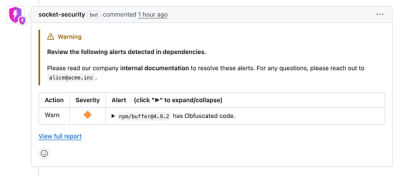
Socket now lets you customize pull request alert headers, helping security teams share clear guidance right in PRs to speed reviews and reduce back-and-forth.

Product
Socket's Rust support is moving to Beta: all users can scan Cargo projects and generate SBOMs, including Cargo.toml-only crates, with Rust-aware supply chain checks.