You're Invited:Meet the Socket Team at RSAC and BSidesSF 2026, March 23–26.RSVP →

@autorest/java
Advanced tools

@autorest/java - npm Package Compare versions
+1
-1
| { | ||
| "name": "@autorest/java", | ||
| "version": "4.1.28", | ||
| "version": "4.1.29", | ||
| "description": "The Java extension for classic generators in AutoRest.", | ||
@@ -5,0 +5,0 @@ "scripts": { |
| { | ||
| "name": "@azure-tools/typespec-java", | ||
| "version": "0.15.6", | ||
| "version": "0.15.15", | ||
| "description": "TypeSpec library for emitting Java client from the TypeSpec REST protocol binding", | ||
@@ -48,9 +48,9 @@ "keywords": [ | ||
| "peerDependencies": { | ||
| "@typespec/compiler": ">=0.53.1 <1.0.0", | ||
| "@typespec/http": ">=0.53.0 <1.0.0", | ||
| "@typespec/rest": ">=0.53.0 <1.0.0", | ||
| "@typespec/openapi": ">=0.53.0 <1.0.0", | ||
| "@typespec/versioning": ">=0.53.0 <1.0.0", | ||
| "@azure-tools/typespec-azure-core": ">=0.40.0 <1.0.0", | ||
| "@azure-tools/typespec-client-generator-core": ">=0.40.0 <1.0.0" | ||
| "@typespec/compiler": ">=0.55.0 <1.0.0", | ||
| "@typespec/http": ">=0.55.0 <1.0.0", | ||
| "@typespec/rest": ">=0.55.0 <1.0.0", | ||
| "@typespec/openapi": ">=0.55.0 <1.0.0", | ||
| "@typespec/versioning": ">=0.55.0 <1.0.0", | ||
| "@azure-tools/typespec-azure-core": ">=0.41.0 <1.0.0", | ||
| "@azure-tools/typespec-client-generator-core": ">=0.41.6 <1.0.0" | ||
| }, | ||
@@ -67,19 +67,19 @@ "dependencies": { | ||
| "@types/mocha": "~10.0.6", | ||
| "@types/node": "~20.11.30", | ||
| "@types/node": "~20.12.7", | ||
| "c8": "~9.1.0", | ||
| "eslint": "~8.57.0", | ||
| "mocha": "~10.3.0", | ||
| "mocha": "~10.4.0", | ||
| "rimraf": "~5.0.5", | ||
| "typescript": "~5.4.3", | ||
| "@typescript-eslint/parser": "~7.4.0", | ||
| "@typescript-eslint/eslint-plugin": "~7.4.0", | ||
| "typescript": "~5.4.5", | ||
| "@typescript-eslint/parser": "~7.7.0", | ||
| "@typescript-eslint/eslint-plugin": "~7.7.0", | ||
| "eslint-plugin-deprecation": "~2.0.0", | ||
| "@azure-tools/typespec-azure-core": "0.40.0", | ||
| "@azure-tools/typespec-client-generator-core": "0.40.0", | ||
| "@typespec/compiler": "0.54.0", | ||
| "@typespec/http": "0.54.0", | ||
| "@typespec/openapi": "0.54.0", | ||
| "@typespec/rest": "0.54.0", | ||
| "@typespec/versioning": "0.54.0" | ||
| "@azure-tools/typespec-azure-core": "0.41.0", | ||
| "@azure-tools/typespec-client-generator-core": "0.41.8", | ||
| "@typespec/compiler": "0.55.0", | ||
| "@typespec/http": "0.55.0", | ||
| "@typespec/openapi": "0.55.0", | ||
| "@typespec/rest": "0.55.0", | ||
| "@typespec/versioning": "0.55.0" | ||
| } | ||
| } |
@@ -12,8 +12,8 @@ { | ||
| "dependencies": { | ||
| "@azure-tools/cadl-ranch-specs": "0.31.5", | ||
| "@azure-tools/typespec-java": "file:/../typespec-extension/azure-tools-typespec-java-0.15.6.tgz" | ||
| "@azure-tools/cadl-ranch-specs": "0.33.2", | ||
| "@azure-tools/typespec-java": "file:/../typespec-extension/azure-tools-typespec-java-0.15.15.tgz" | ||
| }, | ||
| "devDependencies": { | ||
| "@typespec/prettier-plugin-typespec": "~0.54.0", | ||
| "@azure-tools/typespec-azure-resource-manager": "~0.40.0", | ||
| "@typespec/prettier-plugin-typespec": "~0.55.0", | ||
| "@azure-tools/typespec-azure-resource-manager": "~0.41.0", | ||
| "prettier-plugin-organize-imports": "3.2.4", | ||
@@ -23,11 +23,11 @@ "prettier": "~3.2.5" | ||
| "overrides": { | ||
| "@typespec/compiler": ">=0.53.1 <1.0.0", | ||
| "@typespec/http": ">=0.53.0 <1.0.0", | ||
| "@typespec/rest": ">=0.53.0 <1.0.0", | ||
| "@typespec/versioning": ">=0.53.0 <1.0.0", | ||
| "@typespec/openapi": ">=0.53.0 <1.0.0", | ||
| "@azure-tools/typespec-azure-core": ">=0.34.0 <1.0.0", | ||
| "@azure-tools/typespec-client-generator-core": ">=0.34.0 <1.0.0" | ||
| "@typespec/compiler": ">=0.55.0 <1.0.0", | ||
| "@typespec/http": ">=0.55.0 <1.0.0", | ||
| "@typespec/rest": ">=0.55.0 <1.0.0", | ||
| "@typespec/versioning": ">=0.55.0 <1.0.0", | ||
| "@typespec/openapi": ">=0.55.0 <1.0.0", | ||
| "@azure-tools/typespec-azure-core": ">=0.41.0 <1.0.0", | ||
| "@azure-tools/typespec-client-generator-core": ">=0.41.8 <1.0.0" | ||
| }, | ||
| "private": true | ||
| } |
| # Overview | ||
| The `azure-autorest-customization` package provides APIs for customizing Autorest code generation safely and | ||
| programmatically to support special cases not supported by Autorest code generation directly using Eclipse language | ||
| server to ensure valid Java code. | ||
| To set up customizations, create a Maven project with dependency: | ||
| ```xml | ||
| <dependency> | ||
| <groupId>com.azure.tools</groupId> | ||
| <artifactId>azure-autorest-customization</artifactId> | ||
| <version>1.0.0-beta.8</version> | ||
| </dependency> | ||
| ``` | ||
| Create a customization class extending from `com.azure.autorest.customization.Customization` and override the | ||
| `void customize(LibraryCustomization, Logger)` method. You will have access to a `LibraryCustomization` class where you | ||
| will be able to customize the generated Java code before it's written to the disk. Currently, the following | ||
| customizations are supported: | ||
| - [Change class modifier](#change-class-modifier) | ||
| - [Change method modifier](#change-method-modifier) | ||
| - [Change method return type](#change-method-return-type) | ||
| - [Add an annotation to a class](#add-an-annotation-to-a-class) | ||
| - [Add an annotation to a method](#add-an-annotation-to-a-method) | ||
| - [Remove an annotation from a class](#remove-an-annotation-from-a-class) | ||
| - [Refactor: Rename a class](#refactor-rename-a-class) | ||
| - [Refactor: Rename a method](#refactor-rename-a-method) | ||
| - [Refactor: Generate the getter and setter methods for a property](#refactor-generate-the-getter-and-setter-methods-for-a-property) | ||
| - [Refactor: Rename a property and its corresponding getter and setter methods](#refactor-rename-a-property-and-its-corresponding-getter-and-setter-methods) | ||
| - [Refactor: Rename an enum member name](#refactor-rename-an-enum-member-name) | ||
| - [Javadoc: Set the description for a class / method](#javadoc-set-the-description-for-a-class--method) | ||
| - [Javadoc: Set / remove a parameter's javadoc on a method](#javadoc-set--remove-a-parameters-javadoc-on-a-method) | ||
| - [Javadoc: Set the return javadoc on a method](#javadoc-set-the-return-javadoc-on-a-method) | ||
| - [Javadoc: Set / remove an exception's javadoc on a method ](#javadoc-add--remove-an-exceptions-javadoc-on-a-method) | ||
| ## Navigate through the packages and classes | ||
| There are five primary customization classes currently available, `LibraryCustomization`, `PackageCustomization`, | ||
| `ClassCustomization`, `MethodCustomization` and `JavadocCustomization`. From a given `LibraryCustomization`, you can | ||
| navigate through the packages, classes, and methods intuitively with the following methods: | ||
| ```java readme-sample-implementation-customization | ||
| @Override | ||
| public void customize(LibraryCustomization customization, Logger logger) { | ||
| PackageCustomization models = customization.getPackage("com.azure.myservice.models"); | ||
| /* code to customize on the package level */ | ||
| ClassCustomization foo = models.getClass("Foo"); | ||
| /* code to customize the Foo class */ | ||
| MethodCustomization getBar = foo.getMethod("getBar"); | ||
| /* code to customize the getBar method */ | ||
| JavadocCustomization getBarJavadoc = getBar.getJavadoc(); | ||
| /* code to customize javadoc for getBar() method */ | ||
| } | ||
| ``` | ||
| ## Change class modifier | ||
| A class `Foo` | ||
| ```java readme-sample-change-class-modifier-initial | ||
| public class Foo { | ||
| } | ||
| ``` | ||
| with customization | ||
| ```java readme-sample-change-class-modifier-customization | ||
| @Override | ||
| public void customize(LibraryCustomization customization, Logger logger) { | ||
| PackageCustomization models = customization.getPackage("com.azure.myservice.models"); | ||
| ClassCustomization foo = models.getClass("Foo"); | ||
| foo.setModifier(0); // 0 is a special modifier that sets package private | ||
| } | ||
| ``` | ||
| will generate | ||
| ```java readme-sample-change-class-modifier-result | ||
| class Foo { | ||
| } | ||
| ``` | ||
| ## Change method modifier | ||
| A method `getBar` in the `Foo` class | ||
| ```java readme-sample-change-method-modifier-initial | ||
| public class Foo { | ||
| private Bar bar; | ||
| public Bar getBar() { | ||
| return this.bar; | ||
| } | ||
| } | ||
| ``` | ||
| with customization | ||
| ```java readme-sample-change-method-modifier-customization | ||
| @Override | ||
| public void customize(LibraryCustomization customization, Logger logger) { | ||
| PackageCustomization models = customization.getPackage("com.azure.myservice.models"); | ||
| ClassCustomization foo = models.getClass("Foo"); | ||
| MethodCustomization getBar = foo.getMethod("getBar"); | ||
| getBar.setModifier(Modifier.PRIVATE); // change to private | ||
| } | ||
| ``` | ||
| will generate | ||
| ```java readme-sample-change-method-modifier-result | ||
| public class Foo { | ||
| private Bar bar; | ||
| private Bar getBar() { | ||
| return this.bar; | ||
| } | ||
| } | ||
| ``` | ||
| ## Change method return type | ||
| You can change a method's return type, and pass a String formatter to transform the original return value statement. | ||
| If the original return type is `void`, simply pass the full return value String expression in place of the String | ||
| formatter; if the new return type is `void`, simply pass `null`. | ||
| A method `getId` in the `Foo` class | ||
| ```java readme-sample-change-method-return-type-initial | ||
| public class Foo { | ||
| private Bar bar; | ||
| public Bar getBar() { | ||
| return this.bar; | ||
| } | ||
| } | ||
| ``` | ||
| with customization | ||
| ```java readme-sample-change-method-return-type-customization | ||
| @Override | ||
| public void customize(LibraryCustomization customization, Logger logger) { | ||
| PackageCustomization models = customization.getPackage("com.azure.myservice.models"); | ||
| ClassCustomization foo = models.getClass("Foo"); | ||
| MethodCustomization getId = foo.getMethod("getId"); | ||
| getId.setReturnType("UUID", "UUID.fromString(%s)"); // change return type to UUID | ||
| } | ||
| ``` | ||
| will generate | ||
| ```java readme-sample-change-method-return-type-result | ||
| public class Foo { | ||
| private String id; | ||
| public UUID getId() { | ||
| String returnValue = this.id; | ||
| return UUID.fromString(returnValue); | ||
| } | ||
| } | ||
| ``` | ||
| The `UUID` class will be automatically imported. | ||
| ## Add an annotation to a class | ||
| A class `Foo` | ||
| ```java readme-sample-add-class-annotation-initial | ||
| public class Foo { | ||
| } | ||
| ``` | ||
| with customization | ||
| ```java readme-sample-add-class-annotation-customization | ||
| @Override | ||
| public void customize(LibraryCustomization customization, Logger logger) { | ||
| PackageCustomization models = customization.getPackage("com.azure.myservice.models"); | ||
| ClassCustomization foo = models.getClass("Foo"); | ||
| foo.addAnnotation("JsonClassDescription(\"Foo class\")"); | ||
| } | ||
| ``` | ||
| will generate | ||
| ```java readme-sample-add-class-annotation-result | ||
| @JsonClassDescription("Foo class") | ||
| public class Foo { | ||
| } | ||
| ``` | ||
| The `JsonClassDescription` class will be automatically imported. | ||
| ## Add an annotation to a method | ||
| A method `getBar` in the `Foo` class | ||
| ```java readme-sample-add-method-annotation-initial | ||
| public class Foo { | ||
| private Bar bar; | ||
| public Bar getBar() { | ||
| return this.bar; | ||
| } | ||
| } | ||
| ``` | ||
| with customization | ||
| ```java readme-sample-add-method-annotation-customization | ||
| @Override | ||
| public void customize(LibraryCustomization customization, Logger logger) { | ||
| PackageCustomization models = customization.getPackage("com.azure.myservice.models"); | ||
| ClassCustomization foo = models.getClass("Foo"); | ||
| MethodCustomization getBar = foo.getMethod("getBar"); | ||
| getBar.addAnnotation("Deprecated"); | ||
| } | ||
| ``` | ||
| will generate | ||
| ```java readme-sample-add-method-annotation-result | ||
| public class Foo { | ||
| private Bar bar; | ||
| @Deprecated | ||
| public Bar getBar() { | ||
| return this.bar; | ||
| } | ||
| } | ||
| ``` | ||
| The `Deprecated` class will be automatically imported. | ||
| ## Remove an annotation from a class | ||
| A class `Foo` | ||
| ```java readme-sample-remove-class-annotation-initial | ||
| @JsonClassDescription("Foo class") | ||
| public class Foo { | ||
| } | ||
| ``` | ||
| with customization | ||
| ```java readme-sample-remove-class-annotation-customization | ||
| @Override | ||
| public void customize(LibraryCustomization customization, Logger logger) { | ||
| PackageCustomization models = customization.getPackage("com.azure.myservice.models"); | ||
| ClassCustomization foo = models.getClass("Foo"); | ||
| foo.removeAnnotation("JsonClassDescription"); | ||
| } | ||
| ``` | ||
| will generate | ||
| ```java readme-sample-remove-class-annotation-result | ||
| public class Foo { | ||
| } | ||
| ``` | ||
| ## Refactor: Rename a class | ||
| A class `Foo` | ||
| ```java readme-sample-rename-class-initial | ||
| public class Foo { | ||
| } | ||
| ``` | ||
| with customization | ||
| ```java readme-sample-rename-class-customization | ||
| @Override | ||
| public void customize(LibraryCustomization customization, Logger logger) { | ||
| PackageCustomization models = customization.getPackage("com.azure.myservice.models"); | ||
| ClassCustomization foo = models.getClass("Foo"); | ||
| foo.rename("FooInfo"); | ||
| } | ||
| ``` | ||
| will generate | ||
| ```java readme-sample-rename-class-result | ||
| public class FooInfo { | ||
| } | ||
| ``` | ||
| All references of `Foo` will be modified to `FooInfo`. When a valid value is provided, this customization is guaranteed | ||
| to not break the build. | ||
| ## Refactor: Rename a method | ||
| A method `isSupportsUnicode` in the `Foo` class | ||
| ```java readme-sample-rename-method-initial | ||
| public class Foo { | ||
| private boolean supportsUnicode; | ||
| public boolean isSupportsUnicode() { | ||
| return this.supportsUnicode; | ||
| } | ||
| } | ||
| ``` | ||
| with customization | ||
| ```java readme-sample-rename-method-customization | ||
| @Override | ||
| public void customize(LibraryCustomization customization, Logger logger) { | ||
| PackageCustomization models = customization.getPackage("com.azure.myservice.models"); | ||
| ClassCustomization foo = models.getClass("Foo"); | ||
| MethodCustomization isSupportsUnicode = foo.getMethod("isSupportsUnicode"); | ||
| isSupportsUnicode.rename("isUnicodeSupported"); | ||
| } | ||
| ``` | ||
| will generate | ||
| ```java readme-sample-rename-method-result | ||
| public class Foo { | ||
| private boolean supportsUnicode; | ||
| public boolean isUnicodeSupported() { | ||
| return this.supportsUnicode; | ||
| } | ||
| } | ||
| ``` | ||
| All references of `isSupportsUnicode()` will be modified to `isUnicodeSupported()`. When a valid value is provided, this | ||
| customization is guaranteed to not break the build. | ||
| ## Refactor: Generate the getter and setter methods for a property | ||
| A property `active` in the `Foo` class | ||
| ```java readme-sample-generate-getter-and-setter-initial | ||
| public class Foo { | ||
| private boolean active; | ||
| } | ||
| ``` | ||
| with customization | ||
| ```java readme-sample-generate-getter-and-setter-customization | ||
| @Override | ||
| public void customize(LibraryCustomization customization, Logger logger) { | ||
| PackageCustomization models = customization.getPackage("com.azure.myservice.models"); | ||
| ClassCustomization foo = models.getClass("Foo"); | ||
| PropertyCustomization active = foo.getProperty("active"); | ||
| active.generateGetterAndSetter(); | ||
| } | ||
| ``` | ||
| will generate | ||
| ```java readme-sample-generate-getter-and-setter-result | ||
| public class Foo { | ||
| private boolean active; | ||
| public boolean isActive() { | ||
| return this.active; | ||
| } | ||
| public Foo setActive(boolean active) { | ||
| this.active = active; | ||
| return this; | ||
| } | ||
| } | ||
| ``` | ||
| If the class already contains a getter or a setter method, the current method will be kept. This customization is | ||
| guaranteed to not break the build. | ||
| ## Refactor: Rename a property and its corresponding getter and setter methods | ||
| A property `whitelist` in the `Foo` class | ||
| ```java readme-sample-rename-property-initial | ||
| public class Foo { | ||
| private List<String> whiteList; | ||
| public List<String> getWhiteList() { | ||
| return this.whiteList; | ||
| } | ||
| public Foo setWhiteList(List<String> whiteList) { | ||
| this.whiteList = whiteList; | ||
| return this; | ||
| } | ||
| } | ||
| ``` | ||
| with customization | ||
| ```java readme-sample-rename-property-customization | ||
| @Override | ||
| public void customize(LibraryCustomization customization, Logger logger) { | ||
| PackageCustomization models = customization.getPackage("com.azure.myservice.models"); | ||
| ClassCustomization foo = models.getClass("Foo"); | ||
| PropertyCustomization active = foo.getProperty("active"); | ||
| active.rename("allowList"); | ||
| } | ||
| ``` | ||
| will generate | ||
| ```java readme-sample-rename-property-result | ||
| public class Foo { | ||
| private List<String> allowList; | ||
| public List<String> getAllowList() { | ||
| return this.allowList; | ||
| } | ||
| public Foo setAllowList(List<String> allowList) { | ||
| this.allowList = allowList; | ||
| return this; | ||
| } | ||
| } | ||
| ``` | ||
| This customization is guaranteed to not break the build. | ||
| ## Refactor: Rename an enum member name | ||
| An enum member `JPG` in an enum class `ImageFileType`: | ||
| ```java readme-sample-rename-enum-member-initial | ||
| public enum ImageFileType { | ||
| GIF("gif"), | ||
| JPG("jpg"), | ||
| TIFF("tiff"), | ||
| PNG("png"); | ||
| private final String value; | ||
| ImageFileType(String value) { | ||
| this.value = value; | ||
| } | ||
| } | ||
| ``` | ||
| with customization | ||
| ```java readme-sample-rename-enum-member-customization | ||
| @Override | ||
| public void customize(LibraryCustomization customization, Logger logger) { | ||
| PackageCustomization models = customization.getPackage("com.azure.myservice.models"); | ||
| ClassCustomization foo = models.getClass("Foo"); | ||
| foo.renameEnumMember("JPG", "JPEG"); | ||
| } | ||
| ``` | ||
| will generate | ||
| ```java readme-sample-rename-enum-member-result | ||
| public enum ImageFileType { | ||
| GIF("gif"), | ||
| JPEG("jpg"), | ||
| TIFF("tiff"), | ||
| PNG("png"); | ||
| private final String value; | ||
| ImageFileType(String value) { | ||
| this.value = value; | ||
| } | ||
| } | ||
| ``` | ||
| This customization is guaranteed to not break the build. | ||
| ## Javadoc: Set the description for a class / method | ||
| A class `Foo` | ||
| ```java readme-sample-change-javadoc-description-initial | ||
| /** Class Foo. */ | ||
| public class Foo { | ||
| private boolean active; | ||
| public boolean isActive() { | ||
| return this.active; | ||
| } | ||
| public Foo setActive(boolean active) { | ||
| this.active = active; | ||
| return this; | ||
| } | ||
| } | ||
| ``` | ||
| with customization | ||
| ```java readme-sample-change-javadoc-description-customization | ||
| @Override | ||
| public void customize(LibraryCustomization customization, Logger logger) { | ||
| PackageCustomization models = customization.getPackage("com.azure.myservice.models"); | ||
| ClassCustomization foo = models.getClass("Foo"); | ||
| JavadocCustomization fooJavadoc = foo.getJavadoc(); | ||
| fooJavadoc.setDescription("A Foo object stored in Azure."); | ||
| JavadocCustomization setActiveJavadoc = foo.getMethod("setActive").getJavadoc(); | ||
| setActiveJavadoc.setDescription("Set the active value."); | ||
| } | ||
| ``` | ||
| will generate | ||
| ```java readme-sample-change-javadoc-description-result | ||
| /** | ||
| * A Foo object stored in Azure. | ||
| */ | ||
| public class Foo { | ||
| private boolean active; | ||
| public boolean isActive() { | ||
| return this.active; | ||
| } | ||
| /** | ||
| * Set the active value. | ||
| */ | ||
| public Foo setActive(boolean active) { | ||
| this.active = active; | ||
| return this; | ||
| } | ||
| } | ||
| ``` | ||
| ## Javadoc: Set / remove a parameter's javadoc on a method | ||
| A class `Foo` | ||
| ```java readme-sample-change-javadoc-param-initial | ||
| public class Foo { | ||
| private boolean active; | ||
| public boolean isActive() { | ||
| return this.active; | ||
| } | ||
| /** | ||
| * Set the active value. | ||
| */ | ||
| public Foo setActive(boolean active) { | ||
| this.active = active; | ||
| return this; | ||
| } | ||
| } | ||
| ``` | ||
| with customization | ||
| ```java readme-sample-change-javadoc-param-customization | ||
| @Override | ||
| public void customize(LibraryCustomization customization, Logger logger) { | ||
| PackageCustomization models = customization.getPackage("com.azure.myservice.models"); | ||
| ClassCustomization foo = models.getClass("Foo"); | ||
| JavadocCustomization setActiveJavadoc = foo.getMethod("setActive").getJavadoc(); | ||
| setActiveJavadoc.setParam("active", "if the foo object is in active state"); | ||
| } | ||
| ``` | ||
| will generate | ||
| ```java readme-sample-change-javadoc-param-result | ||
| public class Foo { | ||
| private boolean active; | ||
| public boolean isActive() { | ||
| return this.active; | ||
| } | ||
| /** | ||
| * Set the active value. | ||
| * | ||
| * @param active if the foo object is in active state | ||
| */ | ||
| public Foo setActive(boolean active) { | ||
| this.active = active; | ||
| return this; | ||
| } | ||
| } | ||
| ``` | ||
| ## Javadoc: Set the return javadoc on a method | ||
| A `Foo` class | ||
| ```java readme-sample-change-javadoc-return-initial | ||
| public class Foo { | ||
| private boolean active; | ||
| public boolean isActive() { | ||
| return this.active; | ||
| } | ||
| /** | ||
| * Set the active value. | ||
| * | ||
| * @param active if the foo object is in active state | ||
| */ | ||
| public Foo setActive(boolean active) { | ||
| this.active = active; | ||
| return this; | ||
| } | ||
| } | ||
| ``` | ||
| with customization | ||
| ```java readme-sample-change-javadoc-return-customization | ||
| @Override | ||
| public void customize(LibraryCustomization customization, Logger logger) { | ||
| PackageCustomization models = customization.getPackage("com.azure.myservice.models"); | ||
| ClassCustomization foo = models.getClass("Foo"); | ||
| JavadocCustomization setActiveJavadoc = foo.getMethod("setActive").getJavadoc(); | ||
| setActiveJavadoc.setReturn("the current foo object"); | ||
| } | ||
| ``` | ||
| will generate | ||
| ```java readme-sample-change-javadoc-return-result | ||
| public class Foo { | ||
| private boolean active; | ||
| public boolean isActive() { | ||
| return this.active; | ||
| } | ||
| /** | ||
| * Set the active value. | ||
| * | ||
| * @param active if the foo object is in active state | ||
| * @return the current foo object | ||
| */ | ||
| public Foo setActive(boolean active) { | ||
| this.active = active; | ||
| return this; | ||
| } | ||
| } | ||
| ``` | ||
| ## Javadoc: Add / remove an exception's javadoc on a method | ||
| A `FooClient` class | ||
| ```java readme-sample-change-javadoc-throws-initial | ||
| public class FooClient { | ||
| /** | ||
| * Create a Foo object. | ||
| * | ||
| * @param foo the foo object to create in Azure | ||
| * @return the response for creating the foo object | ||
| */ | ||
| public CreateFooResponse createFoo(Foo foo) { | ||
| /* REST call to create foo */ | ||
| return null; | ||
| } | ||
| } | ||
| ``` | ||
| with customization | ||
| ```java readme-sample-change-javadoc-throws-customization | ||
| @Override | ||
| public void customize(LibraryCustomization customization, Logger logger) { | ||
| PackageCustomization models = customization.getPackage("com.azure.myservice.models"); | ||
| ClassCustomization foo = models.getClass("Foo"); | ||
| JavadocCustomization setActiveJavadoc = foo.getMethod("setActive").getJavadoc(); | ||
| setActiveJavadoc.addThrows("RuntimeException", "An unsuccessful response is received"); | ||
| } | ||
| ``` | ||
| will generate | ||
| ```java readme-sample-change-javadoc-throws-result | ||
| /** | ||
| * Create a Foo object. | ||
| * | ||
| * @param foo the foo object to create in Azure | ||
| * @return the response for creating the foo object | ||
| * @throws RuntimeException An unsuccessful response is received | ||
| */ | ||
| public CreateFooResponse createFoo(Foo foo) { | ||
| /* REST call to create foo */ | ||
| return null; | ||
| } | ||
| ``` | ||
| # Troubleshooting | ||
| ## AutoRest fails with "Unable to format output file" | ||
| The cause is that the customized Java code has syntax error. | ||
| Possible root cause: | ||
| * Bug in customization code. | ||
| * Bug in the `customization-base` package. | ||
| Steps to diagnose and fix: | ||
| 1. Add `skip-formatting` flag to skip Java code formatting, and hence not checking the syntax error. | ||
| 2. Compile or inspect the generated code, find the error. | ||
| 3. Determine the root cause. If it is caused by bug in customization code, fix it. If it is caused by bug in `customization-base` package, report it in GitHub issues. | ||
| 4. Remove `skip-formatting` flag. | ||
| # Developer note | ||
| `azure-autorest-customization` passes all generated code files to an Eclipse language server process to enable richer, | ||
| IDE-like functionality. For this to work correctly all required dependencies must be passed to the language server using | ||
| a dummy `pom.xml`, which can be found in `src/main/resources`. If you make changes to code generation and begin seeing | ||
| code customizations failing it may be that the `pom.xml` is missing required dependencies and is causing the language | ||
| server to change processing from IDE-like to a regex, or find and replace, style. |
| # AutoRest Java Documentation | ||
| These documents are Java-specific, see [our main docs][main_docs] for more general information | ||
| 1. Generating Java Clients with AutoRest | ||
| - How do I generate code? Main documents are [here][main_generate], while here are the [Java-specific docs][java_generate] | ||
| 2. Using Your Generated Java Client | ||
| - How do I [use my Java client][java_client] now that I've generated it? Main docs are [here][main_client] | ||
| 3. Migrating from AutoRest 2.0 to 3.0 | ||
| - I have old generated code using the previous version of AutoRest. How do I upgrade my code? Main docs [here][main_migrate], Java-specific docs [here][java_migrate] | ||
| 4. Developing with AutoRest | ||
| - How do I generate or contribute to AutoRest in [dev mode][java_dev] Main docs [here][main_dev] | ||
| 5. Samples | ||
| - [Sample][sample] readmes and generated code for common scenarios. | ||
| 6. [FAQ][faq] | ||
| <!-- LINKS --> | ||
| [main_docs]: https://github.com/Azure/autorest/tree/main/docs | ||
| [main_generate]: https://github.com/Azure/autorest/tree/main/docs/generate/readme.md | ||
| [java_generate]: ./generate/readme.md | ||
| [java_client]: ./client/readme.md | ||
| [main_client]: https://github.com/Azure/autorest/tree/main/docs/generate/client.md | ||
| [main_migrate]: https://github.com/Azure/autorest/tree/main/docs/migrate/readme.md | ||
| [java_migrate]: ./migrate/readme.md | ||
| [java_dev]: ./developer/readme.md | ||
| [main_dev]: https://github.com/Azure/autorest/tree/main/docs/developer/readme.md | ||
| [sample]: ./samples/readme.md | ||
| [faq]: ./faq.md |
| # Prerequisite | ||
| Install [Node.js](https://nodejs.org/en/download/) 16 or above. (Verify by `node --version`) | ||
| Install [Java](https://docs.microsoft.com/java/openjdk/download) 11 or above. (Verify by `java --version`) | ||
| Install [TypeSpec](https://github.com/microsoft/typespec/) 0.54. | ||
| # Initialize TypeSpec Project | ||
| Follow [TypeSpec Getting Started](https://github.com/microsoft/typespec/#using-node--npm) to initialize your TypeSpec project. | ||
| Make sure `npx tsp compile .` runs correctly. | ||
| # Add TypeSpec-Java | ||
| Make sure the version of [TypeSpec-java release](https://github.com/Azure/autorest.java/releases) depends on same version of "@typespec/compiler" as in your TypeSpec project. | ||
| Modify `package.json`, add one line under `dependencies`: | ||
| ```diff | ||
| "dependencies": { | ||
| "@typespec/compiler": "latest", | ||
| "@typespec/rest": "latest", | ||
| "@azure-tools/typespec-azure-core": "latest", | ||
| + "@azure-tools/typespec-java": "latest" | ||
| }, | ||
| ``` | ||
| Run `npm install` again to install `@azure-tools/typespec-java`. | ||
| Modify (or create) `tspconfig.yaml`, specify emit as `@azure-tools/typespec-java`: | ||
| ```diff | ||
| emit: | ||
| - "@azure-tools/typespec-java" | ||
| ``` | ||
| # Generate Java | ||
| `npx tsp compile client.tsp --emit=@azure-tools/typespec-java` or `npx tsp compile client.tsp --emit=@azure-tools/typespec-java --options='@azure-tools/typespec-java.emitter-output-dir=<target-folder>`. | ||
| If `emitter-output-dir` option is not provided, generated Java code will be under `tsp-output/@azure-tools/typespec-java` folder. | ||
| # Optional Configuration | ||
| ## SDK | ||
| One can further configure the SDK generated, using the emitter options on `@azure-tools/typespec-java`. | ||
| ```yaml | ||
| emit: | ||
| - "@azure-tools/typespec-java" | ||
| options: | ||
| "@azure-tools/typespec-java": | ||
| emitter-output-dir: "{project-root}/azure-ai-language-authoring" | ||
| namespace: "com.azure.ai.language.authoring" | ||
| service-name: "Authoring" | ||
| service-versions: | ||
| - "2022-05-15-preview" | ||
| enable-sync-stack: true | ||
| stream-style-serialization: true | ||
| generate-samples: true | ||
| generate-tests: true | ||
| examples-directory: "./examples" | ||
| partial-update: false | ||
| models-subpackage: "models" | ||
| custom-types-subpackage: "implementation.models" | ||
| custom-types: InternalModel1,InternalModel2 | ||
| ``` | ||
| ## Convenience API | ||
| By default, TypeSpec-Java generates all protocol APIs and convenience APIs. | ||
| A few exceptions are API of JSON Merge Patch, and API of long-running operation with ambiguous response type. | ||
| See "convenientAPI" decorator from [typespec-client-generator-core](https://github.com/Azure/typespec-azure/tree/main/packages/typespec-client-generator-core). | ||
| # Customization | ||
| All post-code customizations listed in this [documentation](https://github.com/Azure/autorest.java/tree/main/customization-base/README.md) are supported for code generated from TypeSpec. | ||
| To configure customization with TypeSpec, Java's emitter options should include a `customization-class`. The `customization-class` option should specify the path to the file containing the customization code relative to `emitter-output-dir`. Note that the path should end with `src/main/java/<YourCustomizationClassName>.java`. The recommended practice is to place the customization class in `<output-dir>/customization/src/main/java/<YourCustomizationClassName>.java` and the `customization-class` option will have the value of `customization-class: customization/src/main/java/<YourCustomizationClassName>.java`. See example `tspconfig.yaml` below: | ||
| ```yaml | ||
| emit: | ||
| - "@azure-tools/typespec-java" | ||
| options: | ||
| "@azure-tools/typespec-java": | ||
| emitter-output-dir: "{project-root}/azure-ai-language-authoring" | ||
| namespace: "com.azure.ai.language.authoring" | ||
| customization-class: customization/src/main/java/MyCustomization.java | ||
| ``` | ||
| # Changelog | ||
| See [changelog](https://github.com/Azure/autorest.java/blob/main/typespec-extension/changelog.md). | ||
| # Troubleshooting | ||
| ### Enable logging in Java code | ||
| To enable logging, use `tspconfig.yaml` to add the `loglevel: ` option. Typically, `tspconfig.yaml` file will be | ||
| located in the same directory as the `<target.tsp>` file. The `loglevel` setting is a developer option and should be set under `options->dev-options`. The acceptable values for `loglevel` are | ||
| `off`, `debug`, `info`, `warn` and `error`. A sample `tspconfig.yaml` is shown below that enables logging at `info` level. By default, | ||
| logging is enabled at `error` level. | ||
| ```yaml | ||
| emit: | ||
| - "@azure-tools/typespec-java" | ||
| options: | ||
| "@azure-tools/typespec-java": | ||
| emitter-output-dir: "{project-root}/tsp-output" | ||
| namespace: "com.azure.ai.language.authoring" | ||
| dev-options: | ||
| loglevel: info | ||
| ``` | ||
| ### Debugging Java code | ||
| In order to set breakpoints and debug Java code locally on your development workspace, use the `tspconfig.yaml` file to | ||
| set the `debug` option to `true` under `options->dev-options` as shown in the example below. If the `debug` option is set | ||
| to `true`, then `tsp compile <target.tsp>` command will start the emitter which then invokes the Java process but the process | ||
| will be suspended until a debugger is attached to the process. The process listens on port 5005. Run the remote debugger | ||
| with this port on your IntelliJ or VS Code to connect to the Java process. This should now run the Java code generator | ||
| and breaks at all applicable breakpoints. | ||
| The remote debugger configuration is shown below for reference. | ||
| 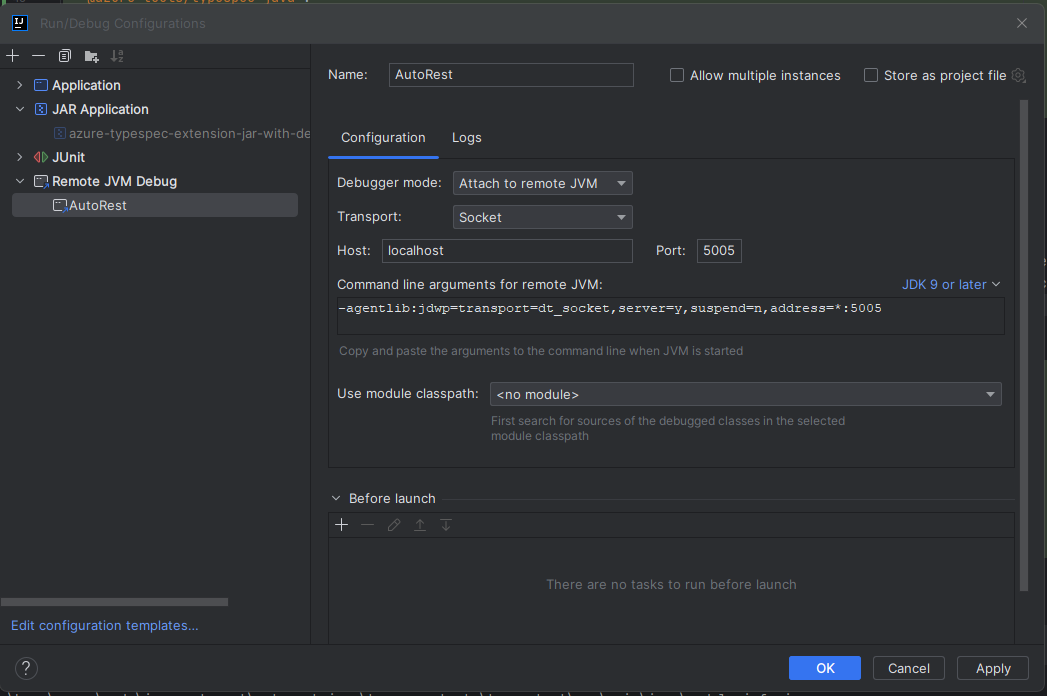 | ||
| ```yaml | ||
| emit: | ||
| - "@azure-tools/typespec-java" | ||
| options: | ||
| "@azure-tools/typespec-java": | ||
| emitter-output-dir: "{project-root}/tsp-output" | ||
| namespace: "com.azure.ai.language.authoring" | ||
| dev-options: | ||
| debug: true | ||
| ``` | ||
| ### New version of `@typespec/compiler` etc. | ||
| Force an installation of new version via deleting `package-lock.json` and `node_modules` in `./typespec-extension` folder. | ||
| ```shell | ||
| rm -rf node_modules | ||
| rm package-lock.json | ||
| ``` |
| # Install and Test on TypeSpec-Java | ||
| ## Install TypeSpec | ||
| Install Node.js and [TypeSpec](https://github.com/microsoft/typespec/). | ||
| ```shell | ||
| npm install -g @typespec/compiler | ||
| ``` | ||
| ## Build JAR, Build and Install TypeSpec-Java | ||
| `pwsh Setup.ps1 -RebuildJar` in `./typespec-tests` folder. | ||
| It builds JAR and makes the npm package in `./typespec-extension`, then install it to `./typespec-tests` folder. | ||
| ## Generate Code | ||
| `pwsh Generate.ps1` in `./typespec-tests` folder. | ||
| It takes time. | ||
| The existing code is already in sync. Run this if you have changed the code of TypeSpec-Java. | ||
| ## Run Test | ||
| Start Cadl-Ranch | ||
| `npm run testserver-run` | ||
| Then, run the tests in `typespec-tests` module as usual Java Tests. | ||
| ## Generate Code for TypeSpec Source | ||
| `tsp compile <target.tsp>` in `./typespec-tests` folder. | ||
| This is usually to do a quick check whether the modified TypeSpec-Java works as expected. | ||
| Generated code will be at `./typespec-tests/tsp-output/` folder for inspect. | ||
| ## Debugging Java code | ||
| `tspconfig.yaml` already configured | ||
| ```yaml | ||
| dev-options: | ||
| generate-code-model: true | ||
| ``` | ||
| With this option, a `code-model.yaml` file is kept in `./typespec-tests/tsp-output/` folder after `tsp compile <target.tsp>`. | ||
| `Main.java` under `./typespec-extension` would load this `code-model.yaml` file as default, and run the Java code to generate the code. | ||
| At this stage, one can modify or debug the Java code (`./typespec-extension/src/main/java/`) in IDE. The code generated in `./typespec-tests/tsp-output/` would reflect the modified Java code. | ||
| Notice: there maybe some difference of other option between `tspconfig.yaml` and `EmitterOptions.java`. Remember to temporary modify `EmitterOptions.java` to reflect the option in `tspconfig.yaml` when running `Main.java` this way. (e.g. set `streamStyleSerialization` to `true`) | ||
| ## Troubleshooting | ||
| ### New version of `@typespec/compiler` etc. | ||
| Force an installation of new version via deleting `package-lock.json` and `node_modules` in `./typespec-extension` folder. | ||
| ```shell | ||
| rm -rf node_modules | ||
| rm package-lock.json | ||
| ``` |
Sorry, the diff of this file is not supported yet
Sorry, the diff of this file is not supported yet
Sorry, the diff of this file is not supported yet
No alert changes
Worsened metrics
- Total package byte prevSize
66527225
-2.9%- Number of package files
16
-20%No dependency changes