
Canvest
Writing a unit test for your HTML5 Canvas component without mocking any DOM element
Using browser to render and execute your component's unit test logic directly, outputting image snapshot to compare in pixel-level
Support TypeScript and zero config needed in most cases for JavaScript project, using API like it and describe with a few unique API for canvas snapshot
Install
Run npm cmd to install on your project
$ npm i @canvest/canvest-cli --save-dev
Create a script in your package.json
 "scripts": {
    ...
    "test": "canvest",
    ...
  },
Usage example
If you just want to test a canvas, create helloworld.canvest.js under ./canvest folder
describe('Test my canvas', () => {
it('should render hello world text in canvas', async () => {
let canvas = document.createElement('canvas');
canvas.width = 800;
canvas.height = 600;
const a = await snapshot(canvas);
const context = canvas.getContext('2d');
context.fillStyle = '#ff0';
context.fillRect(0, 0, 800, 600);
const text = 'Hello, World!';
context.font = 'bold 70pt Menlo';
context.textAlign = 'center';
context.fillStyle = '#fff';
context.fillText(text, 200, 200);
const b = await snapshot(canvas);
a.notEqual(b);
await autoShot('test', canvas);
});
});
Or test the class you create, for example for pixi.js
export class MyClass
{
 	...
 	updateRotation(rotation){
 		this._sprite.rotation = rotation;
 	}
 	...
}
Create MyClass.canvest.js under ./canvest folder
import * as PIXI from 'pixi.js';
import { MyClass } from './MyClass';
describe('Test my class', () => {
it('should update rotation as expect', async () => {
const app = new PIXI.Application({
width: XXX, height: YYY,
preserveDrawingBuffer: true
});
const myClass = new MyClass();
app.stage.addChild(myClass._sprite);
myClass.updateRotation(1.5);
await autoShot('rotation_that_expected', app.view);
const rotation15Snapshot = await snapshot(app.view);
myClass.updateRotation(1.6);
const rotation16Snapshot = await snapshot(app.view);
rotation16Snapshot.notEqual(rotation15Snapshot);
rotation16Snapshot.isMatch(rotation15Snapshot, 0.2);
});
});
Then using npm cmd
$ npm test
Once you ran npm test, Canvest-cli will start running unit test that under canvest folder if files name is after *.canvest.(js|ts) pattern.
Canvest-cli will start two node servers, to config the port you could change npm script by
 "scripts": {
    ...
    "test": "canvest --cachePort XXX --pagePort XXX",
    ...
  },
cachePort: this is the port that canvest-cli using to start the node server to cache your snapshot, default is 45670.pagePort: this is the port that canvest-cli using to start the web page to run your unit test with Mocha, running vite under the hood.
Result
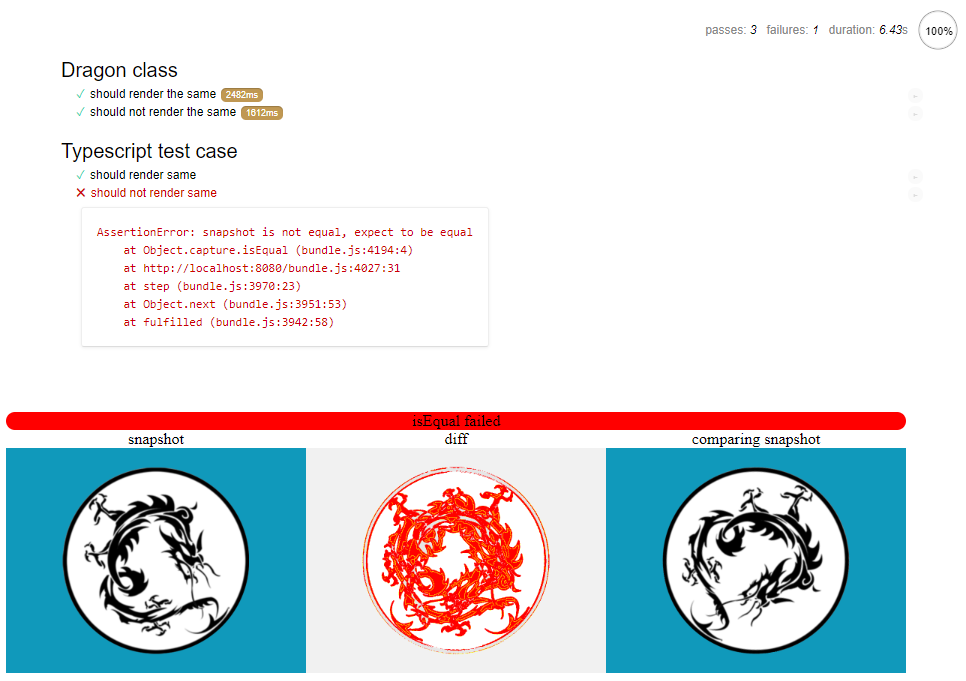
If some test case failed, you will see diff comparison under bottom showing in highlight red color.
One thing should notice is the diff for cached snapshot won't show up if cached snapshot has different size with current one.
API
Canvest framework is using Mocha with Chai under the hood, every API Mocha had in browser, Canvest should have as well by accessing mocha variable but this is not recommended.
You could create file canvest.init.js(or canvest.init.ts when using --ts) under ./canvest folder and doing all the setup in there.
autoShot(name, canvas): Promise<void>
take a snapshot of current canvas and cached in local, if local snapshot already exists, compare current snapshot with local one automatically
-
name: a unique name for snapshot to save under ./canvest/autoShot/(the-name-you-given).png
-
canvas: HTML5 canvas dom element
-
as long as your local snapshot doesn't get removed, autoShot will do the comparison instead of caching it and pass test
snapshot(canvas): Promise<snapshot Object>
take a snapshot of current canvas
canvas: HTML5 canvas dom elementsnapshot Object: return a Canvest snapshot that has 4 APIs in below
isEqual( otherSnapshot ): snapshot should completely equal to otherSnapshotnotEqual( otherSnapshot ): snapshot should not equal to otherSnapshotisMatch( otherSnapshot, tolerance ): snapshot could equal to otherSnapshot if test ignores number of tolerance percentage of pixelsnotMatch( otherSnapshot, tolerance ): snapshot could not equal to otherSnapshot even after test ignores number of tolerance percentage of pixels
setThreshold(number): void
set global threshold for snapshot comparision, if you just want one snapshot comparision to be more tolerant, use isMatch or notMatch function with tolerance parameter
number threshold, a number that can be set to maximum 1.0. Default is 0.05, higher number will ignore more differences between snapshot comparision
Test Coverage
Canvest will create test coverage after all test is done, you could find the coverage.json and/or open index.html under ./coverage folder
TypeScript
Using canvest --ts to start testing
Integrate with CI
If you want to run with headless browser in CI, you could use --ci option. This will make Canvest exit when all tests are done, and add a div inside web page <body> with className test_end or test_end_with_failed.
For example, canvest --ci ./canvest will create a canvest-test-result folder under ./canvest folder, any failed test will create a diff image in result folder.
If diff is a cached snapshot and it is not valid because new snapshot size is different, it will still create an empty file failed-Name.diff.failed.
Link
Canvest example for pixi.js with TypeScript https://github.com/TyrealGray/canvest-pixi.js-example
Canvest example for three.js https://github.com/TyrealGray/canvest-three.js-example
License
AFL-3.0





