@chainplatform/react-native-confirmation-code-field




A simple react-native confirmation code field compatible with iOS, Android and Web. Fork from https://github.com/retyui/react-native-confirmation-code-field
Links
Component features:
- 🔮 Simple and tiny
3.8 KB. Easy to use;
- 🚮 Clearing part of the code by clicking on the cell;
- 🍎 Support "fast paste SMS-code" on iOS. And custom code paste for Android;
- ⚡ TextInput
ref support;
- 🛠 Highly customizable. Can be used as masked TextInput;
- 🤓 Readable changelog.
Install
yarn add @chainplatform/react-native-confirmation-code-field
How it works
I use an invisible <TextInput/> component that will be stretched over <Cell/> components.
JSX structure looks like that:
<View style={rootStyle}>
<Cell>1</Cell>
<Cell>2</Cell>
<Cell>3</Cell>
<Cell>|</Cell>
<Cell></Cell>
<Cell></Cell>
<TextInput value="123"/>
</View>
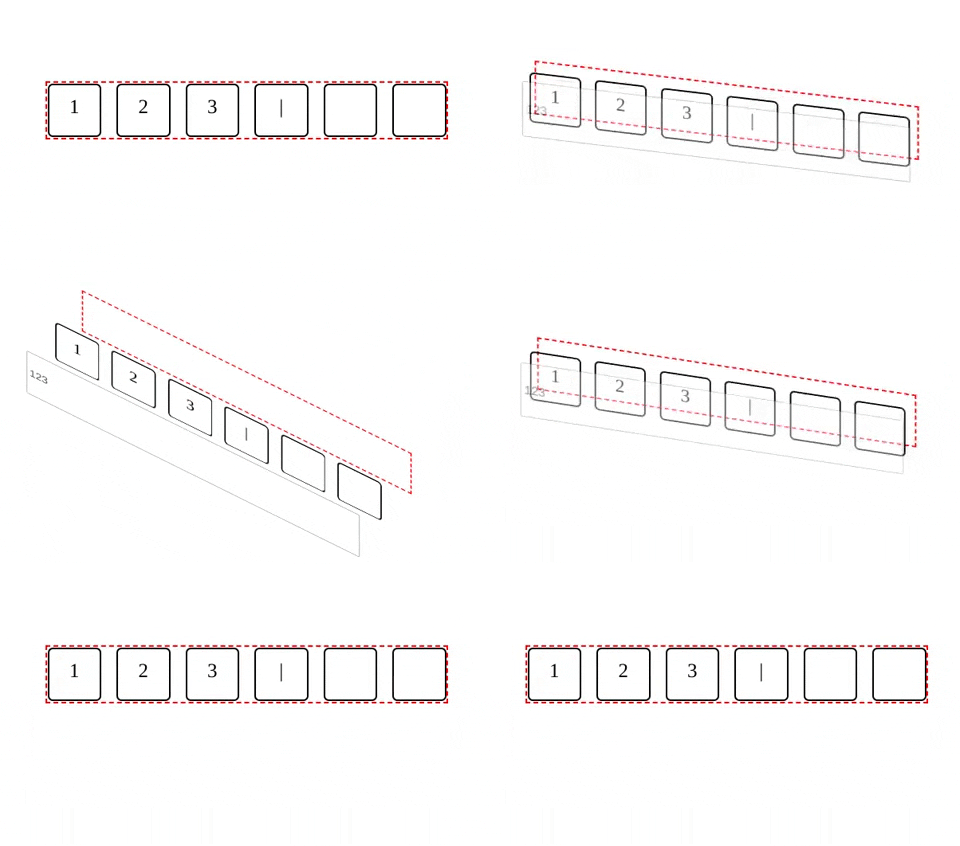
It needs to solve next problems:
- When user pastes code from SMS on iOS issue#25
- Better UX when user types fast, or system sluggish, characters might lost when component switching focus between
<TextInput/>.
Basic example
I took a minimal implementation approach.
It mean that this component provides low-level functionality so you can create incredible UI without tears 😭.
I recommend you start with creating your own wrapper where you apply all styles and basic configuration.
You can use a ready-made solution out of the box:
import React, {useState} from 'react';
import {SafeAreaView, Text, StyleSheet} from 'react-native';

import {
  CodeField,
  Cursor,
  useBlurOnFulfill,
  useClearByFocusCell,
} from '@chainplatform/react-native-confirmation-code-field';

const styles = StyleSheet.create({
  root: {flex: 1, padding: 20},
  title: {textAlign: 'center', fontSize: 30},
  codeFieldRoot: {marginTop: 20},
  cell: {
    width: 40,
    height: 40,
    lineHeight: 38,
    fontSize: 24,
    borderWidth: 2,
    borderColor: '#00000030',
    textAlign: 'center',
  },
  focusCell: {
    borderColor: '#000',
  },
});

const CELL_COUNT = 6;

const App = () => {
  const [value, setValue] = useState('');
  const ref = useBlurOnFulfill({value, cellCount: CELL_COUNT});
  const [props, getCellOnLayoutHandler] = useClearByFocusCell({
    value,
    setValue,
  });

  return (
    <SafeAreaView style={styles.root}>
      <Text style={styles.title}>Verification</Text>
      <CodeField
        ref={ref}
        {...props}
        // Use `caretHidden={false}` when users can't paste a text value, because context menu doesn't appear
        value={value}
        onChangeText={setValue}
        cellCount={CELL_COUNT}
        rootStyle={styles.codeFieldRoot}
        keyboardType="number-pad"
        textContentType="oneTimeCode"
        autoComplete={Platform.select({ android: 'sms-otp', default: 'one-time-code' })}
        testID="my-code-input"
        renderCell={({index, symbol, isFocused}) => (
          <Text
            key={index}
            style={[styles.cell, isFocused && styles.focusCell]}
            onLayout={getCellOnLayoutHandler(index)}>
            {symbol || (isFocused ? <Cursor/> : null)}
          </Text>
        )}
      />
    </SafeAreaView>
  );
};

export default App;





