


Security News
Crates.io Users Targeted by Phishing Emails
The Rust Security Response WG is warning of phishing emails from rustfoundation.dev targeting crates.io users.
By Sarah Gooding - Sep 12, 2025
@coinbase-sample/advanced-trade-sdk-ts
Advanced tools
Welcome to the Coinbase Advanced API TypeScript SDK. This TypeScript project was created to allow developers to easily plug into the [Coinbase Advanced API](https://docs.cdp.coinbase.com/advanced-trade/docs/welcome).
Welcome to the Coinbase Advanced API TypeScript SDK. This TypeScript project was created to allow developers to easily plug into the Coinbase Advanced API.
Coinbase Advanced Trade offers a comprehensive API for traders, providing access to real-time market data, order management, and execution. Elevate your trading strategies and develop sophisticated solutions using our powerful tools and features.
For more information on all the available REST endpoints, see the API Reference.
npm install @coinbase-samples/advanced-trade-sdk-ts
To build the project, run the following command:
npm run build
Note: To avoid potential issues, do not forget to build your project again after making any changes to it.
After building the project, each .ts file will have its .js counterpart generated.
To run a file, use the following command:
node dist/{INSERT-FILENAME}.js
For example, a main.ts file would be run like:
node dist/main.js
This SDK uses Cloud Developer Platform (CDP) API keys. To use this SDK, you will need to create a CDP API key and secret by following the instructions here. Make sure to save your API key and secret in a safe place. You will not be able to retrieve your secret again.
All the REST endpoints are available directly from the client, therefore it's all you need to import.
import { CoinbaseAdvTradeClient } from '@coinbase-samples/advanced-trade-sdk-ts';
Authentication of CDP API Keys is handled automatically by the SDK when making a REST request.
After creating your CDP API keys, store them using your desired method and simply pass them into the client during initialization like:
const credentials = new CoinbaseAdvTradeCredentials(
  process.env.KEY_NAME,
  process.env.PRIVATE_KEY
);

const client = new CoinbaseAdvTradeClient(credentials);
Here are a few examples requests:
const accountService = new AccountsService(client);
accountService
    .listAccounts({})
    .then((result) => {
        console.log(result);
    })
    .catch((error) => {
        console.error(error.message);
    });
productService = new ProductsService(client);
productService
    .getProduct({productId: "BTC-USD"})
    .then((result) => {
        console.log(result);
    })
    .catch((error) => {
        console.error(error.message);
    });
$10 Market Buy on BTC-USD
const orderService = new OrdersService(client);
orderService
    .createOrder({
        clientOrderId: "00000001",
        productId: "BTC-USD",
        side: OrderSide.BUY,
        orderConfiguration:{
            marketMarketIoc: {
                quoteSize: "10"
            }
        }
    })
    .then((result) => {
        console.log(result);
    })
    .catch((error) => {
        console.error(error.message);
    });
FAQs
Welcome to the Coinbase Advanced API TypeScript SDK. This TypeScript project was created to allow developers to easily plug into the [Coinbase Advanced API](https://docs.cdp.coinbase.com/advanced-trade/docs/welcome).
The npm package @coinbase-sample/advanced-trade-sdk-ts receives a total of 466 weekly downloads. As such, @coinbase-sample/advanced-trade-sdk-ts popularity was classified as not popular.
We found that @coinbase-sample/advanced-trade-sdk-ts demonstrated a healthy version release cadence and project activity because the last version was released less than a year ago. It has 1 open source maintainer collaborating on the project.
Did you know?

Socket for GitHub automatically highlights issues in each pull request and monitors the health of all your open source dependencies. Discover the contents of your packages and block harmful activity before you install or update your dependencies.
Security News
The Rust Security Response WG is warning of phishing emails from rustfoundation.dev targeting crates.io users.
Product
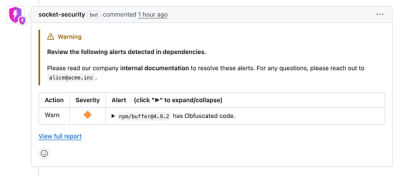
Socket now lets you customize pull request alert headers, helping security teams share clear guidance right in PRs to speed reviews and reduce back-and-forth.
Product
Socket's Rust support is moving to Beta: all users can scan Cargo projects and generate SBOMs, including Cargo.toml-only crates, with Rust-aware supply chain checks.