


Security News
Crates.io Users Targeted by Phishing Emails
The Rust Security Response WG is warning of phishing emails from rustfoundation.dev targeting crates.io users.
By Sarah Gooding - Sep 12, 2025
@degjs/numericycle
Advanced tools

Numericycle is a Javascript module that animates a number from one value to another. It takes advantage of Window.requestAnimationFrame to produce smooth animations. Numericycle can be easily configured for animation duration, easing, and number display format.
Numericycle is an ES6 module. Consequently, you may need a transpiler (Babel is a nice one) to compile numericycle into compatible Javascript for your runtime environment.
If you're using NPM, you can install numericycle with the following command:
$ npm install @degjs/numericycle
Import numericycle, create a new instance of it, and get cyclin'.
import numericycle from '@degjs/numericycle';

const element = document.querySelector('div');

const instance = numericycle(element);

instance.cycle({
	initialValue: 1,
	finalValue: 10,
	duration: 2000,
	easing: 'easeOut',
	format: '0,0'
});
Type: HTMLElement
The HTML element that contains or will contain the number to be animated.
Parameters: options
Animates the content of the HTML element using the values specified in the options parameter:
Type: Number
The initial value of the number. If this option is omitted, numericycle will attempt to convert the content of the HTML element to a number.
Type: Number
The final value of the number. This option is required.
Type: Number Default: 2000
The duration (in milliseconds) of the animation.
Type: String Default: easeOut
The type of easing that the animation should use. Valid options are linear, easeIn, easeOut, and easeInOut.
Type: String Default: 0,0
The display format for the number. Valid options are 0,0 (thousands separator included) and 0 (thousands separator omitted)
Numericycle works on modern browsers. To support legacy browsers, you'll need to include polyfills for the following Javascript APIs:
FAQs
Animate between two numbers
We found that @degjs/numericycle demonstrated a not healthy version release cadence and project activity because the last version was released a year ago. It has 8 open source maintainers collaborating on the project.
Did you know?

Socket for GitHub automatically highlights issues in each pull request and monitors the health of all your open source dependencies. Discover the contents of your packages and block harmful activity before you install or update your dependencies.
Security News
The Rust Security Response WG is warning of phishing emails from rustfoundation.dev targeting crates.io users.
Product
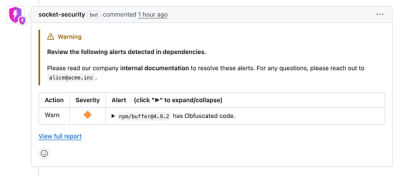
Socket now lets you customize pull request alert headers, helping security teams share clear guidance right in PRs to speed reviews and reduce back-and-forth.
Product
Socket's Rust support is moving to Beta: all users can scan Cargo projects and generate SBOMs, including Cargo.toml-only crates, with Rust-aware supply chain checks.