











Kondonizer
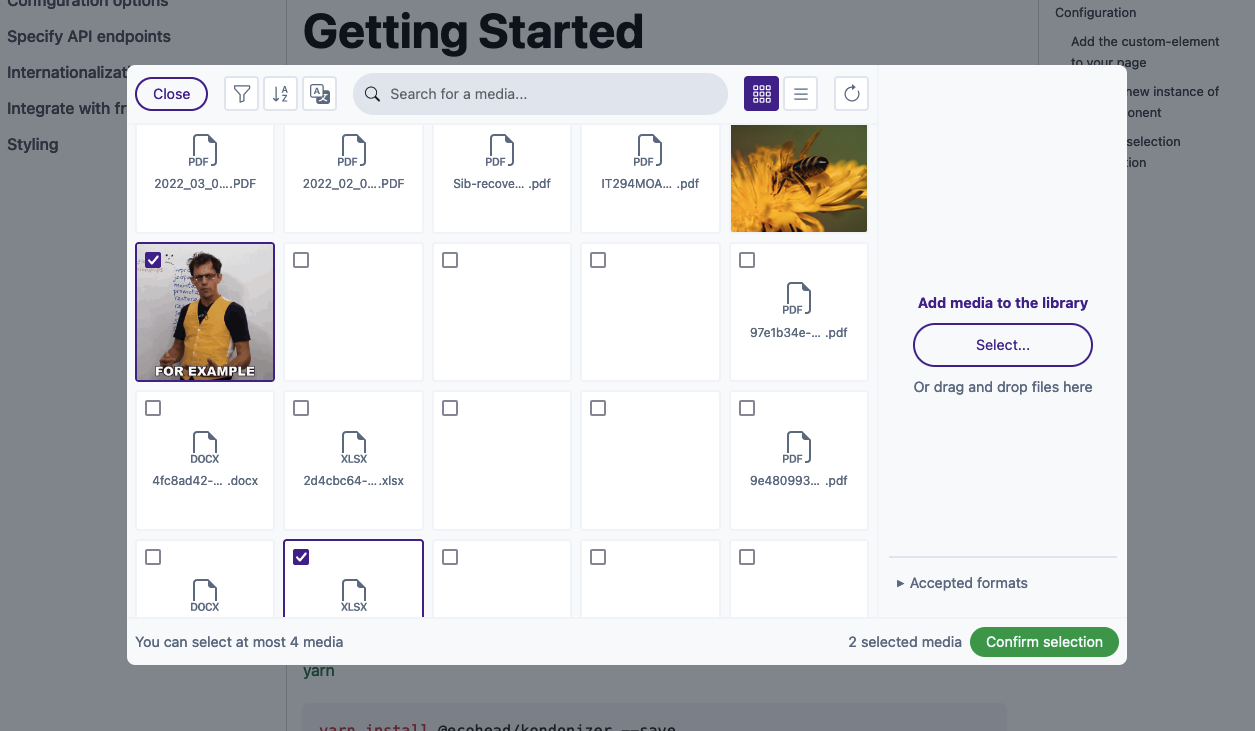
Kondonizer is a custom element (a native HTML tag) that can be integrated in any frontend code. It displays a media library based on a Media model, like WordPress does internally. You can select, upload, edit and delete one or multiple files, all based on a configuration object highly customizable.
This web component needs between 2 and 5 API endpoints to be fully working. More info in the documentation.
Documentation
The full documentation is accessible in a dedicated website.
Installation
You can use your preferred package manager.
npm
npm install @ecohead/kondonizer --save
yarn
yarn add @ecohead/kondonizer --save
pnpm
pnpm install @ecohead/kondonizer --save
Configuration
Add the custom-element to your page
The first step is to place the HTML tag where you need it in your template :
<!doctype html>
<html lang="en">
<head>
<meta charset="UTF-8">
<title></title>
</head>
<body>
<eco-kondonizer></eco-kondonizer>
</body>
</html>
At this point, you will see any changes, because you need to create an instance of kondonizer to actually display the component UI.
Create a new instance of the component
The eco-kondonizer custom element provide a method to create a new instance with some options. To display the component UI, you need to create a new instance as follows :
import { EcoKondonizer, defineConfig } from "@ecohead/kondonizer";
const kondonizer = document.querySelector('eco-kondonizer');
if (!kondonizer) return;
kondonizer.createInstance({
config: defineConfig(),
selectedMedias: [],
defaultLang: 'fr-FR'
});
Note
All the options available are listed here.
Warning
Some config options are required (e.g. server endpoints), so you need to pass a correct config to view the component UI.
Listen to selection confirmation
A CustomEvent is emitted each time the user clicks on the confirm button in the modal.
So, to get the user selection, you have to listen to this event as follows :
kondonizer.addEventListener('kondoupdate', (e) => {
console.log(e.detail)
});
Et voilà !
You now have a fully functional web component that you can integrate in any of your templates.
If you need more details in the integration in the most popular front-end frameworks and libraries, see Integrate with front-end frameworks.
Preview
You can also have a working demo on the documentation website.
Credits
License
This library is MIT licensed.





