


Security News
Crates.io Users Targeted by Phishing Emails
The Rust Security Response WG is warning of phishing emails from rustfoundation.dev targeting crates.io users.
By Sarah Gooding - Sep 12, 2025
@esri/hub-text-notes-layer
Advanced tools
HubTextNotesLayer is a custom JSAPI layer for adding editable, HTML-based text notes to JSAPI graphics.
Create a text notes layer and add it to the map:
const hubTextNotesLayer = new HubTextNotesLayer({
  editable: true, // indicates notes should be editable using the `contenteditable` attribute
  textPlaceholder: 'type something', // placeholder text displayed for an empty note
  cssClass: 'map-note' // CSS class used to style the note
});

view.map.add(hubTextNotesLayer);
To add a text note for a feature called graphic:
// create the note
const note = this.hubTextNotesLayer.addNoteForGraphic(graphic);

// mark it as currently selected (adds `note-select` CSS class)
hubTextNotesLayer.setSelectedNoteForGraphic(graphic);
To influence where the note is placed in relation to the graphic, use the placementHint point parameter, and specify initial text content with text:
this.hubTextNotesLayer.addNoteForGraphic(graphic, {
  text: 'This is my note.',
  placementHint: event.mapPoint // use the location the user clicked, for a `MapView` `click` event
});
To update text note hover and selection states in conjunction with their attached graphics, call note.setHoveredNoteForGraphic(graphic) and note.setSelectedNoteForGraphic(graphic) methods from the appropriate JSAPI MapView handlers (e.g. pointer-move, click).
To programmatically focus a note for editing, use the note.focus() method.
yarn add @esri/hub-text-notes-layer
NOTE: as of v4.0.0 this package has a peer dependency on @arcgis/core@4.28, so you must have that already installed
Then you can import the layer class:
import HubTextNotesLayer from '@esri/hub-text-notes-layer';
If you need to use this with an AMD build of the ArcGIS API, you should install a pre-1.0.0 version with yarn add @esri/hub-text-notes-layer@^0.7 and then see these instructions for how you can configure Dojo to load the layer class.
FAQs
Custom JSAPI layer for Hub text notes
We found that @esri/hub-text-notes-layer demonstrated a not healthy version release cadence and project activity because the last version was released a year ago. It has 41 open source maintainers collaborating on the project.
Did you know?

Socket for GitHub automatically highlights issues in each pull request and monitors the health of all your open source dependencies. Discover the contents of your packages and block harmful activity before you install or update your dependencies.
Security News
The Rust Security Response WG is warning of phishing emails from rustfoundation.dev targeting crates.io users.
Product
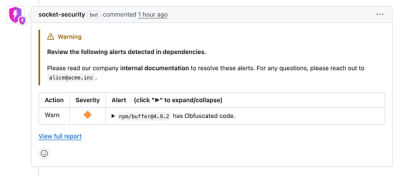
Socket now lets you customize pull request alert headers, helping security teams share clear guidance right in PRs to speed reviews and reduce back-and-forth.

Product
Socket's Rust support is moving to Beta: all users can scan Cargo projects and generate SBOMs, including Cargo.toml-only crates, with Rust-aware supply chain checks.