@jasbel/responsive 

Information
| Package | @jasbel/responsive |
| Description | Media queries for responsive design |
| Browser Version | all |
| Demo |
The best supported, easiest to use react media query module.
Install
$ npm install @jasbel/responsive --save-dev
$ npm i -D @jasbel/responsive
Example Usage
Usage
install compiler sass and import file scss main:
@import "@jasbel/responsive/scss/responsive.scss";

...
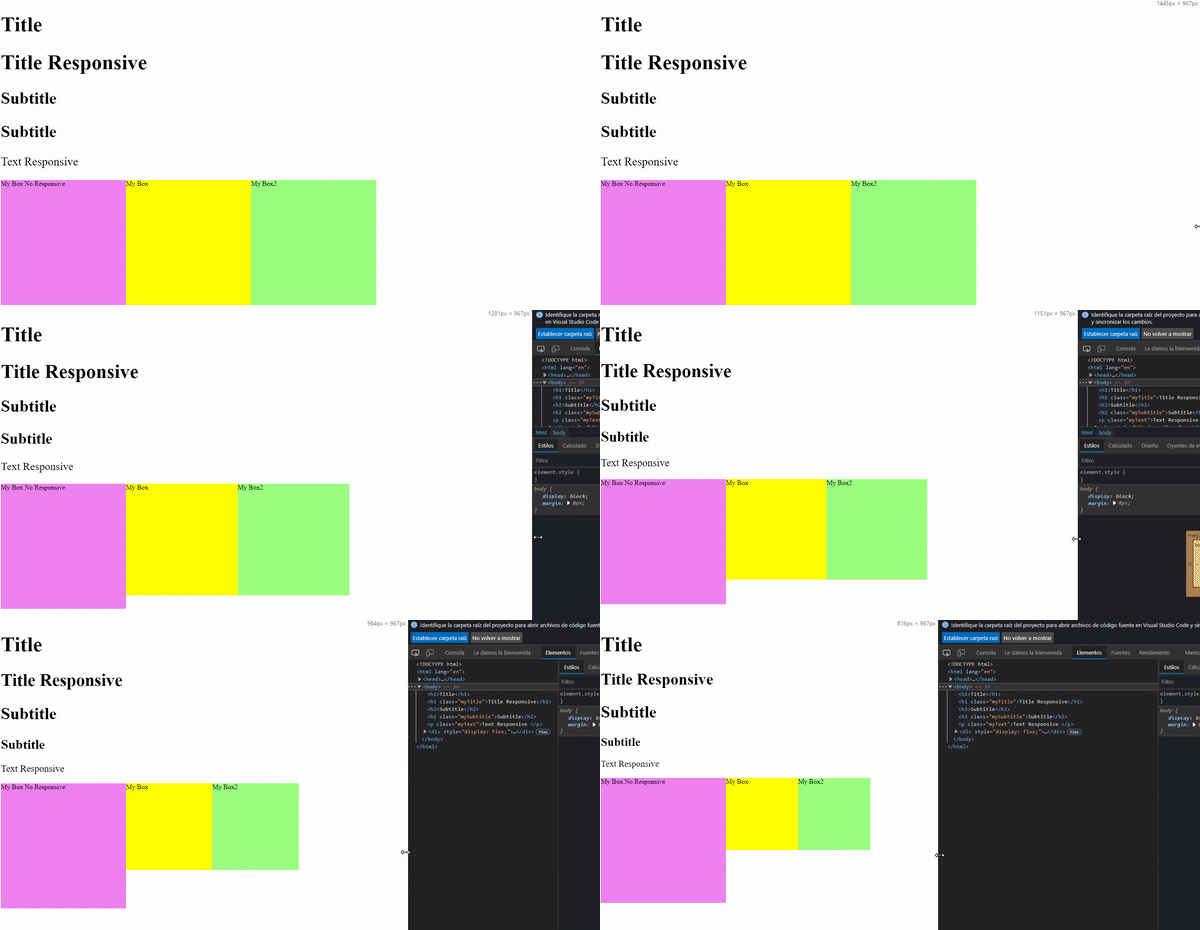
With HTML and SCSS
Example:
index.html
<body>
  <h1>Title</h1>
  <h1 class="myTitle">Title Responsive</h1>
  <h2>Subtitle</h2>
  <h2 class="mySubtitle">Subtitle</h2>
  <p class="myText">Text Responsive </p>

  <div style="display: flex;">
    <div class="myBoxNoResponsive">My Box No Responsive</div>
    <div class="myBox">My Box</div>
    <div class="myBox2">My Box2</div>
  </div>
</body>
@import "@jasbel/responsive/index.scss";
h1 {
font-size: 50px;
@include mq(fz, 50, $desktop-responsive);
@include mq(fz, 30, $phone-responsive);
}
h2 {
font-size: 40px;
@include mq(fz, 40, $desktop-responsive);
@include mq(fz, 20, $phone-responsive);
}
.myTitle {
@include responsive(fz, 50, 30);
}
.mySubtitle {
@include responsive(fz, 40, 20);
}
.myText {
@include responsive(fz, 28, 16);
}
.myBoxNoResponsive {
display: block;
width: 300px;
height: 300px;
@include mq(w, 300, $desktop-responsive);
@include mq(w, 150, $tablet-responsive);
@include mq(w, 80, $phone-responsive);
@include mq(h, 300, $desktop-responsive);
@include mq(h, 150, $tablet-responsive);
@include mq(h, 80, $phone-responsive);
background-color: violet;
}
.myBox {
display: block;
@include responsive(w, 300, 80);
@include responsive(h, 300, 80);
background-color: yellow;
}
.myBox2 {
display: block;
@include r(w, 80, 300);
@include r(h, 80, 300);
background-color: rgb(155, 255, 128);
}
Simple Example
index.html
<!DOCTYPE html>
<html>
  <head>
    <meta charset="utf-8" />
    <meta name="viewport" content="width=device-width" />
    <title>Responsive</title>
    <link href="main.css" rel="stylesheet" type="text/css" />
  </head>
  <body>
    <p class="text textResponsive">Text Responsive</p>
    <p class="text">Text No Responsive</p>
    <div class="box boxResponsive">Box Responsive</div>
    <br />
    <div class="box">Box No Responsive</div>
  </body>
</html>
main.scss
@import "@jasbel/responsive/scss/responsive.scss";

html,
body {
  height: 100%;
  width: 100%;
}

.text {
  font-size: 30px;

  &Responsive {
    @include responsive(fz, 100, 30);
  }
}

.box {
  background-color: lightblue;
  width: 100px;
  height: 100px;
  font-size: 16px;

  &Responsive {
    @include responsive(fz, 50, 16);
    @include responsive(w, 500, 100);
    @include responsive(h, 500, 100);
  }
}
API
@include responsive(fz, 100, 30);
@include mq(fz, 60, 1440);
@include font-responsive(26, 20, 1440, 360);
@include font-responsive(26, 20);
@include responsive-mq(fz, 60, 39, 1440);
@include padding-responsive(...);
@include margin-responsive(...);

padding-left: responsive($pl-max, $pl-min, $w-max, $w-min);
Browser Support
Out of the box
| Chrome | 9 |
| Firefox (Gecko) | 6 |
| MS Edge | All |
| Internet Explorer | 11 |
| Opera | 12.1 |
| Safari | 5.1 |
Documentation
Template (In Process)
Clone a copy of the repo:
git clone https://github.com/jasbel/template-responsive.git





