


Security News
CVE Volume Surges Past 48,000 in 2025 as WordPress Plugin Ecosystem Drives Growth
CVE disclosures hit a record 48,185 in 2025, driven largely by vulnerabilities in third-party WordPress plugins.
By Sarah Gooding - Jan 09, 2026
@jswf/react-sample01
Advanced tools
Sample of Virtual window component for React
Components for realizing virtual windows with React Just enclose with JSWindow and it will become a virtual window
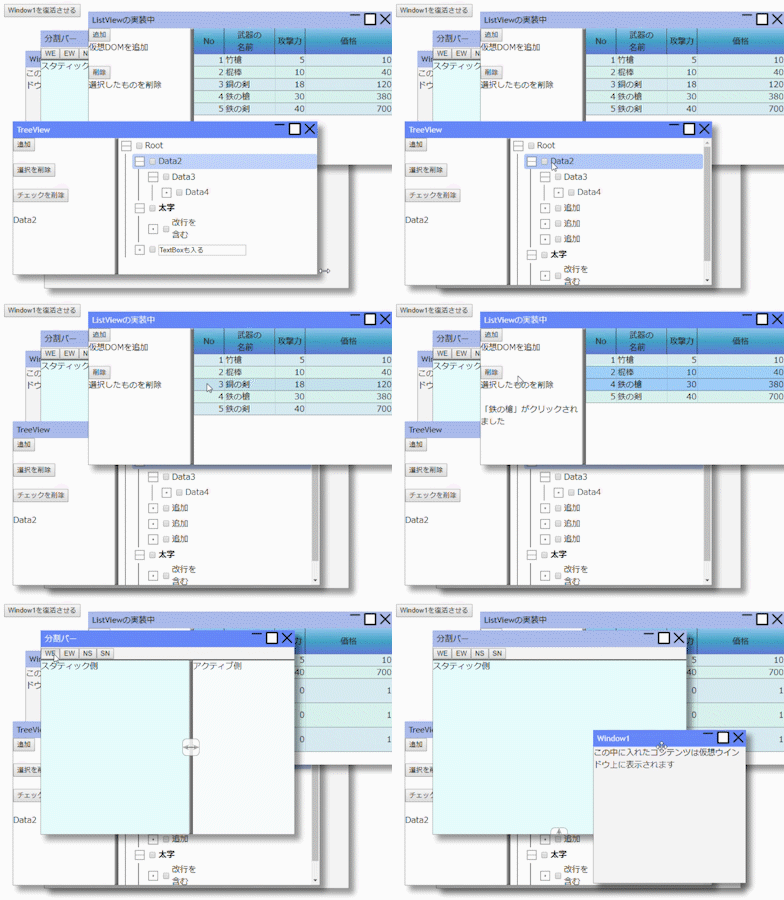
The website where the document is written
https://ttis.croud.jp/?uuid=b292d429-dbad-49b5-8fed-6d268f4feaf0
Source code
https://github.com/JavaScript-WindowFramework/jswf-react
Sample code
https://github.com/JavaScript-WindowFramework/jwf-react-sample01
Operation sample
https://javascript-windowframework.github.io/jwf-react-sample01/dist/
import * as React from "react";
import * as ReactDOM from "react-dom";
import {
JSWindow,
WindowState,
WindowStyle,
WindowInfo,
SplitView,
SplitType
} from "@jswf/react";
function App() {
const frame = React.createRef<JSWindow>();
const [info, setInfo] = React.useState<WindowInfo | null>(null);
const [type, setType] = React.useState<SplitType>("ew");
return (
<>
{/* -------- Simply display the window ------------*/}
<JSWindow ref={frame} title="Window1" x={50} y={100}>
The content you put in this will be displayed on the virtual window
</JSWindow>
{/* -------- Window inside window ------------*/}
<JSWindow title="Window2" width={600} height={500} windowStyle={~WindowStyle.CLOSE}>
If the window position is not set, it will be displayed in the center.
<br />
You can set the function used in windowStyle
<JSWindow title="ChildWindow" overlapped={false} width={200} height={200}>
If overlapped is set to false, it will be displayed in the client area,
if it is set to true, only the overlap will be adjusted.
</JSWindow>
</JSWindow>
{/* -------- Display window information ------------*/}
<JSWindow title="Update test" y={50} onUpdate={p => setInfo(p)}>
<pre>
{info && JSON.stringify(info,["realX", "realY", "realWidth", "realHeight"]," ")}
</pre>
</JSWindow>
{/* -------- Installation of split bar ------------*/}
<JSWindow width={500} height={400} title="Split bar" clientStyle={{ display: "flex", flexDirection: "column" }}>
{/* Button installation */}
<div style={{ borderBottom: "solid 2px" }}>
<button onClick={() => setType("we")}>WE</button>
<button onClick={() => setType("ew")}>EW</button>
<button onClick={() => setType("ns")}>NS</button>
<button onClick={() => setType("sn")}>SN</button>
</div>
{/* Split bar (default style extends to the maximum of the parent client area) */}
<SplitView type={type} style={{ position: "relative", flex: 1 }}>
<div style={{ height: "100%" }}>Active side</div>
<div style={{ height: "100%", backgroundColor: "rgb(230,255,255)" }}>
Static side
</div>
</SplitView>
</JSWindow>
{/* -------- Non-window normal button ------------*/}
<button onClick={() => {
frame.current!.foreground();
frame.current!.setWindowState(WindowState.NORMAL);
}}>
Revive Window1
</button>
</>
);
}
ReactDOM.render(<App />, document.getElementById("root") as HTMLElement);
| Name | Usage |
|---|---|
| JSWindow | Virtual Window Components |
| SplitView | Component for region split |
| ListView | Similar to Windows ListView |
| TreeView | TreeView components |
| TreeItem | TreeView Item components |
MIT
FAQs
VirtualWindow Component Sample
We found that @jswf/react-sample01 demonstrated a not healthy version release cadence and project activity because the last version was released a year ago. It has 1 open source maintainer collaborating on the project.
Did you know?

Socket for GitHub automatically highlights issues in each pull request and monitors the health of all your open source dependencies. Discover the contents of your packages and block harmful activity before you install or update your dependencies.
Security News
CVE disclosures hit a record 48,185 in 2025, driven largely by vulnerabilities in third-party WordPress plugins.

Security News
Socket CEO Feross Aboukhadijeh joins Insecure Agents to discuss CVE remediation and why supply chain attacks require a different security approach.

Security News
Tailwind Labs laid off 75% of its engineering team after revenue dropped 80%, as LLMs redirect traffic away from documentation where developers discover paid products.