


Security News
Crates.io Users Targeted by Phishing Emails
The Rust Security Response WG is warning of phishing emails from rustfoundation.dev targeting crates.io users.
By Sarah Gooding - Sep 12, 2025
@logone/adapter-file
Advanced tools
A Logone adapter for outputting logs to files with rotation capabilities.
npm install @logone/adapter-file
import { createAdapter } from '@logone/adapter-file'
import { createLogger } from '@logone/core'

const adapter = createAdapter({
  filepath: './logs/app.log'
})

const logger = createLogger({
  adapters: adapter
})

logger.info('Hello, world!')
const adapter = createAdapter({
  filepath: './logs/app.log',
  maxFileSize: 10 * 1024 * 1024, // 10MB
  rotateFileCount: 5 // app.log, app.1.log, app.2.log, app.3.log, app.4.log
})
// Daily rotation
const dailyAdapter = createAdapter({
  filepath: './logs/app.log',
  rotationFrequency: 'daily',
  timestampFormat: 'YYYY-MM-DD' // app.2024-01-15.log
})

// Hourly rotation
const hourlyAdapter = createAdapter({
  filepath: './logs/app.log',
  rotationFrequency: 'hourly',
  timestampFormat: 'YYYY-MM-DD_HH' // app.2024-01-15_14.log
})

// Minutely rotation
const minutelyAdapter = createAdapter({
  filepath: './logs/app.log',
  rotationFrequency: 'minutely',
  timestampFormat: 'YYYY-MM-DD_HH-mm' // app.2024-01-15_14-30.log
})
const adapter = createAdapter({
  filepath: './logs/app.log',
  maxFileSize: 5 * 1024 * 1024, // 5MB
  rotateFileCount: 3,
  append: true, // Append to file (default: true)
  encoding: 'utf-8' // File encoding (default: 'utf-8')
})
| Property | Type | Default | Description |
|---|---|---|---|
filepath | string | - | Output file path (required) |
maxFileSize | number | Infinity | Maximum file size in bytes |
rotateFileCount | number | 5 | Number of rotation files to keep |
append | boolean | true | Whether to append to existing file |
encoding | BufferEncoding | 'utf-8' | File encoding |
rotationFrequency | 'daily' | 'hourly' | 'minutely' | undefined | Time-based rotation frequency |
timestampFormat | string | 'YYYY-MM-DD' | Timestamp format pattern |
When maxFileSize is specified, files are automatically rotated when they exceed the specified size.
Example: When app.log reaches 5MB:
app.log → renamed to app.1.logapp.log is createdUse rotateFileCount to specify the number of files to keep. Older files are automatically deleted.
When rotationFrequency is specified, new files are created at specified intervals:
daily: Daily rotation (new file when date changes)hourly: Hourly rotation (new file when hour changes)minutely: Minutely rotation (new file when minute changes)Available format tokens for time-based rotation:
YYYY: Year (4 digits)MM: Month (2 digits, zero-padded)DD: Day (2 digits, zero-padded)HH: Hour (2 digits, zero-padded, 24-hour format)mm: Minute (2 digits, zero-padded)ss: Second (2 digits, zero-padded)FAQs
File adapter for Logone
We found that @logone/adapter-file demonstrated a healthy version release cadence and project activity because the last version was released less than a year ago. It has 1 open source maintainer collaborating on the project.
Did you know?

Socket for GitHub automatically highlights issues in each pull request and monitors the health of all your open source dependencies. Discover the contents of your packages and block harmful activity before you install or update your dependencies.
Security News
The Rust Security Response WG is warning of phishing emails from rustfoundation.dev targeting crates.io users.
Product
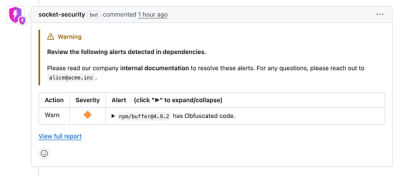
Socket now lets you customize pull request alert headers, helping security teams share clear guidance right in PRs to speed reviews and reduce back-and-forth.

Product
Socket's Rust support is moving to Beta: all users can scan Cargo projects and generate SBOMs, including Cargo.toml-only crates, with Rust-aware supply chain checks.