Monero TypeScript Library
A TypeScript library for creating Monero applications using RPC and WebAssembly bindings to monero v0.18.3.3 'Fluorine Fermi'.
- Supports client-side wallets in Node.js and the browser using WebAssembly.
- Supports wallet and daemon RPC clients.
- Supports multisig, view-only, and offline wallets.
- Wallet types are interchangeable by conforming to a common interface.
- Uses a clearly defined data model and API specification intended to be intuitive and robust.
- Query wallet transactions, transfers, and outputs by their properties.
- Fetch and process binary data from the daemon (e.g. raw blocks).
- Receive notifications when blocks are added to the chain or when wallets sync, send, or receive.
- Over 300 passing Mocha tests.
Architecture
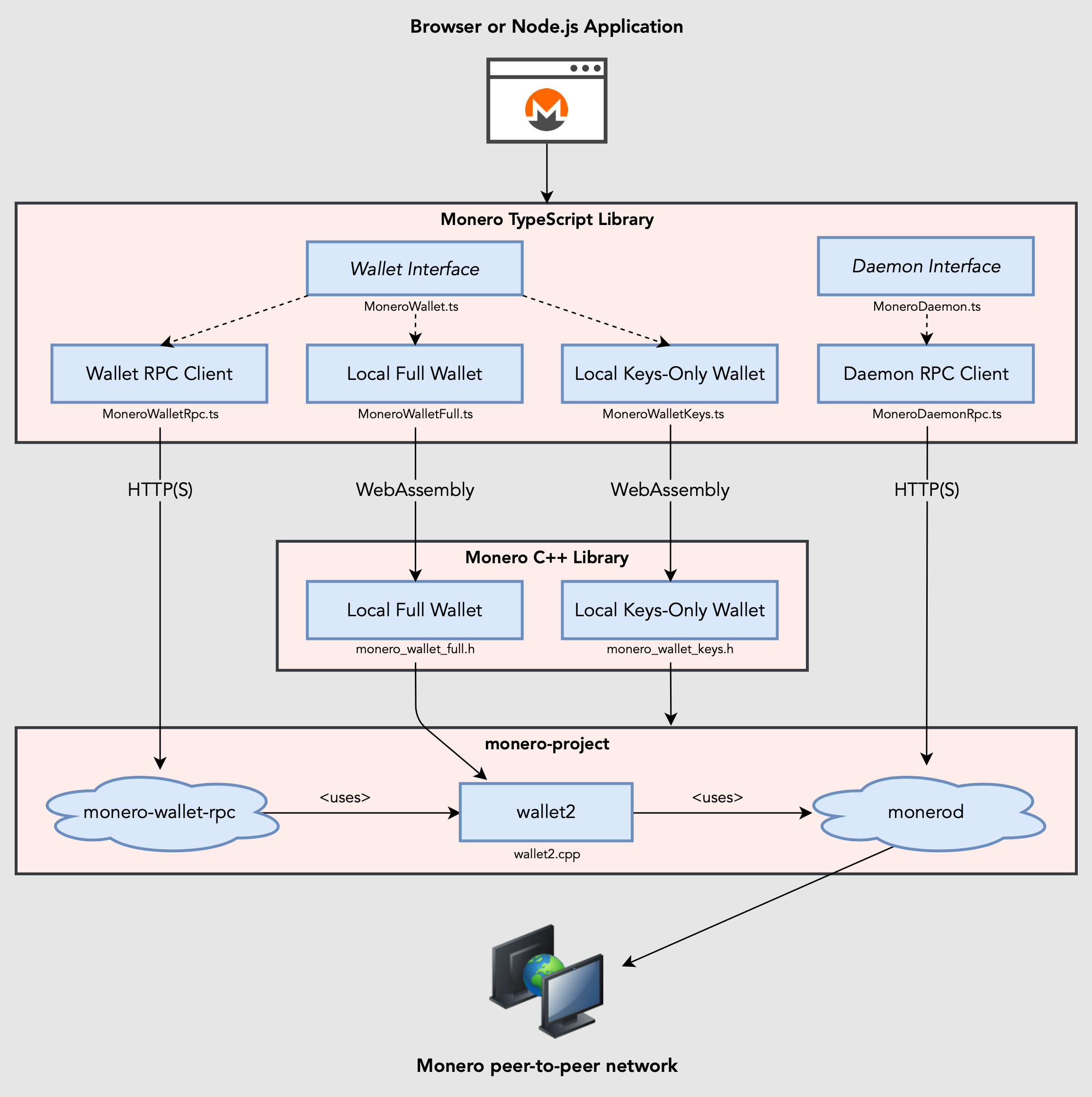
Build browser or Node.js applications using RPC or WebAssembly bindings to monero-project/monero. Wallet implementations are interchangeable by conforming to a common interface, MoneroWallet.ts.
Sample code
import moneroTs from "monero-ts";
let daemon = await moneroTs.connectToDaemonRpc("http://localhost:28081");
let height = await daemon.getHeight();
let txsInPool = await daemon.getTxPool();
let walletFull = await moneroTs.createWalletFull({
path: "sample_wallet_full"
password: "supersecretpassword123",
networkType: moneroTs.MoneroNetworkType.TESTNET,
seed: "hefty value scenic...",
restoreHeight: 573936,
server: {
uri: "http://localhost:28081",
username: "superuser",
password: "abctesting123"
}
});
await walletFull.sync(new class extends moneroTs.MoneroWalletListener {
async onSyncProgress(height: number, startHeight: number, endHeight: number, percentDone: number, message: string) {
}
} as moneroTs.MoneroWalletListener);
await walletFull.startSyncing(5000);
let fundsReceived = false;
await walletFull.addListener(new class extends moneroTs.MoneroWalletListener {
async onOutputReceived(output: moneroTs.MoneroOutputWallet) {
let amount = output.getAmount();
let txHash = output.getTx().getHash();
let isConfirmed = output.getTx().getIsConfirmed();
let isLocked = output.getTx().getIsLocked();
fundsReceived = true;
}
});
let walletRpc = await moneroTs.connectToWalletRpc("http://localhost:28084", "rpc_user", "abc123");
await walletRpc.openWallet("sample_wallet_rpc", "supersecretpassword123");
let primaryAddress = await walletRpc.getPrimaryAddress();
let balance = await walletRpc.getBalance();
let txs = await walletRpc.getTxs();
let createdTx = await walletRpc.createTx({
accountIndex: 0,
address: await walletFull.getAddress(1, 0),
amount: 250000000000n,
relay: false
});
let fee = createdTx.getFee();
await walletRpc.relayTx(createdTx);
await new Promise(function(resolve) { setTimeout(resolve, 5000); });
assert(fundsReceived);
await walletFull.close(true);
Using monero-ts in your project
cd your_project or mkdir your_project && cd your_project && npm initnpm install monero-ts- Add
import moneroTs from "monero-ts" in your application code (or import types individually).
Running in Node.js
Node 20 LTS is recommended. Alternatively, Node 16 and 18 LTS work using the --experimental-wasm-threads flag.
To avoid the error "Failed to parse URL from /path/to/file.wasm" on Node.js >16:
- Pass the
--no-experimental-fetch flag to node.
- Set OpenSSL legacy provider:
- Unix:
export NODE_OPTIONS=--openssl-legacy-provider
- Windows:
set NODE_OPTIONS=--openssl-legacy-provider
Building a browser application
- Bundle your application code for a browser. See xmr-sample-app for an example project using webpack.
- Copy assets from ./dist to your web app's build directory.
Using RPC servers:
- Download and install Monero CLI.
- Start monerod, e.g.:
./monerod --stagenet (or use a remote daemon).
- Start monero-wallet-rpc, e.g.:
./monero-wallet-rpc --daemon-address http://localhost:38081 --stagenet --rpc-bind-port 38084 --rpc-login rpc_user:abc123 --wallet-dir ./
Documentation
Building WebAssembly binaries from source
This project uses WebAssembly to package and execute Monero's source code for a browser or other WebAssembly-supported environment.
Compiled WebAssembly binaries are committed to ./dist for convenience, but these files can be built independently from source code:
- Install and activate emscripten.
- Clone emscripten repository:
git clone https://github.com/emscripten-core/emsdk.git
cd emsdkgit pull && ./emsdk install 3.1.10 && ./emsdk activate 3.1.10 && source ./emsdk_env.shexport EMSCRIPTEN=path/to/emsdk/upstream/emscripten (change for your system)
- Clone monero-ts repository:
git clone --recursive https://github.com/woodser/monero-ts.git
cd monero-ts./bin/update_submodules.sh- Modify ./external/monero-cpp/external/monero-project/src/crypto/wallet/CMakeLists.txt from
set(MONERO_WALLET_CRYPTO_LIBRARY "auto" ... to set(MONERO_WALLET_CRYPTO_LIBRARY "cn" ....
- Build the monero-cpp submodule (located at ./external/monero-cpp) by following instructions for your system. This will ensure all dependencies are installed. Be sure to install unbound 1.19.0 to your home directory (
~/unbound-1.19.0).
./bin/build_all.sh (install monero-project dependencies as needed for your system)
Running tests
- Clone the project repository:
git clone https://github.com/woodser/monero-ts.git
cd monero-ts- Start RPC servers:
- Download and install Monero CLI.
- Start monerod, e.g.:
./monerod --testnet (or use a remote daemon).
- Start monero-wallet-rpc, e.g.:
./monero-wallet-rpc --daemon-address http://localhost:38081 --testnet --rpc-bind-port 28084 --rpc-login rpc_user:abc123 --wallet-dir ./
- Configure the appropriate RPC endpoints, authentication, and other settings in TestUtils.ts (e.g.
WALLET_RPC_CONFIG and DAEMON_RPC_CONFIG).
Running tests in Node.js
- Run all tests:
npm test
- Run tests by their description, e.g.:
npm run test -- --grep "Can get transactions"
Running tests in a browser
- Start monero-wallet-rpc servers used by tests:
./bin/start_wallet_rpc_test_servers.sh
- In another terminal, build browser tests:
./bin/build_browser_tests.sh
- Access http://localhost:8080/tests.html in a browser to run all tests
Related projects
License
This project is licensed under MIT.
Donations
If this library brings you value, please consider donating.

46FR1GKVqFNQnDiFkH7AuzbUBrGQwz2VdaXTDD4jcjRE8YkkoTYTmZ2Vohsz9gLSqkj5EM6ai9Q7sBoX4FPPYJdGKQQXPVz





