


Security News
Deno 2.6 + Socket: Supply Chain Defense In Your CLI
Deno 2.6 introduces deno audit with a new --socket flag that plugs directly into Socket to bring supply chain security checks into the Deno CLI.
By Sarah Gooding - Dec 12, 2025
@queuedash/api
Advanced tools
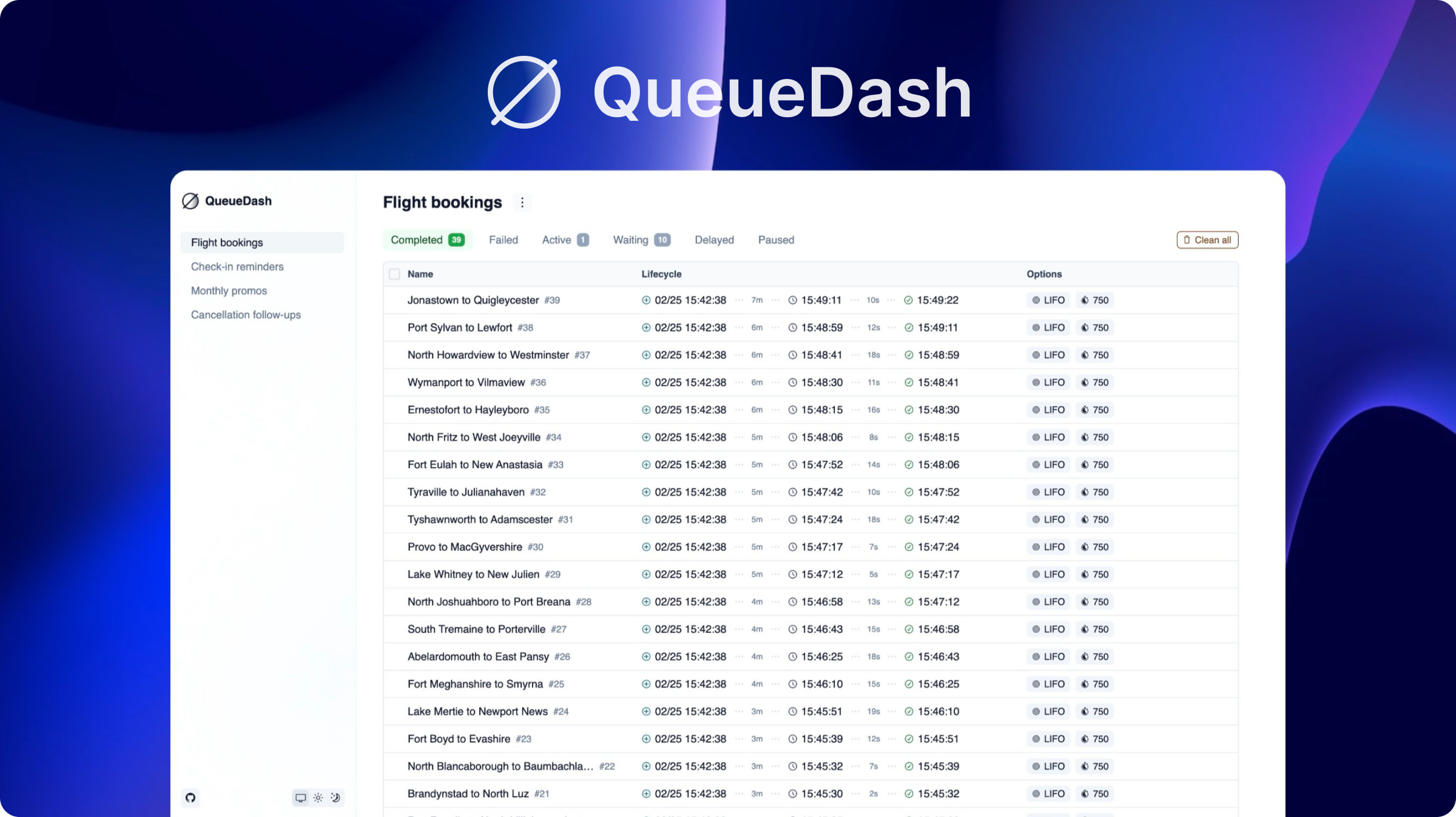
A stunning, sleek dashboard for Bull, BullMQ, Bee-Queue, and GroupMQ.


pnpm install @queuedash/api
import express from "express";
import Bull from "bull";
import { createQueueDashExpressMiddleware } from "@queuedash/api";

const app = express();

const reportQueue = new Bull("report-queue");

app.use(
  "/queuedash",
  createQueueDashExpressMiddleware({
    ctx: {
      queues: [
        {
          queue: reportQueue,
          displayName: "Reports",
          type: "bull" as const,
        },
      ],
    },
  })
);

app.listen(3000, () => {
  console.log("Listening on port 3000");
  console.log("Visit http://localhost:3000/queuedash");
});
pnpm install @queuedash/api @queuedash/ui
// app/admin/queuedash/[[...slug]]/page.tsx
"use client";

import { QueueDashApp } from "@queuedash/ui";
import "@queuedash/ui/dist/styles.css";

function getBaseUrl() {
  if (process.env.VERCEL_URL) {
    return `https://${process.env.VERCEL_URL}/api/queuedash`;
  }

  return `http://localhost:${process.env.PORT ?? 3000}/api/queuedash`;
}

export default function QueueDashPages() {
  return <QueueDashApp apiUrl={getBaseUrl()} basename="/admin/queuedash" />;
}
// app/api/queuedash/[...trpc]/route.ts
import { fetchRequestHandler } from "@trpc/server/adapters/fetch";
import { appRouter } from "@queuedash/api";

const reportQueue = new Bull("report-queue");

function handler(req: Request) {
  return fetchRequestHandler({
    endpoint: "/api/queuedash",
    req,
    router: appRouter,
    allowBatching: true,
    createContext: () => ({
    queues: [
      {
        queue: reportQueue,
        displayName: "Reports",
        type: "bull" as const,
      },
    ],
  });
}

export { handler as GET, handler as POST };
// pages/admin/queuedash/[[...slug]].tsx
import { QueueDashApp } from "@queuedash/ui";

function getBaseUrl() {
  if (process.env.VERCEL_URL) {
    return `https://${process.env.VERCEL_URL}/api/queuedash`;
  }

  return `http://localhost:${process.env.PORT ?? 3000}/api/queuedash`;
}

const QueueDashPages = () => {
  return <QueueDashApp apiUrl={getBaseUrl()} basename="/admin/queuedash" />;
};

export default QueueDashPages;
// pages/api/queuedash/[trpc].ts
import * as trpcNext from "@trpc/server/adapters/next";
import { appRouter } from "@queuedash/api";

const reportQueue = new Bull("report-queue");

export default trpcNext.createNextApiHandler({
  router: appRouter,
  batching: {
    enabled: true,
  },
  createContext: () => ({
    queues: [
      {
        queue: reportQueue,
        displayName: "Reports",
        type: "bull" as const,
      },
    ],
  }),
});
The fastest way to get started is using the official Docker image:
docker run -p 3000:3000 \
  -e QUEUES_CONFIG_JSON='{"queues":[{"name":"my-queue","displayName":"My Queue","type":"bullmq","connectionUrl":"redis://localhost:6379"}]}' \
  ghcr.io/alexbudure/queuedash:latest
Then visit http://localhost:3000
QUEUES_CONFIG_JSON - Required. JSON string containing queue configurationExample configuration:
{
  "queues": [
    {
      "name": "cancellation-follow-ups",
      "displayName": "Cancellation follow-ups",
      "type": "bullmq",
      "connectionUrl": "redis://localhost:6379"
    },
    {
      "name": "email-queue",
      "displayName": "Email Queue",
      "type": "bull",
      "connectionUrl": "redis://localhost:6379"
    }
  ]
}
Supported queue types: bull, bullmq, bee, groupmq
See the ./examples folder for more.
createQueueDash<*>Middlewaretype QueueDashMiddlewareOptions = {
app: express.Application | FastifyInstance; // Express or Fastify app
baseUrl: string; // Base path for the API and UI
ctx: QueueDashContext; // Context for the UI
};
type QueueDashContext = {
queues: QueueDashQueue[]; // Array of queues to display
};
type QueueDashQueue = {
queue: Bull.Queue | BullMQ.Queue | BeeQueue; // Queue instance
displayName: string; // Display name for the queue
type: "bull" | "bullmq" | "bee" | "groupmq"; // Queue type
};
<QueueDashApp />type QueueDashAppProps = {
apiUrl: string; // URL to the API endpoint
basename: string; // Base path for the app
};
If you need more capabilities, check out queuedash.com:
QueueDash was inspired by some great open source projects. Here's a few of them:
FAQs
A stunning, sleek dashboard for Bull, BullMQ, and Bee-Queue
The npm package @queuedash/api receives a total of 7,736 weekly downloads. As such, @queuedash/api popularity was classified as popular.
We found that @queuedash/api demonstrated a healthy version release cadence and project activity because the last version was released less than a year ago. It has 1 open source maintainer collaborating on the project.
Did you know?

Socket for GitHub automatically highlights issues in each pull request and monitors the health of all your open source dependencies. Discover the contents of your packages and block harmful activity before you install or update your dependencies.
Security News
Deno 2.6 introduces deno audit with a new --socket flag that plugs directly into Socket to bring supply chain security checks into the Deno CLI.

Security News
New DoS and source code exposure bugs in React Server Components and Next.js: what’s affected and how to update safely.

Security News
Socket CEO Feross Aboukhadijeh joins Software Engineering Daily to discuss modern software supply chain attacks and rising AI-driven security risks.