Userfront Vue
The Userfront Vue binding allows you to quickly add pre-built signup, login, and password reset forms to your Vue.js application.
This binding includes all methods from the Userfront core JS library.
The Userfront Vue library supports both Vue 2 and Vue 3.
Setup
Working example
You can find installation instructions for your account in the Toolkit section of the Userfront dashboard.
1. Install the @userfront/vue package with npm (or yarn)
npm install @userfront/vue --save
2. Initialize Userfront and any tools you want to use, then render them
<template>
  <div>
    <signup-form tool-id="nkmbbm" />
  </div>
</template>

<script>
  import Userfront, { SignupForm } from "@userfront/vue";

  Userfront.init("demo1234");

  export default {
    components: {
      SignupForm,
    },
  };
</script>
Usage as a Vue plugin:
Userfront may also be installed as a Vue plugin.
This initializes Userfront when your app launches, and makes all of the tools available anywhere any your app.
Vue 3:
import { createApp } from "vue";
import App from "./App.vue";
import Userfront from "@userfront/vue";
const app = createApp(App);
app.use(Userfront, { tenantId: "demo1234" });
app.mount("#app");
Vue 2:
import Vue from "vue";
import App from "./App.vue";
import Userfront from "@userfront/vue";
Vue.use(Userfront, { tenantId: "demo1234" });
new Vue({ render: (h) => h(App) })
.$mount("#app");
When the plugin is initialized, it automatically calls Userfront.init() with your tenant ID.
This registers the forms globally on your Vue instance, so you can use them in any component:
<template>
<div>
<SignupForm tool-id="nkmbbm" />
</div>
</template>
<script>
</script>
When using as a plugin, Core JS methods are used as in the following section.
This example uses the following:
- Account ID:
demo1234
- Tool ID:
nkmbbm (signup form)
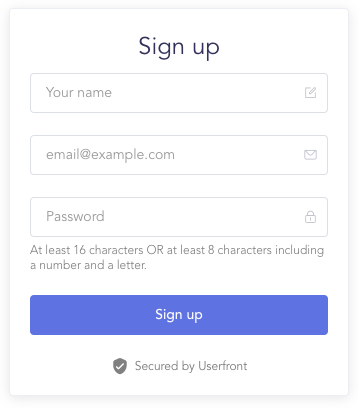
This will add a working signup form to your page:
Core JS methods
When you add the Userfront Vue binding to your application, you can use any of the methods from the Userfront core JS library too.
Docs for the core JS methods are here: https://userfront.com/docs/js.html
Note that you do not need to import @userfront/core separately when using the Vue binding.
Examples:
import Userfront from "@userfront/vue";
Userfront.init("demo1234");
Userfront.sendLoginLink("jane@example.com");
Userfront.tokens.accessToken;
Userfront.logout();
Userfront.user;





