Cluster Explorer Plugin
The Cluster plugin has two approaches:
⚠️ It is important to note that the Cluster is a Kind customized by the VeeCode Platform and therefore it requires the installation of the veecode-platform-common plugin in order to work.
To install the veecode-platform-common plugin click here.
Okay, given that you already have a properly configured environment, let's start our installation.
Get Started
cd packages/app
yarn add @veecode-platform/plugin-cluster-explorer
Now, in the file packages > app > src > App.tsx:
...
+ import { clusterExplorerPage } from '@veecode-platform/plugin-cluster-explorer';

...

const routes = (
<FlatRoutes>
+ <Route path="/cluster-explorer" element={<clusterExplorerPage/>}/>
</FlatRoutes>
)
...
To add a menu to your sidebar, just follow these steps:
packages > app > src > components > Root > Root.tsx
In the example, we've added an external icon, using the lib react-icons.
cd packages/app
yarn add react-icons
...
+ import { Imcluster } from "react-icons/im";

...

export const Root = ({ children }: PropsWithChildren<{}>) => (
  <SidebarPage>
    <Sidebar>
      <SidebarLogo />
      <SidebarGroup label="Search" icon={<SearchIcon />} to="/search">
        <SidebarSearchModal />
      </SidebarGroup>
      <SidebarDivider />
      <SidebarGroup label="Menu" icon={<MenuIcon />}>
        <SidebarItem icon={HomeIcon} to="catalog" text="Home" />
        <SidebarItem icon={ExtensionIcon} to="api-docs" text="APIs" />
        <SidebarItem icon={LibraryBooks} to="docs" text="Docs" />
+        <SidebarItem icon={Imcluster} to="cluster-explorer" text="clusters" />
        <SidebarItem icon={CreateComponentIcon} to="create" text="Create..." />
        <SidebarDivider />
        <SidebarScrollWrapper>
          <SidebarItem icon={MapIcon} to="tech-radar" text="Tech Radar" />
        </SidebarScrollWrapper>
      </SidebarGroup>
      <SidebarSpace />
      <SidebarDivider />
      <SidebarGroup
        label="Settings"
        icon={<UserSettingsSignInAvatar />}
        to="/settings"
      >
        <SidebarSettings />
      </SidebarGroup>
    </Sidebar>
    {children}
  </SidebarPage>
);
Or you can create a "Resources" menu and add "clusters" as a submenu:
...

+ import BusinessIcon from '@material-ui/icons/Business';
+ import { Imcluster } from "react-icons/im";

...

export const Root = ({ children }: PropsWithChildren<{}>) => (
  <SidebarPage>
    <Sidebar>
      <SidebarLogo />
      <SidebarGroup label="Search" icon={<SearchIcon />} to="/search">
        <SidebarSearchModal />
      </SidebarGroup>
      <SidebarDivider />
      <SidebarGroup label="Menu" icon={<MenuIcon />}>
        <SidebarItem icon={HomeIcon} to="catalog" text="Home" />
        <SidebarItem icon={ExtensionIcon} to="api-docs" text="APIs" />
        <SidebarItem icon={LibraryBooks} to="docs" text="Docs" />
+          <SidebarItem icon={BusinessIcon} text="Resources">
+            <SidebarSubmenu title="">
+              <SidebarDivider />
+              <SidebarSubmenuItem
+                title="clusters"
+                to="cluster-explorer"
+                icon={Imcluster}
+              />
+
+            </SidebarSubmenu>
+          </SidebarItem>
        <SidebarItem icon={CreateComponentIcon} to="create" text="Create..." />
        <SidebarDivider />
        <SidebarScrollWrapper>
          <SidebarItem icon={MapIcon} to="tech-radar" text="Tech Radar" />
        </SidebarScrollWrapper>
      </SidebarGroup>
      <SidebarSpace />
      <SidebarDivider />
      <SidebarGroup
        label="Settings"
        icon={<UserSettingsSignInAvatar />}
        to="/settings"
      >
        <SidebarSettings />
      </SidebarGroup>
    </Sidebar>
    {children}
  </SidebarPage>
);
And that's the view:
By clicking on the icon in the side menu:


1- Setting up the kubernetes config in the app-config.yaml:
kubernetes:
  serviceLocatorMethod:
    type: multiTenant
  clusterLocatorMethods:
    - type: "config"
      clusters:
        - url: ${KUBERNETES_URL}
          name: ${NAME}
          authProvider: serviceAccount
          skipTLSVerify: false
          skipMetricsLookup: false
          serviceAccountToken: ${KUBERNETES_SERVICE_ACCOUNT_TOKEN}
          caData: ${KUBERNETES_CERTIFICATE_DATA}
How to add annotation cluster/instructions:
The cluster/instruction annotation is based on a block of text with instructions for raising the cluster, according to its type.
It needs to be filled in the cluster's catalog-info.yaml as shown in the example:
apiVersion: veecode.backstage.io/v1alpha1
kind: Cluster
metadata:
  name: "ec2-cluster-2"
  annotations:
    github.com/project-slug: xxxxxxxxxxxxxxxx
    backstage.io/techdocs-ref: dir:.
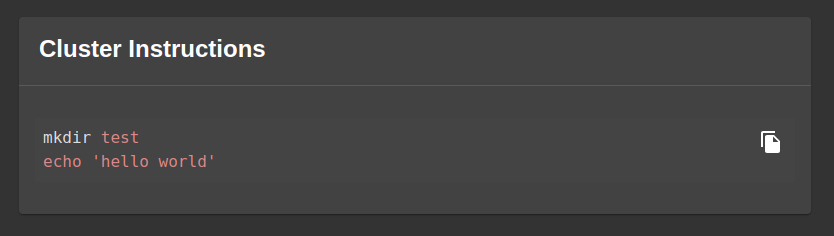
+    cluster/instructions: |
+      mkdir test
+      echo 'hello world'
spec:
  type: ec2
  lifecycle: development
  owner: "admin"
This way, we'll have a card on the Cluster Overview Page with instructions on how to set up the cluster correctly.
How to reuse the resources of the Cluster entity
In the context we envisioned for the project, the Cluster is used to reuse information that will be useful when creating new entities for our catalog.
We have developed customizable components to provide the scaffolder with the possibility of parsing information from the environment key of our Kind.
This is our ResourcePicker, ➡️ here's how to install it.
With it we can approach the reuse of this information when creating entities via a template.
Example:
    - title: Cluster Settings
      properties:
        clusterResource:
          title: Select the Cluster from our catalog
          type: object
          ui:field: ResourcePicker
          ui:options:
            catalogFilter:
              kind: [Cluster]
In this case, we will list all our entities in the catalog that have the Cluster kind, and under the hood we will scan the metadata.enviromnet key of the chosen entity, and thus parse the information as values to serve the skeleton of our template.
example:
...
  steps:
    - id: template
      name: Fetch Skeleton + Template
      action: fetch:template
      input:
        url: ./skeleton
        values:
          dns: ${{ parameters.clusterResource.type }}

...
ℹ️ Remember to validate that the selected entity has this property, otherwise the values will be empty.





