React Velo
Add the ability to use native React APIs (components and hooks) to Velo, by creating a React structure which corresponds to dynamic elements in the editor.
React Velo supports React native APIs (ref supports only ref callback syntax and has a slightly different API),
Installation
This module is aimed to be used in Wix Velo environment.
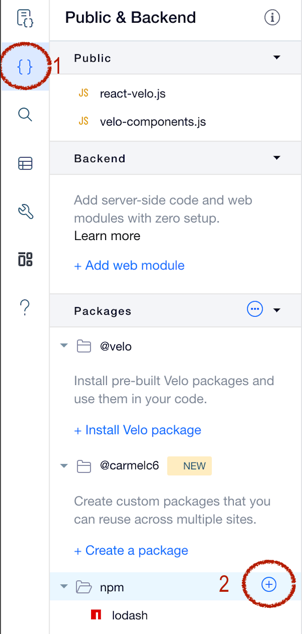
- Open a Wix Site
- Enable Dev Mode
- Add
@wix/react-velo npm module
- Add
react npm module
Usage Example
Given a site with the following elements (and their Velo IDs),
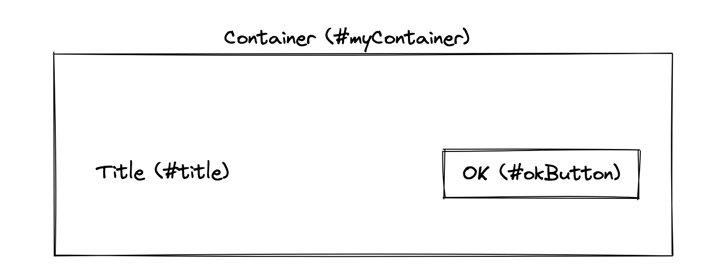
A Velo User can control these elements the behavior, style and content using the following React Velo code
import React, { useState } from 'react';
import { render, W } from '@wix/react-velo';

function App() {
  const [background, setBackground] = useState('green');
  return (
    <W.myContainer style={{backgroundColor: background}}>
      <W.title text={'Click to change background'} />
      <W.okButton onClick={() => setBackground('red')} />
    </W.myContainer>
  );
}

$w.onReady(() => render(App, $w, React));
API
Module Exports
| render | Method | The method which initiates the link between the editor elements and the react component which represents their behavior.
It should be invoked in $w.onReady method |
| W | Object | An object representing the Wix Editor/ Editor X elements such that W.<id> is a React representation of the Editor element in this page. The returned component's props are identical to the Velo representation of the Element returned by using $w(<id>).
For exact props and usages, see Wix Editor Elements ($w) API |
Render method
render(Component, $w, React, callback?)
| Component | Method | The React component root |
| $w | $w | The Wix query element provided in a page API |
| React | React Instance | The React instance used in this page, in order to assure that react-velo is using the same React version as the hosting page |
| callback | () => void | (Optional) A callback to be passed to the react-velo react-reconsiler implementation, see React Reconsiler documentation for more details |
Repeaters
A Repeater is a special Wix Editor Element which is responsible to generate a list of elements from either a data-set (dynamic) or an array set by Velo code).
In order to provide a React component API, React Velo creates a specialized react component which allows controlling the rendering of each item using a renderItem prop, as seen in the following example:
Given A following page with a repeater
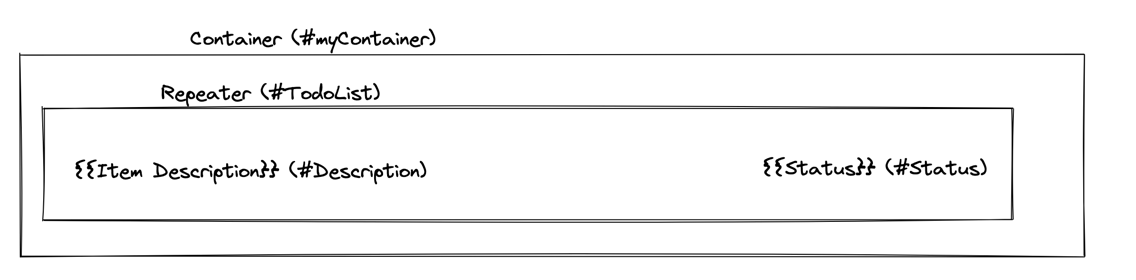
Its React implementation can be controlled using the following code
import React, { useState } from 'react';
import { render, W } from '@wix/react-velo';
function App() {
const [todos, setTodos] = useState([{
_id: '1',
description: 'Item 1',
status: 'In Progress',
}, {
_id: '2',
description: 'Item 2',
status: 'Done',
}]);
return <W.TodoList data={todos} renderItem={({ description, status }) =>
(
<>
<W.Description text={description}/>
<W.Status text={status}/>
</>
)
}/>;
}
$w.onReady(() => render(App, $w, React));
Repeater Component API
| data | Array | The data to be used by the repeater, similar to $w('#TodoList').data |
| renderItem | (itemData) => void | The representation of each item, similarly to $w('#TodoList').onItemReady |
Native Elements access
A velo user can access "native" velo components (i.e. the object you get from $w('#someid')) using react's ref mechanism.
For example, if you want to use some Text's scrollTo() method, we can do something like that:
let textRef;
const setTextRef = (element) => {
textRef = element;
};
<W.MyButton onClick={() => {
if (textRef) {
console.log('Scrolling...');
textRef.scrollTo();
}
}} />
<W.text3 text={`Selected: ${selectedColorName}`} ref={setTextRef} />
Animation
Animation can be achivied using wix-animation as usual, simply by getting the element's native reference and creating a proper animation timeline.
import React from 'react';
import { W, render } from '@wix/react-velo';
import wixAnimations from 'wix-animations';
const timeline = wixAnimations.timeline();
function App() {
const effect = {scale: 2, duration: 200, "rotate": 360};
let refSet = false;
const setRef = (element) => {
if (!refSet && element) {
refSet = true;
timeline.add(element, effect);
}
};
return (
<W.MyButton
ref={setRef}
onMouseIn={() => timeline.play()}
onMouseOut={() => timeline.reverse()}
/>
);
}
$w.onReady(() => render(App, $w, React));
Sometimes a velo user would like to compose multiple elements to a single timeline animation,
Here is an example of how it can be achieved:
function createAnimation(animationOptionsArray) {
const timeline = wixAnimations.timeline();
let refsSetCounter = 0;
const refsArray = animationOptionsArray.map(() => null);
const applyAnimationSettings = () => {
if (refsSetCounter < animationOptionsArray.length) {
return;
}
animationOptionsArray.forEach((animationOptions, idx) => {
timeline.add(refsArray[idx], animationOptions);
});
};
return {
timeline,
setRefs: animationOptionsArray.map((_, idx) => (el) => {
if (!refsArray[idx] && el) {
refsSetCounter++;
refsArray[idx] = el;
applyAnimationSettings();
}
})
};
}
const animation = createAnimation([
{scale: 0.8, duration: 200},
{opacity: 1, duration: 100},
{opacity: 0, duration: 10},
]);
const onMouseIn = () => animation.timeline.play();
const onMouseOut = () => animation.timeline.reverse();
return (
<W.container1 onClick={onClick}>
<W.mainColor
ref={animation.setRefs[0]}
style={{backgroundColor: props.color}}
onMouseIn={onMouseIn}
onMouseOut={onMouseOut}>
</W.mainColor>
<W.blackBorder ref={animation.setRefs[1]} />
<W.emptyBorder ref={animation.setRefs[2]} />
</W.container1>
);
Widget interaction (Blocks)
You can use $widget.props and $widget.onPropsChanged(...) to get props for your widget, like so:
function App() {
const [items, setItems] = useState($widget.props.items);
useEffect(() => {
$widget.onPropsChanged((_, newProps) => {
setItems(newProps.items);
});
}, []);
}
or create a HoC that will abstract that away, for example like that:
import React from 'react';
import { render } from '@wix/react-velo';
const withWidgetProps = (ReactInstance, Component) => {
const [props, setProps] = ReactInstance.useState($widget.props);
ReactInstance.useEffect(
() => $widget.onPropsChanged((_, newProps) => setProps({ ...newProps })),
[]
);
return <Component {...props} />;
};
$w.onReady(() => render(withWidgetProps(React, App), $w, React));





