Cross-platform state without boundaries: Zustand-inspired simplicity for Electron
Why Zubridge?
tldr: I want to seamlessly interact with my main process state using Zustand-inspired hooks.
Zustand is a great state management library that, like Redux, recommends using a single store for your application. However, in Electron apps, this approach faces challenges when state needs to be accessed across process boundaries.
@zubridge/electron solves this by enabling a single store workflow, abstracting away the IPC management and state synchronization between processes.
How It Works
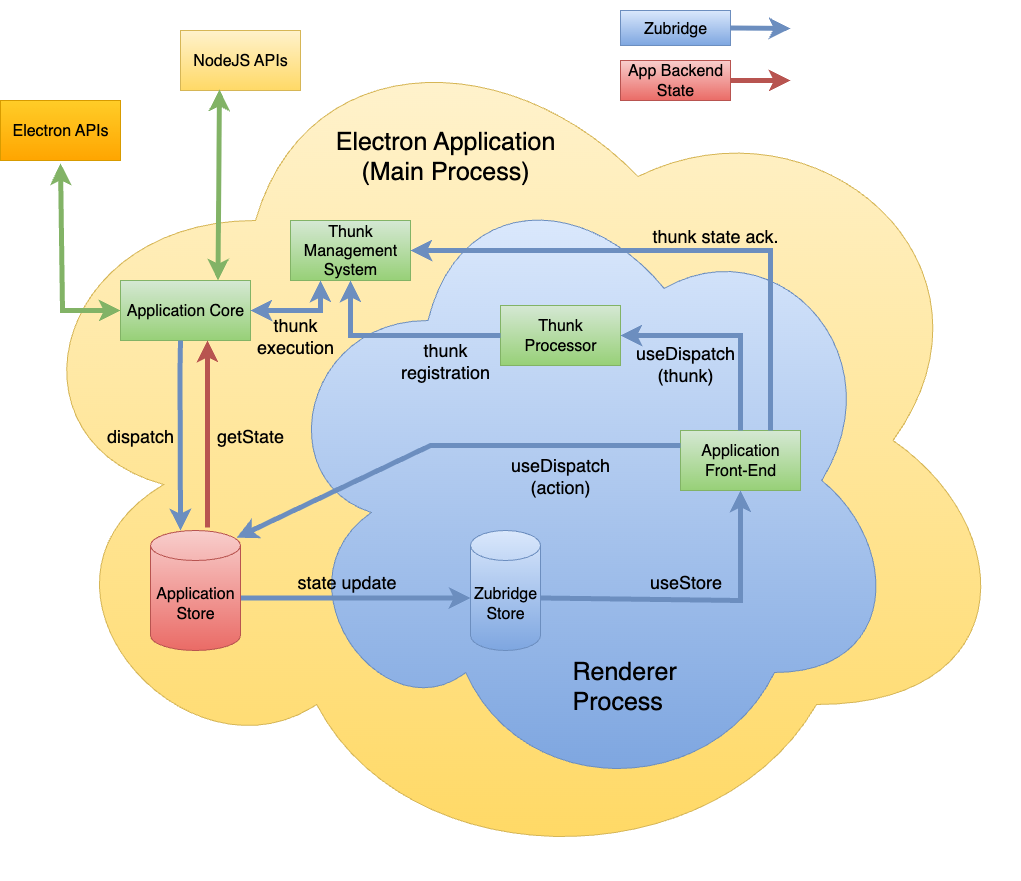
Zubridge creates a bridge between your main process state and your renderer processes. The main process state acts as the single source of truth, while renderer processes receive synchronized copies of the state through a Zustand-like interface.
Actions from renderer processes are sent through IPC to the main process, which updates the central state. These updates are then automatically broadcast to all connected renderer processes, ensuring consistent state throughout your application.
Features
Zustand-like API for state management across main and renderer processes
Frontend flexibility - works with React, other frontend frameworks, or vanilla JavaScript
Choice of state management solutions:
Zustand adapter with support for store handlers, separate handlers, and Redux-style reducers
Redux adapter for Redux/Redux Toolkit integration
Generic bridge for creating custom state management implementations
Type-safe state management between processes
Enhanced TypeScript integration with typed action objects for auto-completion and type-checking
Automatic state synchronization across multiple windows
Zustand Immer Example - Zustand with Immer middleware for immutable updates using createZustandBridge
Special Configuration Examples
Context Isolation Disabled - Example showing Zubridge usage with contextIsolation: false (legacy apps only, not recommended for new projects)
Debugging
Zubridge includes a built-in debugging utility that allows you to control logging across different parts of the package. This is separate from the middleware logging which focuses on IPC traffic.
Enabling Debug Mode
Zubridge uses the popular debug package for debugging. You can enable it in several ways:
Using the DEBUG environment variable:
# Enable all Zubridge debugging
DEBUG=zubridge:* electron .

# Enable specific debug areas only
DEBUG=zubridge:ipc,zubridge:core electron .
Using the ZUBRIDGE_DEBUG environment variable:
# Enable all debugging
ZUBRIDGE_DEBUG=true electron .
Programmatically:
import { debug } from'@zubridge/core';
// Enable all debugging
debug.enable();
// Enable debugging for specific areas
debug.enable(['ipc', 'core']);
// Disable debugging
debug.disable();
Debug Areas
The following debug namespaces are available:
zubridge:core: Core bridge functionality
zubridge:ipc: IPC communication between processes
zubridge:store: Store management
zubridge:adapters: Zustand and Redux adapters
zubridge:windows: Window management
zubridge:serialization: State serialization/deserialization
Browser Integration
For debugging in the renderer process, you can use the browser's localStorage:
// In the DevTools consolelocalStorage.debug = 'zubridge:*'; // Enable all debugginglocalStorage.debug = ''; // Disable debugging
A streamlined state management library for Electron applications using Zustand.
We found that @zubridge/electron demonstrated a healthy version release cadence and project activity because the last version was released less than a year ago.It has 1 open source maintainer collaborating on the project.
Package last updated on 19 Oct 2025
Did you know?
Socket for GitHub automatically highlights issues in each pull request and monitors the health of all your open source dependencies. Discover the contents of your packages and block harmful activity before you install or update your dependencies.
Socket Threat Research maps a rare inside look at OtterCookie’s npm-Vercel-GitHub chain, adding 197 malicious packages and evidence of North Korean operators.