

Tiny terminal spinner
Forked from yocto-spinner
Features
- Works with Bare and Pear
- Tiny and fast
- Customizable text and color options
- Customizable spinner animations
- Only one tiny dependency
- Supports both Unicode and non-Unicode environments
- Gracefully handles process signals (e.g.,
SIGINT, SIGTERM)
- Can display different status symbols (info, success, warning, error)
- Works well in CI environments
Install
npm install bare-spinner
Usage
import bareSpinner from 'bare-spinner';

const spinner = bareSpinner({text: 'Loading…'}).start();

setTimeout(() => {
	spinner.success('Success!');
}, 2000);
API
bareSpinner(options?)
Creates a new spinner instance.
options
Type: object
text
Type: string
Default: ''
The text to display next to the spinner.
spinner
Type: object
Default: 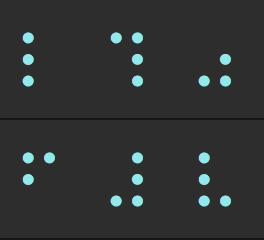
Customize the spinner animation with a custom set of frames and interval.
{
	frames: ['-', '\\', '|', '/'],
	interval: 100,
}
Pass in any spinner from cli-spinners.
color
Type: string
Default: 'cyan'
Values: 'black' | 'red' | 'green' | 'yellow' | 'blue' | 'magenta' | 'cyan' | 'white' | 'gray'
The color of the spinner.
stream
Type: stream.Writable
Default: process.stderr
The stream to which the spinner is written.
Instance methods
.start(text?)
Starts the spinner.
Returns the instance.
Optionally, updates the text:
spinner.start('Loading…');
.stop(finalText?)
Stops the spinner.
Returns the instance.
Optionally displays a final message.
spinner.stop('Stopped.');
.success(text?)
Stops the spinner and displays a success symbol with the message.
Returns the instance.
spinner.success('Success!');
.error(text?)
Stops the spinner and displays an error symbol with the message.
Returns the instance.
spinner.error('Error!');
.warning(text?)
Stops the spinner and displays a warning symbol with the message.
Returns the instance.
spinner.warning('Warning!');
.clear()
Clears the spinner.
Returns the instance.
.info(text?)
Stops the spinner and displays an info symbol with the message.
Returns the instance.
spinner.info('Info.');
.text get/set
Change the text displayed next to the spinner.
spinner.text = 'New text';
.color get/set
Change the spinner color.
.isSpinning get
Returns whether the spinner is currently spinning.
FAQ
How do I change the color of the text?
Use yoctocolors:
import bareSpinner from 'bare-spinner';
import {red} from 'yoctocolors';

const spinner = bareSpinner({text: `Loading ${red('unicorns')}`}).start();
Why does the spinner freeze?
JavaScript is single-threaded, so any synchronous operations will block the spinner's animation. To avoid this, prefer using asynchronous operations.
Related
- ora - Comprehensive terminal spinner
- yoctocolors - Tiny terminal coloring
- nano-spawn - Tiny process execution for humans





