





Beer CSS
Build material design interfaces in record time...
...without stress for devs 🍺💛
Cheers, www.beercss.com
Beer CSS is an MIT-licensed open source project with its ongoing development made possible entirely by the support of these awesome sponsors and backers. If you'd like to join them, please consider sponsoring Beer CSS's development.
Open Collective


Github Sponsors


Why?
- 🥇 The first CSS framework based on Material Design 3
- 👉 Latest "M3 Expressive" already.
- ⬇️ 10x smaller than others CSS frameworks based on Material Design.
- 🧙♂️ Translates Material Design to HTML semantic standard.
- 🤓 Ready to use with any JS framework.
- 🎯 Highly focused on DX.
- 🚫 No build steps, configurations or dependencies.
- ✨ Build modern interfaces without any custom CSS.
- ✅ Compliance with web standards.
- 💯 Google Lighthouse friendly.
A lightweight beer
Let's be honest, in the ever-evolving world of web development, we're all looking for that sweet spot: powerful functionality without the bloat. We want speed, efficiency, and something that doesn't feel like lugging around a digital elephant. And if you're looking at the chart below, you're probably thinking, "Wow, XYZ is huge!". You're not wrong. But look all the way to the top. See that? That's Beer CSS.

The principles
This project was guided by the "Germany Beer Purity Law" or "Reinheitsgebot" created in 1516. This law states that beer should only be brewed with the following ingredients: water, barley malt and hops. Only 3 ingredients. Exciting, right? So we thinking about It and our 3 ingredients are: Settings, Elements and Helpers. This sounds weird at first time, because It's not BEM, OOCSS, SMACSS, ITCSS, "Utility first" or any other approach. Our approach doesn't avoid some bad practices, but is lightweight, tasty and pure like a beer. Just try it and feel it! 😁
| SETTINGS | // The settings affects all document
|---------------|----|
| | |
| ELEMENTS | | // The elements are the components, widgets or tags
| | |
|---------------| |
| | |
| | |
| HELPERS |----| // The common helpers makes the elements more scalable and customizable
| |
| |
|---------------|
Get started
DEFAULT VERSION
<link href="https://cdn.jsdelivr.net/npm/beercss@4.0.20/dist/cdn/beer.min.css" rel="stylesheet" />
<script type="module" src="https://cdn.jsdelivr.net/npm/beercss@4.0.20/dist/cdn/beer.min.js"></script>
<script type="module" src="https://cdn.jsdelivr.net/npm/material-dynamic-colors@1.1.4/dist/cdn/material-dynamic-colors.min.js"></script>
npm i beercss
npm i material-dynamic-colors
import "beercss";
import "material-dynamic-colors";
SCOPED VERSION
Applied on child elements of <* class="beer">...</*>.
<link href="https://cdn.jsdelivr.net/npm/beercss@4.0.20/dist/cdn/beer.scoped.min.css" rel="stylesheet" />
<script type="module" src="https://cdn.jsdelivr.net/npm/beercss@4.0.20/dist/cdn/beer.min.js"></script>
<script type="module" src="https://cdn.jsdelivr.net/npm/material-dynamic-colors@1.1.4/dist/cdn/material-dynamic-colors.min.js"></script>
npm i beercss
npm i material-dynamic-colors
import "beercss/scoped";
import "material-dynamic-colors";
CUSTOM ELEMENT VERSION
Applied on child elements of <beer-css>...</beer-css>.
<script type="module" src="https://cdn.jsdelivr.net/npm/beercss@4.0.20/dist/cdn/beer.custom-element.min.js"></script>
<script type="module" src="https://cdn.jsdelivr.net/npm/material-dynamic-colors@1.1.4/dist/cdn/material-dynamic-colors.min.js"></script>
npm i beercss
npm i material-dynamic-colors
import "beercss/custom-element";
import "material-dynamic-colors";
LOCAL CDN VERSION
Download all files from CDN https://cdn.jsdelivr.net/npm/beercss@4.0.20/dist/cdn/ and https://cdn.jsdelivr.net/npm/material-dynamic-colors@1.1.4/dist/cdn/. Now put the files inside a new folder in your project (like /beercss for example):
<link href="/beercss/beer.min.css" rel="stylesheet" />
<script type="module" src="/beercss/beer.min.js"></script>
<script type="module" src="/beercss/material-dynamic-colors.min.js"></script>
HTML
You can use this html to setup your project. See on Codepen. More about in Main layout.
<!DOCTYPE html>
<html lang="en">
  <head>
    <meta charset="UTF-8">
    <meta name="viewport" content="width=device-width, initial-scale=1">
    <meta http-equiv="X-UA-Compatible" content="ie=edge">
    <meta name="google" content="notranslate">
    <title>Hello world</title>
    <link href="https://cdn.jsdelivr.net/npm/beercss@4.0.20/dist/cdn/beer.min.css" rel="stylesheet">
    <script type="module" src="https://cdn.jsdelivr.net/npm/beercss@4.0.20/dist/cdn/beer.min.js"></script>
    <script type="module" src="https://cdn.jsdelivr.net/npm/material-dynamic-colors@1.1.4/dist/cdn/material-dynamic-colors.min.js"></script>
  </head>
  <body class="dark">
    <nav class="left max l">
      <header>
        <nav>
          <img alt="logo" src="https://www.beercss.com/favicon.png" class="circle extra">
          <h6>Cheers</h6>
        </nav>
      </header>
      <a>
        <i>home</i>
        <span>Home</span>
      </a>
      <a>
        <i>search</i>
        <span>Search</span>
      </a>
      <a>
        <i>share</i>
        <span>Share</span>
      </a>
      <a>
        <i>more_vert</i>
        <span>More</span>
      </a>
      <div class="divider"></div>
      <a>
        <i>widgets</i>
        <span>Widgets</span>
      </a>
      <a>
        <i>chat</i>
        <span>Chat</span>
      </a>
      <a>
        <i>help</i>
        <span>Help</span>
      </a>
    </nav>

    <nav class="left m">
      <header>
        <img alt="logo" src="https://www.beercss.com/favicon.png" class="circle extra">
      </header>
      <a>
        <i>home</i>
        <span>Home</span>
      </a>
      <a>
        <i>search</i>
        <span>Search</span>
      </a>
      <a>
        <i>share</i>
        <span>Share</span>
      </a>
      <a>
        <i>more_vert</i>
        <span>More</span>
      </a>
    </nav>

    <nav class="bottom s">
      <a>
        <i>home</i>
      </a>
      <a>
        <i>search</i>
      </a>
      <a>
        <i>share</i>
      </a>
      <a>
        <i>more_vert</i>
      </a>
    </nav>

    <main class="responsive">
      <img alt="beer and woman" src="https://www.beercss.com/beer-and-woman.svg" class="responsive round medium-height">
      <h3>Welcome</h3>
      <h4>The beer is ready!</h4>
    </main>
  </body>
</html>
The beer.min.js and material-dynamic-colors.min.js are optional, but could be required for some use cases.
✅ DO:
// 1 setting to 1 document
<body class="dark|light">...</body>

// 1 element to N helpers
<element class="helper helper">...</element>
<div class="element helper helper">...</div>

// 1 main element per document
<...>
  <main></main>
</...>

// inline/block elements in block elements
<div>
  <div></div>
  <span></span>
</div>

// write css like this
.element.helper {...}
.element > .element {...}
.element > .helper {...}
🚫 DON'T:
// N elements to 1 tag
<div class="element element helper">...</div>
<element class="element helper">...</element>

// element with dependencies
<div class="element">
  <div class="element-header">...</div>
  <div class="element-content">...</div>
  <div class="element-footer">...</div>
</div>

// N main elements per document
<...>
  <main></main>
  <main></main>
</...>

// block elements in inline elements
<span>
  <div></div>
</span>

// write css like this
.element.element {...}
.element .element {...}
.element .helper {...}
Documentation
Complete documentation and examples available at:
Contributing guide
Hi! We are really excited that you are interested in contributing to Beer CSS! Before submitting your contribution, please make sure to take a moment and read through the following guidelines:
Beer CSS Contributing Guidelines
License
MIT
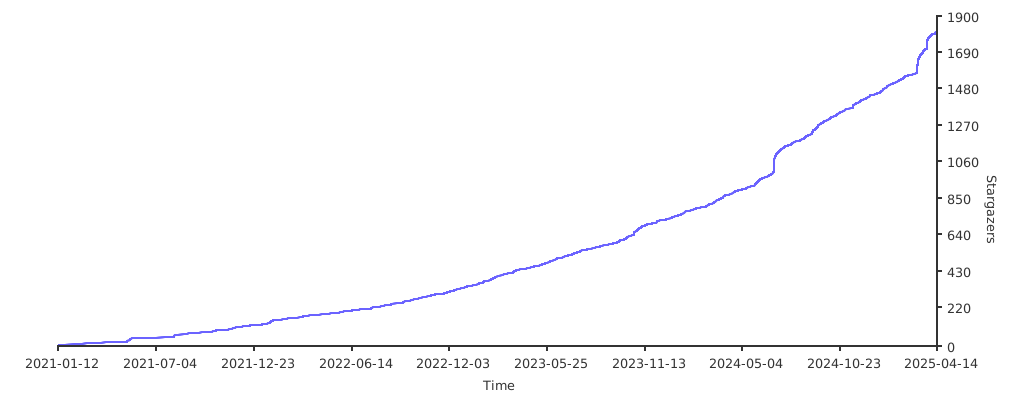
Cheers to all stargazers 🍻

Stargazers over time