bubble-chart-js
A high-performance, fully configurable Bubble Chart library for high-density analytics dashboards.
Zero dependencies. Framework-agnostic. Ships as ESM, CJS, and UMD.



Demo
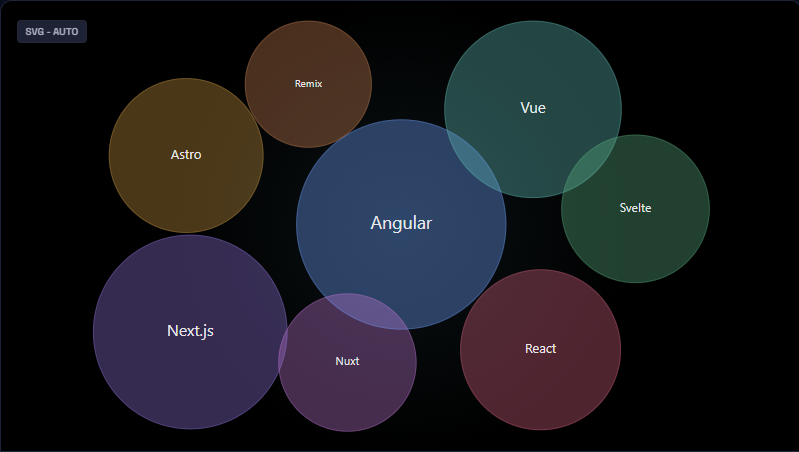
View the Live Interactive Demo →
Features
- Dual renderer — auto-selects Canvas (large datasets) or SVG (small datasets); override with
render.mode
- Physics & static layouts — force-directed physics simulation with fully tunable parameters, or instant static placement
- Glass & flat themes — built-in visual themes with GPU-accelerated bloom and glow effects
- Per-bubble customization — individual color, opacity, label, icon, and font overrides per data item
- Live updates — call
chart.update(newData) for smooth, reconciled transitions without re-initializing
- Pluggable layer hooks — inject custom draw calls into any render layer (
background, bubbles, text, overlay, …)
- Event system — subscribe to
bubble:click, bubble:hover, and more with a clean pub/sub API
- Angular-ready — ships full TypeScript types; integrates seamlessly into Angular, React, Vue, or vanilla JS
- Tiny footprint — zero runtime dependencies; tree-shakeable ESM build
Installation
npm install bubble-chart-js
CDN (no build step)
<script src="https://unpkg.com/bubble-chart-js/dist/bubbleChart.umd.js"></script>
Quick Start
Vanilla JavaScript / TypeScript
<div id="chart" style="width: 800px; height: 500px;"></div>
import { initializeChart } from "bubble-chart-js";
const chart = initializeChart({
canvasContainerId: "chart",
data: [
{ id: "chrome", label: "Chrome", value: 65, bubbleColor: "#4285F4" },
{ id: "safari", label: "Safari", value: 19, bubbleColor: "#34A853" },
{ id: "firefox", label: "Firefox", value: 10, bubbleColor: "#FF6D00" },
{ id: "edge", label: "Edge", value: 6, bubbleColor: "#0078D4" },
],
layout: { type: "physics" },
render: { mode: "auto", theme: "glass" },
});
chart.on("bubble:click", ({ item }) => console.log("Clicked:", item.label));
chart.update(newData);
chart.destroy();
Angular
import { Component, OnDestroy, AfterViewInit } from "@angular/core";
import { initializeChart, BubbleChart } from "bubble-chart-js";
@Component({
selector: "app-chart",
template: `<div id="bubble-chart" style="width:100%;height:500px"></div>`,
})
export class ChartComponent implements AfterViewInit, OnDestroy {
private chart!: BubbleChart;
ngAfterViewInit(): void {
this.chart = initializeChart({
canvasContainerId: "bubble-chart",
data: [
{ id: "revenue", label: "Revenue", value: 840, bubbleColor: "#6366f1" },
{ id: "churn", label: "Churn", value: 230, bubbleColor: "#f43f5e" },
{ id: "nps", label: "NPS", value: 510, bubbleColor: "#10b981" },
],
layout: { type: "physics" },
render: { theme: "glass" },
});
}
ngOnDestroy(): void {
this.chart.destroy();
}
}
Browser Script Tag (UMD)
<div id="chart" style="width:800px;height:500px"></div>
<script src="https://unpkg.com/bubble-chart-js/dist/bubbleChart.umd.js"></script>
<script>
  const chart = window.initializeChart({
    canvasContainerId: "chart",
    data: [
      { label: "Alpha", value: 120, bubbleColor: "#6366f1" },
      { label: "Beta", value: 80, bubbleColor: "#f43f5e" },
      { label: "Gamma", value: 55, bubbleColor: "#10b981" },
    ],
  });
</script>
API Reference
initializeChart(config)
Creates and renders the chart. Returns a BubbleChart instance.
import { initializeChart } from "bubble-chart-js";
const chart = initializeChart(config);
BubbleChart Instance Methods
update | (newData: DataItem[]) => void | Re-render with new data; animates transitions |
on | (event, handler) => UnsubscribeFn | Subscribe to chart events (bubble:click, bubble:hover) |
destroy | () => void | Stop animation, remove DOM nodes, clear all subscriptions |
addLayerHook | (hook) => string | Inject a custom draw call into a named render layer |
removeLayerHook | (id: string) => void | Remove a layer hook by ID |
simulation | Readonly<SimulationSnapshot> | Snapshot of the last physics simulation tick |
topN(data, n) Utility
Selects the top N items by value — useful for capping high-cardinality datasets before render.
import { initializeChart, topN } from "bubble-chart-js";

initializeChart({ canvasContainerId: "chart", data: topN(rawData, 25) });
Configuration Reference
DataItem
id | string | No | Stable key for reconciliation on update(). Auto-derived if omitted. |
label | string | Yes | Text displayed inside the bubble |
value | number | Yes | Determines bubble radius relative to the dataset |
bubbleColor | string | No | CSS color string for this specific bubble |
opacity | number | No | Fill opacity 0–1. Overrides global bubbleAppearance.opacity |
icon | string | No | Unicode codepoint or ligature string (e.g. "trending_up") |
iconFont | string | No | Font family for the icon, e.g. "Material Symbols Outlined" |
Configuration (top-level)
canvasContainerId | string | — | Required. ID of the host DOM element |
data | DataItem[] | — | Required. Array of bubble data |
colorPalette | string[] | built-in | Fallback color cycle for bubbles without an explicit bubbleColor |
minRadius | number | 20 | Minimum bubble radius in pixels |
canvasBackgroundColor | string | transparent | Canvas background fill color |
isResizeCanvasOnWindowSizeChange | boolean | true | Auto-resize chart on window resize |
theme | "flat" | "glass" | "flat" | Shorthand alias for render.theme |
layout
type | "static" | "physics" | "static" | Layout engine selection |
physics.seed | number | — | Seed for deterministic initial bubble placement |
physics.centerStrength | number | 0.012 | Strength of the centering force |
physics.collisionPad | number | 3 | Extra padding (px) added to each bubble's collision radius |
physics.velocityDecay | number | 0.82 | Velocity decay per tick (0–1) |
physics.alphaDecay | number | 0.0228 | Alpha decay rate per tick |
physics.maxVelocity | number | 8 | Maximum velocity magnitude per tick |
physics.updateBehavior | "restart" | "momentum" | "restart" | How update() affects a running simulation |
render
mode | "auto" | "svg" | "canvas" | "auto" | Renderer selection (auto picks Canvas for >25 items) |
theme | "flat" | "glass" | "flat" | Visual theme |
glassPerformanceHint | "safe" | "full" | "safe" | full = GPU feGaussianBlur bloom; safe = CSS drop-shadow |
glassOptions.glowIntensity | number | 0.35 | Glow intensity 0–1 (glass theme only) |
glassOptions.blurRadius | number | 12 | Outer halo blur radius in px (full mode only) |
interaction
hoverScale | number | 1.08 | Scale factor applied to the hovered bubble |
hoverEase | number | 0.10 | Lerp factor for hover animation (0–1) |
tooltipEnabled | boolean | true | Show tooltip on hover |
animation
entryDuration | number | 25 | Entry animation duration in frames |
transitionEasing | (t: number) => number | — | Custom easing function for position/radius tweens |
Tooltip (tooltipOptions)
Full CSS-style control over the hover tooltip. Accepts backgroundColor, fontColor, fontFamily, fontSize, padding, borderColor, boxShadow, zIndex, and more. Supply a formatter function for fully custom HTML content:
tooltipOptions: {
  backgroundColor: '#1e1e2e',
  fontColor: '#cdd6f4',
  formatter: (item) => `<strong>${item.label}</strong>: ${item.value.toLocaleString()}`,
},
Events
bubble:click | { item: DataItem, event: PointerEvent } | Fired when a bubble is clicked |
bubble:hover | { item: DataItem | null, event: PointerEvent } | Fired on hover enter / leave |
const unsub = chart.on("bubble:click", ({ item }) => {
console.log(`${item.label}: ${item.value}`);
});
unsub();
Layer Hooks
Inject custom Canvas 2D draw calls into any render layer for complete visual control:
chart.addLayerHook({
  layer: "overlay",
  draw: ({ ctx, bubbles }) => {
    bubbles.forEach((b) => {
      ctx.strokeStyle = "rgba(255,255,255,0.4)";
      ctx.lineWidth = 2;
      ctx.beginPath();
      ctx.arc(b.x, b.y, b.r + 4, 0, Math.PI * 2);
      ctx.stroke();
    });
  },
});
Available layers: background, shadows, bubbles, text, overlay, debug.
Contributing
Contributions, bug reports, and feature requests are welcome. Please open an issue or submit a pull request on GitHub.
License
MIT © Pragadeeshwaran Pasupathi





