New Research: Supply Chain Attack on Axios Pulls Malicious Dependency from npm.Details →
Socket
Book a DemoSign in
Socket

capacitor-play-games-services

Package Overview
Dependencies
Maintainers
2
Versions
7
Alerts
File Explorer

Advanced tools

Socket logo

Install Socket

Detect and block malicious and high-risk dependencies

Install

capacitor-play-games-services

Capacitor Play Games Services is a native Google Play Games Services implementation for Android.

latest
Source
npmnpm
Version
2.0.1
Version published
Maintainers
2
Created
Source

capacitor-play-games-services

Capacitor Play Games Services is a native Google Play Games Services implementation for Android.

  • To be able to use this plugin it is necessary to download it to the project with npm:
> npm i capacitor-play-games-services
  • Once downloaded you have to update the project to recognize the plugin:
> npx cap update && npx cap sync
  • Open Android Studio and register the plugin in your Android project.
    • Go to android > app > src > main > java > domain name of your project > MainActivity.java
    • Add the plugin to your MainActivity, example:
package com.xx.xx;

...

import gammafp.playgames.PlayGamesPlugin;

public class MainActivity extends BridgeActivity {

    @Override
    public void onCreate(Bundle savedInstanceState) {
        registerPlugin(PlayGamesPlugin.class);

        // Important, super.onCreate(...) should go down
        super.onCreate(savedInstanceState);
    }
}
  • Add games id to your project:

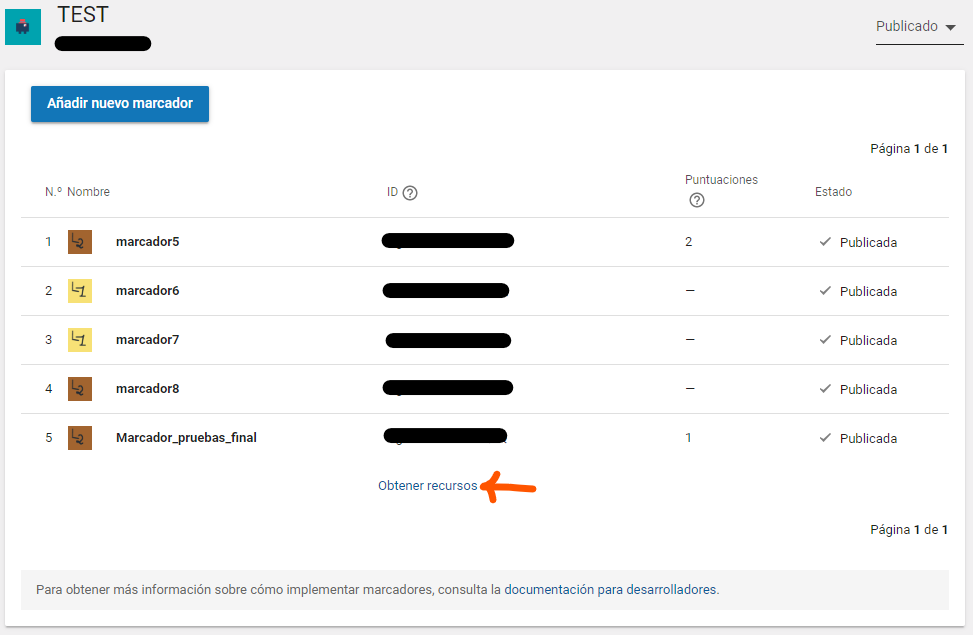
    • Go to your google play games services console (you should know this) and click on achievements or markers and below you will see the option to obtain resources:

    Recursos

    • When you get the resources get the id number and copy it. Recursos
    • In Android Studio go to plugin capacitor-play-games-services > res > values > string.xml and add the app_id. app_id

Congratulations, you already have your plugin added to your android project

TypeScript integration:

To integrate it into your javascript project, you must import the capacitor module and then get the plugin.

import { PlayGames } from 'capacitor-play-games-services';

Methods

Login - signin

Listen for a change event: (this is interesting to listen the first login event)

PlayGames.addListener("onSignInStatus", (res) => {
    setLoginData(JSON.stringify(res, null, 4));
})

Login

playGames.login().then((response) => {
    /* response return: 
        id: string;
        display_name: string;
        icon: string; // URI Does not work yet.
        title: string;
        message: string; // A messate that say what happen with the plugin correct / error (usded for tests) 
        isLogin: boolean; TRUE if is online FALSE if is offline
    */
});

Get connection status

PlayGames.status().then((response) => {
    /* response return:
        message: string; // A messate that say what happen with the plugin correct / error (usded for tests)  
        isLogin: boolean; TRUE if is online FALSE if is offline
    */
});

Logout

this method has been removed by google.

Leaderboard

Show all leaderboard

PlayGames.showAllLeaderboard();

Show one leaderboard by id

PlayGames.showLeaderboard({
    id: 'XXXXXXXX-XXXXXXXX' // id of your leaderboard
});

Add points to leaderboard

PlayGames.submitScore({
    id: 'XXXXXXXX-XXXXXXXX' // id of your leaderboard,
    score: 10 // int value only
});

Medals

Show all medals

PlayGames.showAchievements();

Unlock one medal

PlayGames.unlockAchievement({
    id: 'XXXXXXXX-XXXXXXXX' // id of your achievement
});

IMPORTANT: For testings you need sign your app.

Keywords

capacitor

FAQs

Package last updated on 04 Jul 2023

Did you know?

Socket

Socket for GitHub automatically highlights issues in each pull request and monitors the health of all your open source dependencies. Discover the contents of your packages and block harmful activity before you install or update your dependencies.

Install

Related posts