Claudemaster 🎯



Task management MCP server optimized for Claude Code - No API keys required!
Transform your development workflow with intelligent task management designed specifically for Claude Code integration.
✨ What is Claudemaster?
Claudemaster is a specialized MCP (Model Context Protocol) server that provides intelligent task management capabilities directly within Claude Code. Unlike traditional task management tools, Claudemaster:
- 🔐 No API Keys Required - Works entirely within Claude Code's capabilities
- 🎯 Claude Code Optimized - Smart prompts and workflows designed for Claude
- 🧠 Intelligent Guidance - Contextual suggestions and task breakdown
- 📋 Project Health Monitoring - Comprehensive project analysis
- 🚀 Zero Configuration - Install and start using immediately
🎥 Quick Demo
npm install -g claudemaster
"Initialize Claudemaster for my React project"
"Help me parse my PRD and create structured tasks"
"What should I work on next?"
"Break down this complex task into subtasks"
🚀 Installation & Setup
Option 1: Claude Code (Recommended)
Add Claudemaster to your Claude Code configuration:
For global configuration (~/.claude/mcp.json):
{
  "mcpServers": {
    "claudemaster": {
      "command": "npx",
      "args": ["-y", "claudemaster"]
    }
  }
}
For project-specific configuration (.mcp.json in your project root):
{
  "mcpServers": {
    "claudemaster": {
      "command": "npx",
      "args": ["-y", "claudemaster"]
    }
  }
}
Option 2: Global Installation
npm install -g claudemaster
⚡ No Setup Required!
Unlike other task management tools, Claudemaster requires zero configuration:
- ✅ No API keys needed - Works within Claude Code
- ✅ No environment variables - Pure MCP integration
- ✅ No database setup - File-based storage
- ✅ No server management - Serverless MCP design
Quick Start
Option 1: MCP (Recommended)
MCP (Model Control Protocol) lets you run Task Master directly from your editor.
1. Add your MCP config at the following path depending on your editor
| Cursor | Global | ~/.cursor/mcp.json | %USERPROFILE%\.cursor\mcp.json | mcpServers |
| Project | <project_folder>/.cursor/mcp.json | <project_folder>\.cursor\mcp.json | mcpServers |
| Windsurf | Global | ~/.codeium/windsurf/mcp_config.json | %USERPROFILE%\.codeium\windsurf\mcp_config.json | mcpServers |
| VS Code | Project | <project_folder>/.vscode/mcp.json | <project_folder>\.vscode\mcp.json | servers |
Manual Configuration
Cursor & Windsurf (mcpServers)
{
  "mcpServers": {
    "taskmaster-ai": {
      "command": "npx",
      "args": ["-y", "--package=task-master-ai", "task-master-ai"],
      "env": {
        "ANTHROPIC_API_KEY": "YOUR_ANTHROPIC_API_KEY_HERE",
        "PERPLEXITY_API_KEY": "YOUR_PERPLEXITY_API_KEY_HERE",
        "OPENAI_API_KEY": "YOUR_OPENAI_KEY_HERE",
        "GOOGLE_API_KEY": "YOUR_GOOGLE_KEY_HERE",
        "MISTRAL_API_KEY": "YOUR_MISTRAL_KEY_HERE",
        "OPENROUTER_API_KEY": "YOUR_OPENROUTER_KEY_HERE",
        "XAI_API_KEY": "YOUR_XAI_KEY_HERE",
        "AZURE_OPENAI_API_KEY": "YOUR_AZURE_KEY_HERE",
        "OLLAMA_API_KEY": "YOUR_OLLAMA_API_KEY_HERE"
      }
    }
  }
}
🔑 Replace YOUR_…_KEY_HERE with your real API keys. You can remove keys you don't use.
VS Code (servers + type)
{
  "servers": {
    "taskmaster-ai": {
      "command": "npx",
      "args": ["-y", "--package=task-master-ai", "task-master-ai"],
      "env": {
        "ANTHROPIC_API_KEY": "YOUR_ANTHROPIC_API_KEY_HERE",
        "PERPLEXITY_API_KEY": "YOUR_PERPLEXITY_API_KEY_HERE",
        "OPENAI_API_KEY": "YOUR_OPENAI_KEY_HERE",
        "GOOGLE_API_KEY": "YOUR_GOOGLE_KEY_HERE",
        "MISTRAL_API_KEY": "YOUR_MISTRAL_KEY_HERE",
        "OPENROUTER_API_KEY": "YOUR_OPENROUTER_KEY_HERE",
        "XAI_API_KEY": "YOUR_XAI_KEY_HERE",
        "AZURE_OPENAI_API_KEY": "YOUR_AZURE_KEY_HERE"
      },
      "type": "stdio"
    }
  }
}
🔑 Replace YOUR_…_KEY_HERE with your real API keys. You can remove keys you don't use.
2. (Cursor-only) Enable Taskmaster MCP
Open Cursor Settings (Ctrl+Shift+J) ➡ Click on MCP tab on the left ➡ Enable task-master-ai with the toggle
3. (Optional) Configure the models you want to use
In your editor's AI chat pane, say:
Change the main, research and fallback models to <model_name>, <model_name> and <model_name> respectively.
Table of available models
4. Initialize Task Master
In your editor's AI chat pane, say:
Initialize taskmaster-ai in my project
5. Make sure you have a PRD (Recommended)
For new projects: Create your PRD at .taskmaster/docs/prd.txt
For existing projects: You can use scripts/prd.txt or migrate with task-master migrate
An example PRD template is available after initialization in .taskmaster/templates/example_prd.txt.
[!NOTE]
While a PRD is recommended for complex projects, you can always create individual tasks by asking "Can you help me implement [description of what you want to do]?" in chat.
Always start with a detailed PRD.
The more detailed your PRD, the better the generated tasks will be.
6. Common Commands
Use your AI assistant to:
- Parse requirements:
Can you parse my PRD at scripts/prd.txt?
- Plan next step:
What's the next task I should work on?
- Implement a task:
Can you help me implement task 3?
- Expand a task:
Can you help me expand task 4?
More examples on how to use Task Master in chat
Option 2: Using Command Line
Installation
npm install -g task-master-ai
npm install task-master-ai
Initialize a new project
task-master init
npx task-master init
This will prompt you for project details and set up a new project with the necessary files and structure.
Common Commands
task-master init
task-master parse-prd your-prd.txt
task-master list
task-master next
task-master generate
Troubleshooting
If task-master init doesn't respond
Try running it with Node directly:
node node_modules/claude-task-master/scripts/init.js
Or clone the repository and run:
git clone https://github.com/eyaltoledano/claude-task-master.git
cd claude-task-master
node scripts/init.js
Contributors
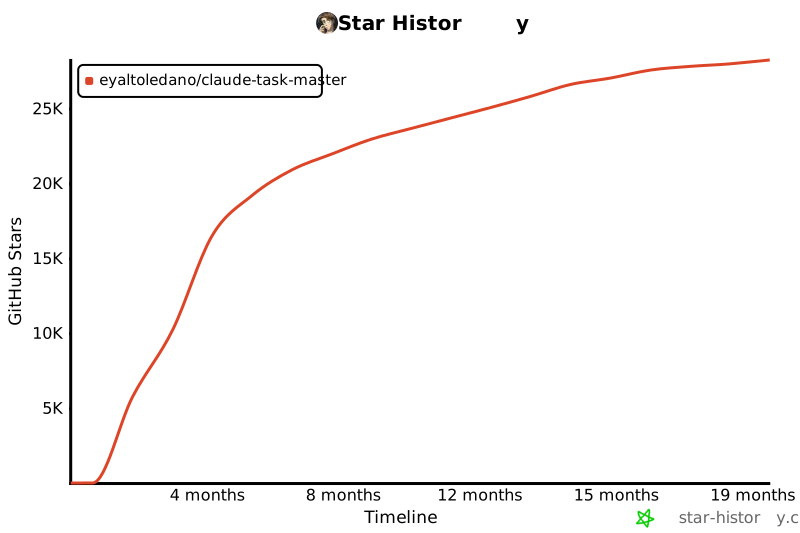
Star History
Licensing
Task Master is licensed under the MIT License with Commons Clause. This means you can:
✅ Allowed:
- Use Task Master for any purpose (personal, commercial, academic)
- Modify the code
- Distribute copies
- Create and sell products built using Task Master
❌ Not Allowed:
- Sell Task Master itself
- Offer Task Master as a hosted service
- Create competing products based on Task Master
See the LICENSE file for the complete license text and licensing details for more information.





