clawd-models
CLI tool to manage OpenClaw model configurations.
Quick Start Flow
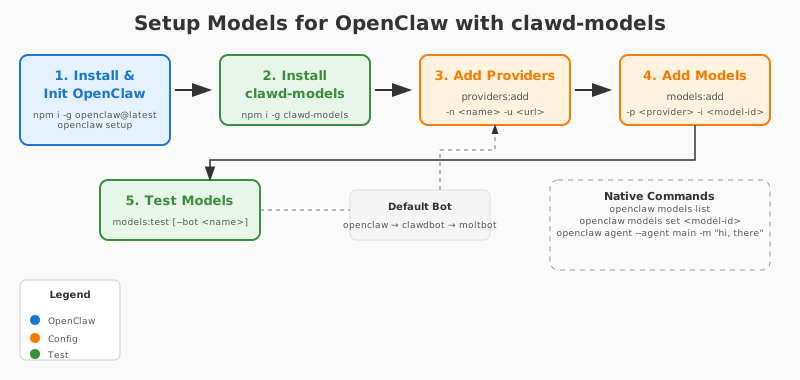
Prerequisite
Install and Setup openclaw firstly
# setup openclaw
openclaw setup

# or configure it interactively

openclaw configure
Refer to https://github.com/openclaw/openclaw
Installation
npm i -g clawd-models
Refer to https://github.com/qidu/clawd-models
Usage
clawd-models <command> [--bot <openclaw|clawdbot|moltbot>]
Global Options:
--bot <bot-id> - Target bot (openclaw, clawdbot, moltbot). Also saves as default for future commands.--clear-bot - Clear the default bot setting
Bot Priority (when --bot not specified):
- Saved preference (if set via previous
--bot use)
- Auto-detect: openclaw → clawdbot → moltbot
Config Locations:
- OpenClaw:
~/.openclaw/openclaw.json
- ClawdBot:
~/.clawdbot/clawdbot.json
- MoltBot:
~/.moltbot/moltbot.json
- Preferred bot:
~/.clawd-models/bot
Default Bot Priority: openclaw → clawdbot → moltbot (auto-selected if not specified via --bot)
Commands
Core
init | Initialize OpenClaw configuration with defaults |
view | View current configuration file and path |
edit | Edit configuration in default editor |
import -f <file> | Import configuration from a JSON config file of openclaw |
export | Export configuration to stdout |
Provider Management
providers:add -n <name> -u <url> [-k <api-key>] | Add a new model provider |
providers:remove -n <name> | Remove a model provider |
providers:list | List all configured providers |
| Should add a provider firstly, then add a model (refer to next section). | |
Model Management
models:add -p <provider> -i <model-id> --name <name> | Add a model to a provider |
models:remove -p <provider> -i <model-id> | Remove a model from a provider |
models:list [--provider <name>] | List all configured models |
models:test | Test the default model configuration by sending a test message |
Use agents:set-default in next section or refer to openclaw models set to set a default model for 'main' and all agents.
Refer to openclaw agent --agent main -m <message> to test the default model and agent.
Agent Management
agents:add -i <id> | Add a new agent |
agents:remove -i <id> | Remove an agent |
agents:list | List all configured agents |
agents:set-default -a <agent> -m <provider>/<model-id> | Set default model for an agent type |
Refer to openclaw agents and openclaw agent --help for more. | |
Gateway Management
gateway:view | View the Gateway |
gateway:refresh-token | Refresh(regenerate) gateway auth token |
Refer to openclaw gateway status for more. | |
Auth Profile Management
auth:add-profile -n <name> | Add an auth profile |
auth:profiles | List auth profiles configured |
Configuration Location
~/.openclaw/openclaw.json
or
~/.clawdbot/clawdbot.json
or
~/.moltbot/moltbot.json





