#Clrlog#
##Lightweight colorful JavaScript application logger with stack trace and logfile support for node.js##


#Changes in version 1.6#
- LOG_CUSTOM_VARIABLES allow tracing by also setting TRACE=true when debugging
- Logging messages contain an ISO date string as default
- Logging message type is always exposed [message], [success], [warning], [error]
#Changes in version 1.4#
##Log level changes##
-
Now the default log level is error & warning. Log message and success is disabled by default. It can be enabled again by setting the logLevel (logLevel='error,warning,success,message')
-
Any log message can be enabled temporary by
-
- A) via process.env.DEBUG=true or
-
- B) via context based environment variable which can be assigned to constructor
##Activation switch changes##
Clrlog has now a new property inside the constructor.
An env variable (process.env.CUSTOM_VARIALBE) can be registered (e.g by starting the node app CUSTOM_VARIALBE=true node app.js )
which enables any log level in the specific context for a better app behave logging.
#How to use#
Instal Clrlog via npm
npm install clrlog
Require the Clrlog class
var Clrlog = require('clrlog');
To give log messages color set global.DEBUG=true or run application in node.js's debug mode
process.env.DEBUG = true;
Or create a file named debug in applications root folder
Clrlog can be used as a function
Clrlog("Hello I'm Clrlog");
Or as an object of the Clrlog class (The logger can be registered to a process.env property to enable logging for different purposes)
    var myClrlog = new Clrlog("I support logging into logfiles too", 'success', __dirname + '/application.log', 'MY_CUSTOM_LOG');
        myClrlog.logLevel = 'error';
        myClrlog.warning('This line is not written into logfile');
        myClrlog.error('This line is written into logfile');
Set custom log levels for a single logmessage type
myClrlog.logLevel = 'error';
Or set log levels for multiple log message types
myClrlog.logLevel = 'error,warning,success';
The logs are stored in the following format
    Sat Apr 05 2014 [...] | SUCCESS ᑀ And hold log instances for more complex logging purposes
    Sat Apr 05 2014 [...] | SUCCESS ᑀ The current loglevel is message,success
    Sat Apr 05 2014 [...] | MESSAGE ᑀ This message goes into the logfile
    Sat Apr 05 2014 [...] | SUCCESS ᑀ This line goes into the logfile too
    Sat Apr 05 2014 [...] | SUCCESS ᑀ {
    	"I": "can",
    	"log": "Objects too"
    }
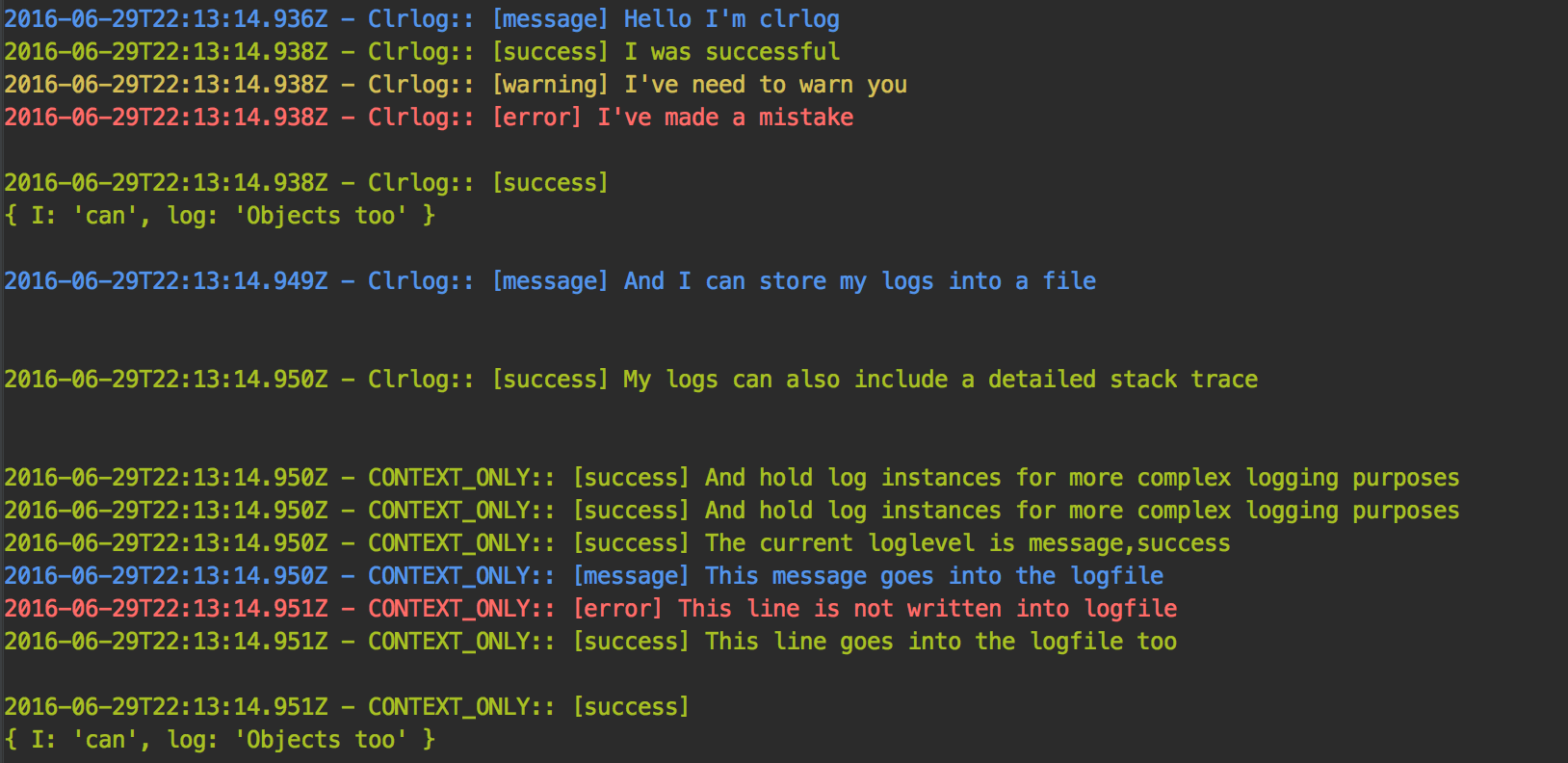
#Full working example (demo/demo.js)#
(function () {
"use strict";
var Clrlog = require(__dirname + '/../index.js');
Clrlog("Hello I'm Clrlog");
Clrlog("I was successful", 'success');
Clrlog("I've need to warn you ", 'warning');
Clrlog("I've made a mistake", 'error');
Clrlog({
I: 'can',
log: 'Objects too'
}, 'success');
Clrlog("And I can store my logs into a file", 'message', __dirname + '/example.log');
Clrlog("My logs can also include a detailed stack trace", 'success', false, true);
var myClrlog = new Clrlog("And hold log instances for more complex logging purposes", 'success', __dirname + '/application.log');
myClrlog.logLevel = 'error';
myClrlog.logLevel = 'warning';
myClrlog.logLevel = 'success';
myClrlog.logLevel = 'message';
myClrlog.logLevel = 'error,warning';
myClrlog.logLevel = 'error,warning,success';
myClrlog.logLevel = 'message,success';
myClrlog.logLevel = 'message,success';
myClrlog.success('The current loglevel is ' + myClrlog.logLevel);
myClrlog.message('This message goes into the logfile');
myClrlog.error('This line is not written into logfile');
myClrlog.success('This line goes into the logfile too');
})();
Author:
Clrlog was written by Bernhard Bezdek
Released under MIT License
###Dependencies###
node.js file system api





