colorlogger

colored stdout
npm install colorlogger
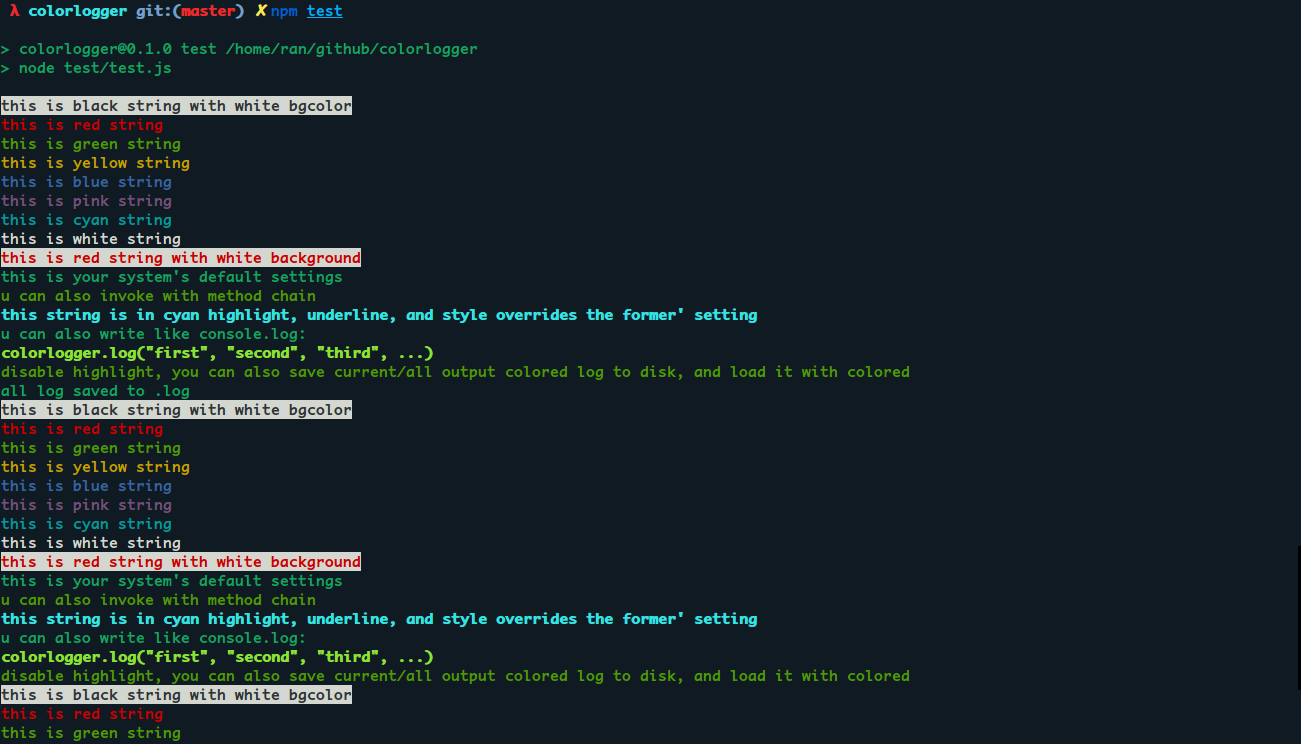
run test
npm test
common usage:
  var path = require('path');
  var colorlogger = require('../index.js');

  colorlogger.colored('black', true).colored('white', 'b').log('this is black string with white bgcolor');
  colorlogger.colored('red', true).log('this is red string');
  colorlogger.colored('green', true).log('this is green string');
  colorlogger.colored('yellow', true).log('this is yellow string');
  colorlogger.colored('blue', true).log('this is blue string');
  colorlogger.colored('pink', true).log('this is pink string');
  colorlogger.colored('cyan', true).log('this is cyan string');
  colorlogger.colored('white', true).log('this is white string');

  colorlogger.colored('red');
  colorlogger.colored('white', 'b');

  colorlogger.log('this is red string with white background');

  colorlogger.default();

  colorlogger.log('this is your system\'s default settings');

  colorlogger.colored('green', true).log('u can also invoke with method chain');

  colorlogger.default();

  colorlogger
            .highlight().underline()
            .colored('cyan', 'f', true)
            .log('this string is in cyan highlight, underline, and style overrides the former\' setting')
            .default();

  colorlogger
            .log('u', 'can', 'also', 'write', 'like', 'console.log:')
            .colored('green').highlight()
            .log('colorlogger.log("first", "second", "third", ...)');
you can also save the colorful log to disk, and load it to terminal in colored next time
in Promise mode:
  colorlogger
  .highlight(false)
  .log('disable highlight, you can also save current/all output colored log to disk, and load it with colored');

  colorlogger
  .save('.log', { append: true, record: 'all' })
  .then(function () {
    console.log('all log saved to .log');
  })
  .catch(function (err) {
    console.error(err.message);
  })
  .then(function () {
    return colorlogger.load('.log');
  })
  .then(function (log) {
    console.log(log);
  });





