Console Log Plus
💬🌈😍 Bring meaningful prefixes and colors to your console log


console.log is a very useful tool in web development. It lets us know what we do have and gives us hints of what we need. But important information can get overseen in the midst of all that noise.
Meaninful prefixes and color-coded messages can come a long way in helping us scan through our log.
Console Log Plus - or clp as the function is called - gives us both. It also gives us the convenience of 6 optional types, which we can use if we want to:
ok - white on purpleinfo - black on light blueerror - white on redwarning - white on orangeattention - black on yellowsuccess - black on greendefault - black on white
Usage
As with any node module, first you'll have to import it with require:
var clp = require('console-log-plus');
...or through import:
import clp from 'console-log-plus';
Custom prefixes, with types
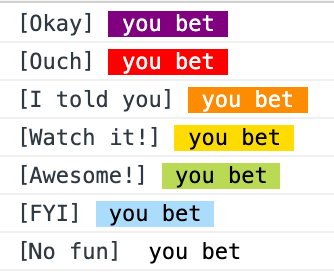
clp({
  type: 'ok',
  prefix: 'Okay',
  message: 'you bet'
});
clp({
  type: 'error',
  prefix: 'Ouch',
  message: 'you bet'
});
clp({
  type: 'warning',
  prefix: 'I told you',
  message: 'you bet'
});
clp({
  type: 'attention',
  prefix: 'Watch it!',
  message: 'you bet'
});
clp({
  type: 'success',
  prefix: 'Awesome!',
  message: 'you bet'
});
clp({
  type: 'info',
  prefix: 'FYI',
  message: 'you bet'
});
clp({
  type: 'default',
  prefix: 'No fun',
  message: 'you bet'
});
No prefixes, with types
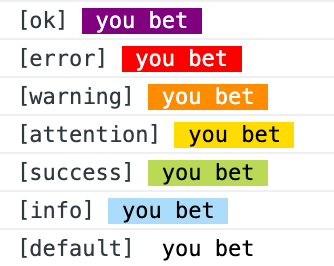
clp({
  type: 'ok',
  message: 'you bet'
});
clp({
  type: 'error',
  message: 'you bet'
});
clp({
  type: 'warning',
  message: 'you bet'
});
clp({
  type: 'attention',
  message: 'you bet'
});
clp({
  type: 'success',
  message: 'you bet'
});
clp({
  type: 'info',
  message: 'you bet'
});
clp({
  type: 'default',
  message: 'you bet'
});
With prefixes, no types, custom colors
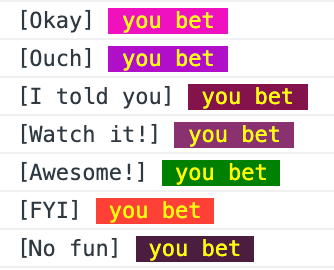
clp({
  prefix: 'Okay',
  color: 'yellow',
  background: '#f012be',
  message: 'you bet'
});
clp({
  prefix: 'Ouch',
  color: 'yellow',
  background: '#b10dc9',
  message: 'you bet'
});
clp({
  prefix: 'I told you',
  color: 'yellow',
  background: '#85144b',
  message: 'you bet'
});
clp({
  prefix: 'Watch it!',
  color: 'yellow',
  background: '#89326f',
  message: 'you bet'
});
clp({
  prefix: 'Awesome!',
  color: 'yellow',
  background: 'green',
  message: 'you bet'
});
clp({
  prefix: 'FYI',
  color: 'yellow',
  background: '#ff4136',
  message: 'you bet'
});
clp({
  prefix: 'No fun',
  color: 'yellow',
  background: '#4d1e40',
  message: 'you bet'
});
No prefixes, no types, custom colors
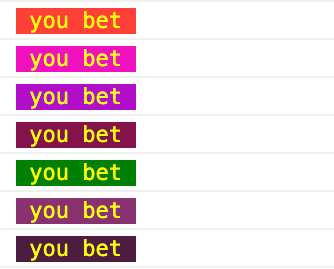
clp({
  color: 'yellow',
  background: '#ff4136',
  message: 'you bet'
});
clp({
  color: 'yellow',
  background: '#f012be',
  message: 'you bet'
});
clp({
  color: 'yellow',
  background: '#b10dc9',
  message: 'you bet'
});
clp({
  color: 'yellow',
  background: '#85144b',
  message: 'you bet'
});
clp({
  color: 'yellow',
  background: 'green',
  message: 'you bet'
});
clp({
  color: 'yellow',
  background: '#89326f',
  message: 'you bet'
});
clp({
  color: 'yellow',
  background: '#4d1e40',
  message: 'you bet'
});
Development
Getting started
Clone this repo locally. You'll need to have NodeJS installed. Install all dependencies by running:
npm i
Run it locally
To start the app locally, run:
npm run dev
This command fires up the application on port 9887, making it visible on http://localhost:9887.
Every time you make changes to src/index.js, your page will refresh and reflect the changes.
This is only meant as a way to debug the function in the browser, and is only available in development mode.
Building for production
When you're done with your changes, run:
npm run build
This command compiles the production-optimised javascript to dist/index.js, a file compiled out of src/index.js.
Deploy to NPM
npm run deploy
⚠️ Make sure to bump version before releasing!
Good to know
License
MIT
About
Console Log Plus was put together by Wallace Sidhrée. 👨💻🇳🇴





