copy-push


一步完成文件的复制和提交(git)
为什么做这个
前后端分离的开发过程中, 每次前端将静态资源文件上传到 CDN 之后, 还需要将页面放置到后端项目的目录中, 然后再提交到 git.
因此每次都需要重复的执行: pull -> copy -> add -> commit -> push, 整个过程很是繁琐.
对于重复的工作, 很懒的我们肯定是需要自动化工具代劳之.
示例
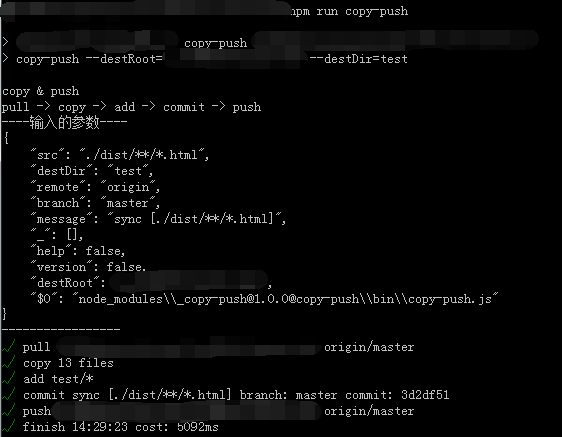
使用方法
需要先安装好 Git
-
全局安装使用
npm install copy-push -g
cd fe-project
copy-push --destRoot=../backend-project --destDir=dir
也可以局部安装, 配置在 npm scripts 中来使用
cd fe-project
npm install copy-push --save-dev
"scripts": {
    "copy-push": "copy-push --repoUrl=http://gitlab.com/xxx/backend-project.git --destRoot=../backend-project --destDir=dir"
}
npm run copy-push
-
做为模块使用
npm install copy-push --save-dev
cd fe-project
var copyPush = require('copy-push');
var repoUrl = 'http://gitlab.com/xxx/backend-project.git';
var destRoot = '../backend-project';
var destDir = 'dir';
copyPush(destRoot, {
repoUrl: repoUrl,
destDir: destDir
});
参数说明
全局安装使用时, 可以运行 copy-push --help 来查看参数说明
| repoUrl | 远程仓库的 URL | | |
| destRoot | 复制文件到哪个项目(git项目的根目录) | | 是 |
| src | 需要复制的文件(glob) | ./dist/**/*.html | |
| destDir | 复制文件到哪个目录(相对于 destRoot 目录) | src/main/webapp/views | |
| remote | 远程仓库 | origin | |
| branch | 分支名 | master | |
| message | 提交信息 | sync [./dist/**/*.html] ${远端项目名}:${当前分支名} ${最近一次的提交日志} | |
注意事项
- 必须设置 git 可以免密码 pull & push(配置 SSH key或者配置用户名密码)
- 因此
repoUrl 参考推荐使用 SSH 的 URL





