


New Research: Supply Chain Attack on Axios Pulls Malicious Dependency from npm.Details →
Socket
Book a DemoSign in
Socket

coxy

Package Overview
Dependencies
Maintainers
1
Versions
3
Alerts
File Explorer

Advanced tools

Socket logo

Install Socket

Detect and block malicious and high-risk dependencies

Install

coxy

<source media="(prefers-color-scheme: dark)" srcset="https://raw.githubusercontent.com/coxy-proxy/coxy/refs/heads/main/assets/header-light.png"> <img alt="Coxy logo" src="https://raw.githubusercontent.com/coxy-proxy/

latest
npmnpm
Version
0.0.4
Version published
Maintainers
1
Created
Source

Coxy logo
GitHub Copilot as OpenAI-compatible APIs

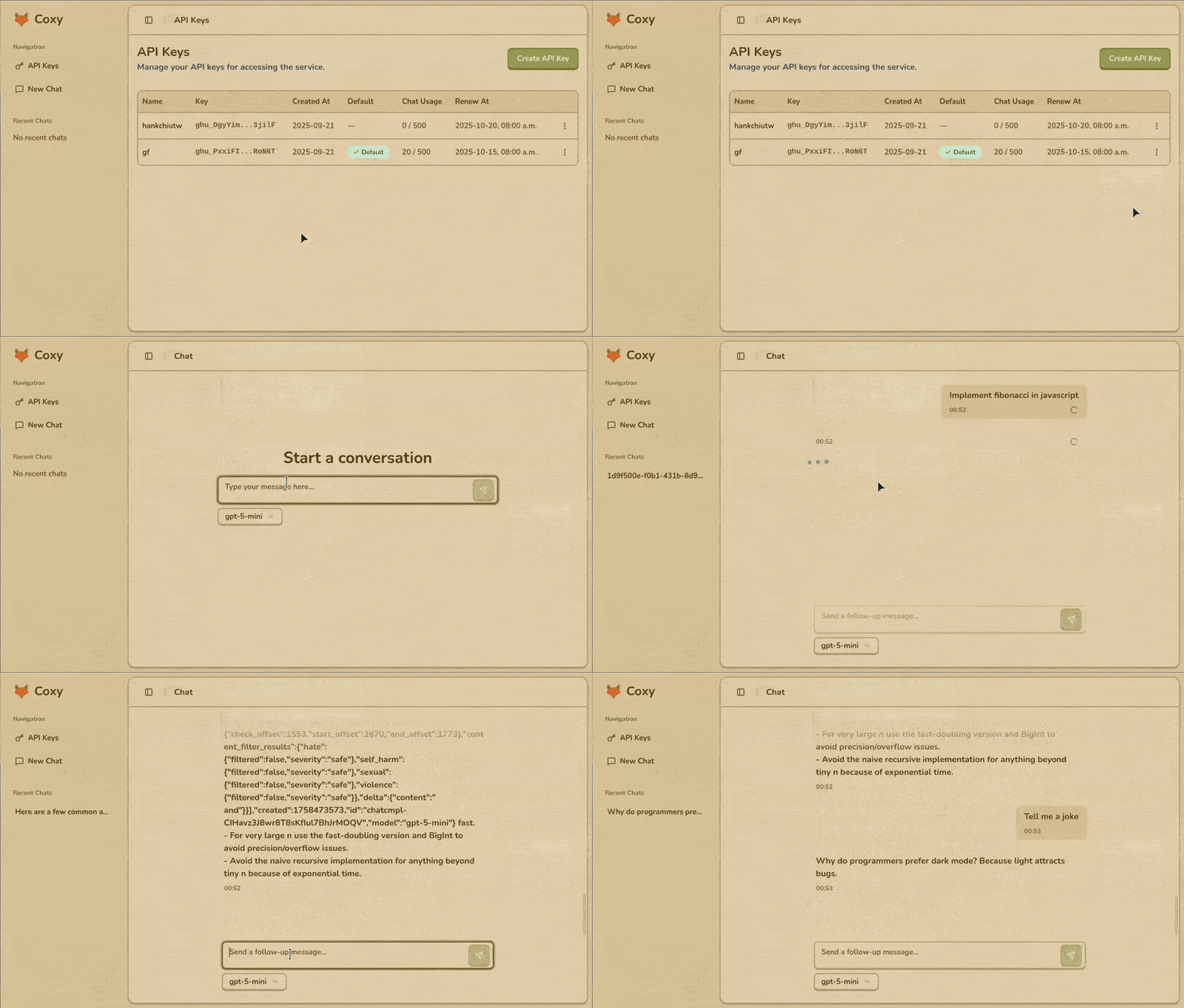
Coxy demo

Why?

  • You have a lot of free quota on GitHub Copilot, you want to use it like OpenAI-compatible APIs.
  • You want the computing power of GitHub Copilot beyond VS Code.
  • You want to use modern models like gpt-4.1 free.
  • You have multiple GitHub accounts and the free quota is just wasted.
  • Host LLM locally and leave the computing remotely.

Features

  • Proxies requests to https://api.githubcopilot.com
    • Support endpoints: /chat/completions, /models
  • User-friendly admin UI:
    • Log in with GitHub and generate tokens
    • Add tokens manually
    • Manage multiple tokens with ease
    • View chat message usage statistics
    • Simple chat bot for model evaluation
      • Client-side chat session history

How to use

  • Start the proxy server
    • Option 1: Use Docker
      docker run -p 3000:3000 ghcr.io/coxy-proxy/coxy:latest
      
    • Option 2: Use pnpx(recommended) or npx
      pnpx coxy
      
  • Browse http://localhost:3000 to generate the token by following the instructions.
    • Or add your own token manually.
  • Set a default token.
  • Your OpenAI-compatible API base URL is http://localhost:3000/api
    • You can test it like this: (no need authorization header since you've set a default token!)
    curl --request POST --url http://localhost:3000/api/chat/completions --header 'content-type: application/json' \
    --data '{
        "model": "gpt-4",
        "messages": [{"role": "user", "content": "Hi"}]
    }'
    
    • You still can set a token in the request header authorization: Bearer <token> and it will override the default token.
  • (Optional) Use environment variable PORT for setting different port other than 3000.

Available environment variables

  • PORT: Port number to listen on (default: 3000)
  • LOG_LEVEL: Log level of pino (default: info)
  • DATABASE_URL: Database URL for Prisma (currently only supports sqlite). Should start with file:. (default: file:../coxy.db)
    • The relative path will be resolved to the absolute path at runtime.

Advanced usage

  • Dummy token _ to make coxy use the default token.
    • In most cases, the default token just works without 'Authorization' header. But if your LLM client requires a non-empty API key, you can use the special dummy token _ to make coxy use the default token.
  • Provisioning: launch the CLI with --provision to force initialize the database schema via Prisma.
  • Tips for using docker:
    • Mount the sqlite db file from host to persist the tokens and use .env file to set environment variables. Use --provision first time to initialize the database schema via Prisma, e.g.
      docker run -p 3000:3000 -v /path/to/sqlite.db:/app/coxy.db -v /path/to/.env:/app/.env ghcr.io/coxy-proxy/coxy:latest --provision
      

Troubleshooting

  • I got status code 400 when using GPT-5-mini model.
    • Make sure you have enabled "OpenAI GPT-5 mini" in your github account Copilot settings. The URL looks like https://github.com/settings/copilot/features.
  • I got the error Fail to load API keys when opening API Keys page.
    • Make sure you have sqlite db file and provisioned correctly.
  • I'm using podman and cannot access via localhost:3000 but can access via 127.0.0.1:3000.
    • It seems podman's known issue or bug. Just use 127.0.0.1:3000 instead or setting another host name, like 127.0.0.1 coxy, in your /etc/hosts file.

Use cases

  • Use with LLM CLI locally.
  • Chat with GitHub Copilot by Open WebUI.

Requirements

  • Node.js 22 or higher

References

Licensed under the MIT License.

Keywords

copilot

FAQs

Package last updated on 22 Sep 2025

Did you know?

Socket

Socket for GitHub automatically highlights issues in each pull request and monitors the health of all your open source dependencies. Discover the contents of your packages and block harmful activity before you install or update your dependencies.

Install

Related posts

