New Research: Supply Chain Attack on Axios Pulls Malicious Dependency from npm.Details →
Socket
Book a DemoSign in
Socket

cronmon

Package Overview
Dependencies
Maintainers
1
Versions
7
Alerts
File Explorer

Advanced tools

Socket logo

Install Socket

Detect and block malicious and high-risk dependencies

Install

cronmon

Execute cron jobs and monitor their run results with email and slack notifications

latest
Source
npmnpm
Version
1.0.6
Version published
Maintainers
1
Created
Source

cronmon

Node.js module for executing cron jobs and monitoring their run results with email and slack notifications
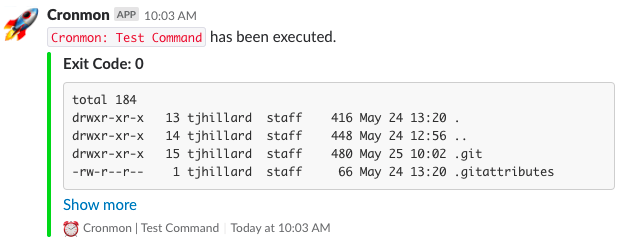
demoimage

Getting Started

npm i cronmon

Basic Usage

let Cronmon = require('cronmon');
let cronmon = new Cronmon({
    command: 'ls -al',
    crontab: '* * * * *',
    expectedExitCode: 0
});

Advanced Configuration

let Cronmon = require('cronmon');
let cronmon = new Cronmon({
    
    // required
    command: 'ls -al',
    crontab: '* * * * *',
    expectedExitCode: 0, // Must be of type int
    
    // optional
    name: 'Test Command',
    timeout: 30000, // timeout for command execution (default 60000)
    silent: false, // Set to true to receive no additional logging (defaults false)

    // Cronmon uses 'emailjs' behind the scenes
    // For additional details on configuration, check out their docs
    // https://github.com/eleith/emailjs

    email: {
        enabled: true,
        // required
        user: 'example@email.com',
        password: 'YourPassword123',
        host: 'smtp.gmail.com',
        ssl: true,
        recipients: 'recipient1@email.com, recipient2@email.com, recipient3@email.com',
        from: 'Cronmon <username@your-email.com>',
        // optional
        alertOnSuccess: false,
    },

    // Cronmon uses 'node-slack' behind the scenes
    // For additional details on configuration, check out their docs
    // https://github.com/xoxco/node-slack

    slack: {
        enabled: true,
        // required
        hookUri: '', // Get this from your Slack API dev console
        channel: '#dev', // Make sure to prefix with a '#'
        username: 'Cronmon',
        // optional
        alertOnSuccess: false
    },

    // Will run after job exectution regardless of exitCode (optional)
    callback: (exitCode, output) => {
        console.log('Callback!');
    }
    
});

You can manually start and stop your processes via:

cronmon.start(); // Set autoStart: false in config obj to init manually via method
cronmon.stop();

Keywords

cron

FAQs

Package last updated on 29 May 2018

Did you know?

Socket

Socket for GitHub automatically highlights issues in each pull request and monitors the health of all your open source dependencies. Discover the contents of your packages and block harmful activity before you install or update your dependencies.

Install

Related posts




