


Security News
Feross on TBPN: How North Korea Hijacked Axios
Socket CEO Feross Aboukhadijeh breaks down how North Korea hijacked Axios and what it means for the future of software supply chain security.
By Sarah Gooding - Apr 08, 2026
css-color-extract-plugin
Advanced tools
npm install css-color-extract-plugin
yarn add css-color-extract-plugin
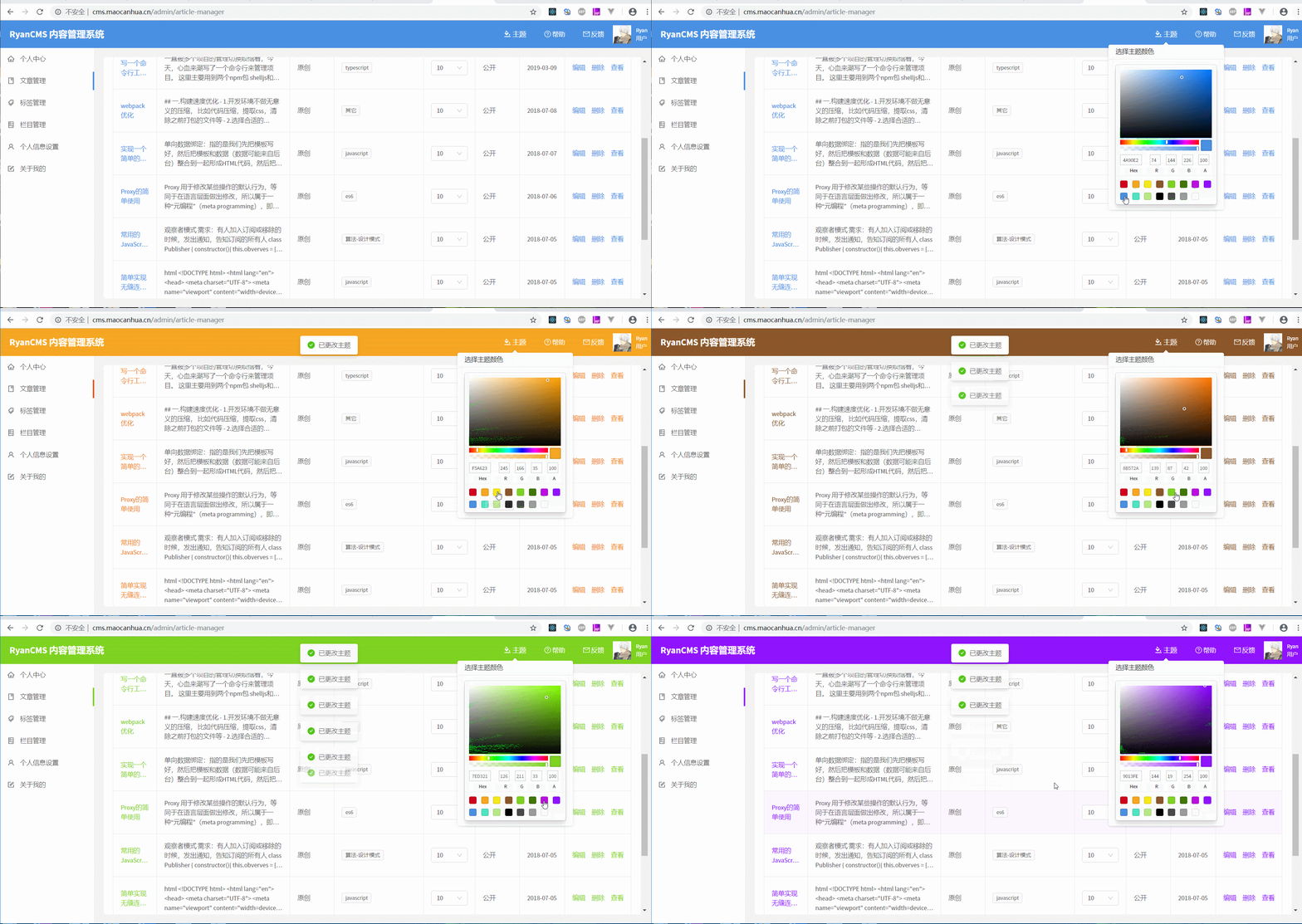
- 该插件主要用于提取主题颜色
- 提取到的css数据会挂载到window下
- 通过颜色替换再插入到,可达到动态修改主题的目的
Usage
// webpack.config.js
const CssColorExtractPlugin = require('css-color-extract-plugin').default;
const PRIMARY_COLOR = '#1890ff';
module.exports = {
    ...
    module: {
        rules: [
          {
            test: /\.css$/,
            exclude: '/\.module\.css$/',
            use: [
                "style-loader",
                "css-loader",
                {
                  loader: CssColorExtractPlugin.loader,
                  options: {
                    colors: [ PRIMARY_COLOR ]
                  }
              },
           ]
        },
        {
            test:  /\.module\.css$/,
            use: [
                "style-loader",
                 {
                   loader: "css-loader",
                   options: {
                     modules: true,
                     localIdentName: '[path][name]__[local]',
                   }
								},
                {
                    loader: CssColorExtractPlugin.loader,
                    options: {
                    colors: [ PRIMARY_COLOR ],
                    modules: true,
                    localIdentName: '[path][name]__[local]',
                  }
               },
            ]
        }
      ]
    }
   ...
   	plugins: [
      ...
      new CssColorExtractPlugin({ fileName: 'theme' }),
     ]
};
window.CSS_EXTRACT_COLOR_PLUGIN = [
  {"source":".src-App-module__example {  background: #1890ff;}","fileName":"App.module.scss","matchColors":["#1890ff"]},
  {"source":".src-controller-blog-components-Header-Header-module__theme {  color: #067785;}.src-controller-blog-components-Header-Header-module__pc_header {  background: #1890ff;}.src-controller-blog-components-Header-Header-module__mb_header {  background: #1890ff;}.src-controller-blog-components-Header-Header-module__mb_header .src-controller-blog-components-Header-Header-module__mb_nav {  background: #1890ff;}","fileName":"Header.module.scss","matchColors":["#1890ff"]}
];
import React, { Component } from 'react';
import styles from './App.module.scss';
import { SketchPicker } from 'react-color';

function replaceColor(source, color, replaceColor) {
	return source.replace(new RegExp(`(:.*?\\s*)(${color})(\\b.*?)(?=})`, 'mig'), (group) => {
		return group.replace(new RegExp(`${color}`, 'mig'), replaceColor);
	});
}

const PRIMARY_COLOR = '#1890ff';

class App extends Component {

	async setColor(color) {
		const styleData = window.CSS_EXTRACT_COLOR_PLUGIN || [];
		const cssText = styleData.map((item) => item.source).join('');
		const styleText = replaceColor(cssText, PRIMARY_COLOR, color);
		const style = document.createElement('style');
		style.innerHTML = styleText;
		document.body.appendChild(style);
	}
	render() {
		return (
			<div className={styles['example']}>
				<SketchPicker onChangeComplete={(colorResult) => this.setColor(colorResult.hex)} />
			</div>
		);
	}
}

export default App;
 {
	colors: string[]; // 匹配的颜色数组,如果出现颜色层次错误覆盖的情况,需要选上被覆盖的颜色,可通过该选项在不同的文件提取不同的颜色
	only?: boolean = true; // 仅提取选中颜色规则,否则会将整个文件提取进去
	modules?: boolean = false;
	localIdentName?: string = '';
}
  {
    fileName?: string; // 提取颜色的文件名,不提供则直接嵌在 script标签中
    json?: boolean = false; // 提起到json
	  variableName?: string = 'CSS_EXTRACT_COLOR_PLUGIN'; // 挂载到window的变量名, 默认 CSS_EXTRACT_COLOR_PLUGIN
}
FAQs
css-color-extract
We found that css-color-extract-plugin demonstrated a not healthy version release cadence and project activity because the last version was released a year ago. It has 1 open source maintainer collaborating on the project.
Did you know?

Socket for GitHub automatically highlights issues in each pull request and monitors the health of all your open source dependencies. Discover the contents of your packages and block harmful activity before you install or update your dependencies.
Security News
Socket CEO Feross Aboukhadijeh breaks down how North Korea hijacked Axios and what it means for the future of software supply chain security.

Security News
OpenSSF has issued a high-severity advisory warning open source developers of an active Slack-based campaign using impersonation to deliver malware.

Research
/Security News
Malicious packages published to npm, PyPI, Go Modules, crates.io, and Packagist impersonate developer tooling to fetch staged malware, steal credentials and wallets, and enable remote access.