


Security News
CVE Volume Surges Past 48,000 in 2025 as WordPress Plugin Ecosystem Drives Growth
CVE disclosures hit a record 48,185 in 2025, driven largely by vulnerabilities in third-party WordPress plugins.
By Sarah Gooding - Jan 09, 2026
datocms-plugin-ai-translations
Advanced tools
This plugin integrates with AI providers and provides on-demand AI-powered translations for your fields. You can also translate entire records or perform bulk translations across multiple records and models.
See the CHANGELOG.md file for details about all the latest features and improvements.
On the plugin's Settings screen:
:fx (Free plan).{fieldValue}, {fromLocale}, {toLocale}, and {recordContext}.Models
Save your changes. The plugin is now ready.
For each translatable field:
You can also pull content from a different locale by choosing "Translate from" to copy and translate that locale's content into your current locale.
If enabled:
Translate multiple records at once from any table view:
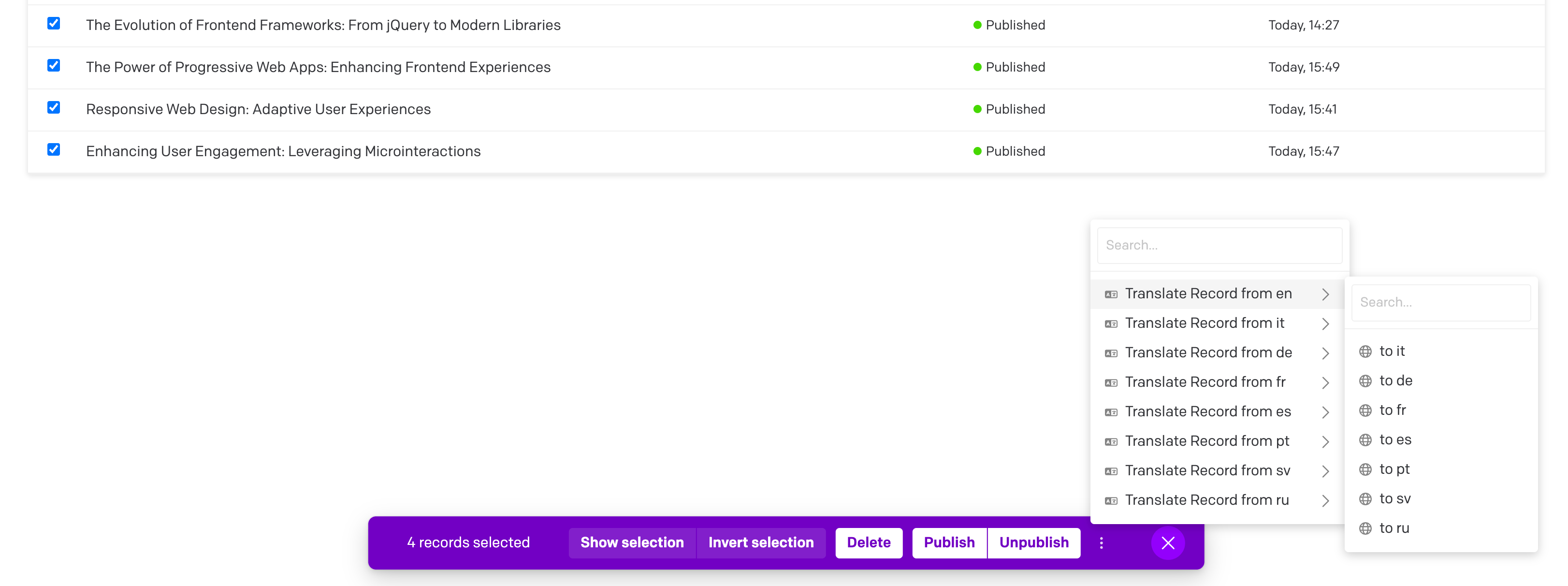
The plugin includes a dedicated page for translating multiple models at once:
The plugin now supports context-aware translations through the {recordContext} placeholder:
The plugin supports ICU Message Format strings, ensuring that complex pluralization and selection logic is preserved during translation.
{name} are masked to protect them, while ICU structures like {count, plural, ...} are passed to the AI.Example:
You have {count, plural, one {# message} other {# messages}}
Becomes:
Você tem {count, plural, one {# mensagem} other {# mensagens}}
You can customize the translation prompt template in the plugin settings:
{fieldValue} to represent the content to translate{fromLocale} and {toLocale} to specify languages{recordContext} to include the automatically generated record contextThe plugin supports DeepL glossaries to enforce preferred terminology. You can set a default glossary ID and/or map specific language pairs to specific glossary IDs. This works for all field types, including Structured Text.
gls-abc123).You can use either DatoCMS locales (e.g., en-US, pt-BR) or DeepL codes (e.g., EN, PT-BR). The plugin normalizes both to DeepL codes internally.
Scenario A: Single Language Pair If you only translate from English to German, you only need one glossary.
gls-12345 (Your EN->DE glossary)Scenario B: Multiple Language Pairs If you translate to multiple languages, map each one specifically.
EN->DE=gls-german123
EN->FR=gls-french456
Scenario C: Fallback Strategy Use specific glossaries for main languages, and a default for everything else.
gls-fallback999EN->DE=gls-german123
(Note: If the default glossary doesn't match the language pair of a translation, the plugin will automatically retry without it.)
One entry per line. Supported forms:
EN->DE=gls-abc123
en-US->pt-BR=gls-xyz789
fr→it gls-123                 # alt arrow and delimiter
*->pt-BR=gls-777              # wildcard: any source to target
EN->*=gls-555                 # wildcard: source to any target
pt-BR=gls-777                 # shorthand for *->pt-BR
Delimiters: =, :, or whitespace. Arrows: ->, →, ⇒ (all treated the same). Case is ignored.
When translating from fromLocale → toLocale, the plugin picks a glossary ID using this precedence:
EN:PT-BR).en-US:pt-BR).*:PT-BR or *:pt-BR).EN:* or en-US:*).If DeepL returns a glossary mismatch (e.g., glossary languages don’t match the current pair) or a missing glossary, the plugin automatically retries the same request once without a glossary so your translation continues. A brief hint is surfaced in the UI logs.
The plugin only needs the glossary_id string. You can create and list glossaries with the DeepL API from your own machine or server. Examples with cURL:
List glossaries
curl -H "Authorization: DeepL-Auth-Key $DEEPL_AUTH_KEY" \
     https://api.deepl.com/v2/glossaries
Create a small glossary inline (tab-separated entries)
curl -X POST https://api.deepl.com/v2/glossaries \
  -H "Authorization: DeepL-Auth-Key $DEEPL_AUTH_KEY" \
  -H "Content-Type: application/json" \
  -d '{
    "name": "Marketing-EN-DE",
    "source_lang": "EN",
    "target_lang": "DE",
    "entries_format": "tsv",
    "entries": "CTA\tCall-to-Action\nlead magnet\tLeadmagnet"
  }'
Note: If your account uses the Free endpoint, replace the host with https://api-free.deepl.com.
Manage glossaries from your server/CLI or the DeepL dashboard, then paste the resulting IDs into the plugin settings.
notranslate, ph, etc.). Glossaries will not alter those tokens.:fx) should have "Use DeepL Free endpoint" enabled.EN->DE=... mapping.apiKey and gptModel remain valid.:fx), enable "Use DeepL Free endpoint".This project is licensed under the MIT License - see the LICENSE file for details.
FAQs
Translate fields and records directly on DatoCMS using AI
The npm package datocms-plugin-ai-translations receives a total of 124 weekly downloads. As such, datocms-plugin-ai-translations popularity was classified as not popular.
We found that datocms-plugin-ai-translations demonstrated a healthy version release cadence and project activity because the last version was released less than a year ago. It has 1 open source maintainer collaborating on the project.
Did you know?

Socket for GitHub automatically highlights issues in each pull request and monitors the health of all your open source dependencies. Discover the contents of your packages and block harmful activity before you install or update your dependencies.
Security News
CVE disclosures hit a record 48,185 in 2025, driven largely by vulnerabilities in third-party WordPress plugins.

Security News
Socket CEO Feross Aboukhadijeh joins Insecure Agents to discuss CVE remediation and why supply chain attacks require a different security approach.

Security News
Tailwind Labs laid off 75% of its engineering team after revenue dropped 80%, as LLMs redirect traffic away from documentation where developers discover paid products.