


Security News
The Hidden Blast Radius of the Axios Compromise
The Axios compromise shows how time-dependent dependency resolution makes exposure harder to detect and contain.
By Ahmad Nassri - Apr 01, 2026
easyapi-json-editor
Advanced tools
easyapi-json-editor
EasyAPI JSON 编辑器组件,参考市面上标准的 JSON 编辑器风格,另外还包括数据类型(字段类型),数据注释(字段描述),示例值。
当 JSON 数据传入(覆盖性传入),保持原来填写的注释与类型内容,在原来基础上继续完善,例如有新增的字段。
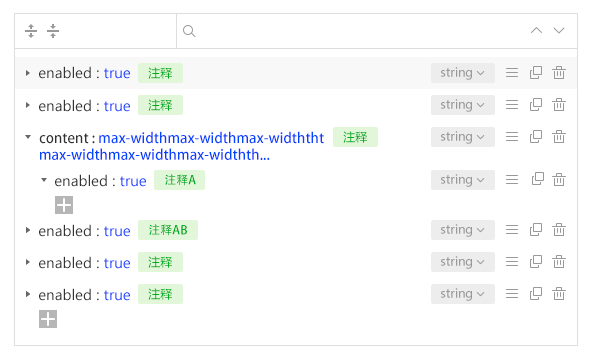
本组件重点是可以在编辑器上面直接设置数据注释(字段描述)和数据类型(字段类型)
传入数据格式与输出数据格式一致
JSON 示例如下:
{
"name": "blog",
"type": "object",
"description": "博客",
"demo": "",
"sequence": 1,
"childs": [
{
"name": "title",
"type": "string",
"description": "标题",
"demo": "我和我的祖国",
"sequence": 1
}
]
}
1、getJSONEditorData 获取 JSON 编辑器数据
2、importJSON 导入标准 JSON 数据
使用 JSON 的 Value 作为示例值,并自动处理数据类型
3、exportJSON 导出标准 JSON 数据
使用示例值作为 JSON 的 Value
数据类型(字段类型)
<template>
  <easyapi-json-form :jsonData="jsonData" v-model="jsonData"></easyapi-json-form>
</template>

<script>
export default {
  name: "app",
  data: function() {
    return {
      jsonData: [
        {
          id: 1,
          name: "blog",
          type: "object",
          description: "博客",
          required: false,
          demo: "",
          demo: "",
          sequence: 1,
          childs: [
            {
              id: 10,
              name: "title",
              type: "string",
              description: "标题",
              required: true,
              demo: "我和我的祖国",
              demo: "",
              sequence: 1,
              childs: [
                {
                  id: 110,
                  name: "title",
                  type: "string",
                  description: "标题",
                  required: true,
                  demo: "我和我的祖国",
                  demo: "",
                  sequence: 1,
                  childs: []
                }
              ]
            }
          ]
        },
        {
          id: 2,
          name: "title",
          type: "string",
          description: "标题",
          required: true,
          demo: "我和我的祖国",
          demo: "",
          sequence: 1,
          childs: []
        }
      ]
    };
  },
  mounted: function() {}
};
</script>
string, number, boolean, integer, float, double, object, array
<template>
  <easyapi-json-editor :jsonData="jsonData" v-model="jsonData"></easyapi-json-editor>
</template>

<script>
export default {
  name: "app",
  data: function() {
    return {
      jsonData: {
        name: "",
        type: "object",
        description: "博客",
        demo: "",
        sequence: 1,
        childs: [
          {
            name: "title",
            type: "string",
            description: "标题",
            demo: "我和我的祖国",
            sequence: 1
          }
        ]
      },
      newJsonData: {}
    };
  },
  mounted: function() {}
};
</script>
├── dist                      打包后产物
├── example                   运行用例
├── src                       源码
│   ├── ArrayView.vue         数组模块
│   ├── ItemAddForm.vue       新建输入框
│   ├── JsonEditor.vue        JSON编辑外层
│   ├── JsonView.vue          object模块
│   ├── assets                资源
│   │   ├── font              字体
│   │   └── styles            样式
│   └── index.js
├── webpack.base.js           webpack配置基础
├── webpack.build.js          webpack配置prod
└── webpack.config.js         webpack配置dev
FAQs
EasyAPI JSON 编辑器
We found that easyapi-json-editor demonstrated a not healthy version release cadence and project activity because the last version was released a year ago. It has 4 open source maintainers collaborating on the project.
Did you know?

Socket for GitHub automatically highlights issues in each pull request and monitors the health of all your open source dependencies. Discover the contents of your packages and block harmful activity before you install or update your dependencies.
Security News
The Axios compromise shows how time-dependent dependency resolution makes exposure harder to detect and contain.

Research
A supply chain attack on Axios introduced a malicious dependency, plain-crypto-js@4.2.1, published minutes earlier and absent from the project’s GitHub releases.

Research
Malicious versions of the Telnyx Python SDK on PyPI delivered credential-stealing malware via a multi-stage supply chain attack.