superTable
介绍
基于 vue 与 elementUI 的 table 插件,只需提供 headerList 与 tableData 即可自动生成
安装
npm install element-super-table -S
使用说明
- 基础使用
- 基本表格
传入 tableData 与 headerList
headerList 是个对象,lable 表示显示的文字,prop 表示 tableData 对应的属性
data() {
return {
headerList: [
{ label: '姓名', prop: 'name',width="80px"},
{ label: '年龄', prop: 'age',realWidth="60px" },
{ label: '邮箱', prop: 'email' }
],
tableData: [
{
name: '张三',
age: 16,
email: '123@xyz.com'
},
{
name: '李四',
age: 20,
email: '321@xyz.com'
},
{
name: 'Bob',
age: 6,
email: '123@xyz.com'
}
]
}
},
<SuperTable :tableData="tableData" :headerList="headerList"></SuperTable>
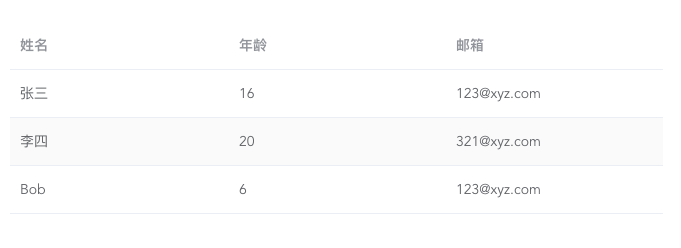
<SuperTable :tableData="tableData" :headerList="headerList" editable></SuperTable>
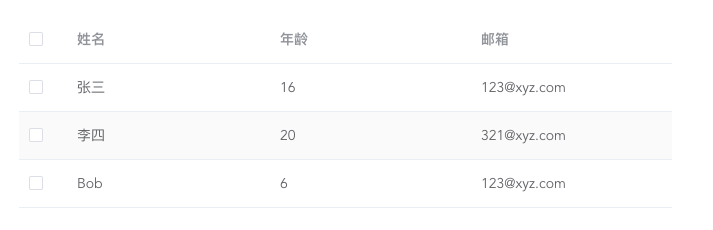

-
高级特性
-
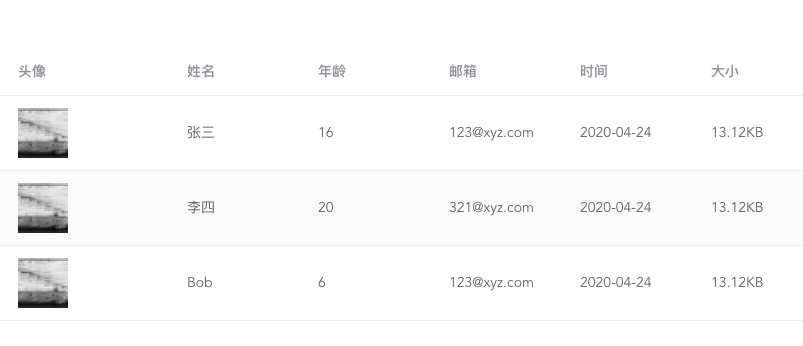
SuperTable 内部自定义了一部分常见的类型方便使用
图片(type:"image") 时间(type:"time"),文件大小(type:"size"),段落(type:"textarea")
headerList: [
{label:"头像",type:"image",prop:"avatar"},
{ label: '姓名', prop: 'name' },
{ label: '年龄', prop: 'age' },
{ label: '邮箱', prop: 'email' },
{ label: '时间', type: 'time',format:"",prop:"addTime"},
{ label: '大小', type: 'size',prop:"docSize"},
],
tableData: [
{
name: '张三',
age: 16,
email: '123@xyz.com',
docSize:13435,
addTime:1587695391141,
avator:"https://picsum.photos/200/300"
},
{
name: '李四',
age: 20,
email: '321@xyz.com',
docSize:13435,
addTime:1587695391141,
avator:"https://picsum.photos/200/300"
},
{
name: 'Bob',
age: 6,
email: '123@xyz.com',
docSize:13435,
addTime:1587695391141,
avator:"https://picsum.photos/200/300"
}
],
- 自定义表格 table-column-item
经常会遇到表格中需要显示复杂内容的需求,SuperTable 采用了插槽的方式进行封装,只需在 headerList 中声明
type="slotItem" name="slotName"
headerList: [
{ label: '姓名', prop: 'name' },
{ label: '年龄', prop: 'age' },
{ label: '邮箱', prop: 'email' },
{ label: '时间', type: 'time',format:"",prop:"addTime"},
{ label: '大小', type: 'size',prop:"docSize"},
{ label: '自定义', name: 'userData', type: 'slotItem' },
],
<SuperTable :tableData="tableData" :headerList="headerList" editable">
<template v-slot:userData="slotData">
<el-tooltip placement="right">
<div slot="content">
<div>{{slotData.data.name+slotData.data.age+slotData.data.email}}</div>
</div>
<el-button>自定义</el-button>
</el-tooltip>
</template>
</SuperTable>

-
编辑模式下自定义操作栏
SuperTable 内部自定义了修改、查看、删除操作栏
你也可以设置:action-show="false"'关闭默认操作栏并通过 moreTabs 的具名插槽自定义操作栏
<superTable :action-show="false">
<template v-slot:moreTabs="slotData">
<span >自定义操作1</span>
<span >自定义操作2</span>
<span >自定义操作3</span>
</template>
</superTable>
还有翻页、翻页缓存等功能,对于经常跟表格打交道的绝对是解放生产力的神器





