



Security News
CVE Volume Surges Past 48,000 in 2025 as WordPress Plugin Ecosystem Drives Growth
CVE disclosures hit a record 48,185 in 2025, driven largely by vulnerabilities in third-party WordPress plugins.
By Sarah Gooding - Jan 09, 2026
express-react-middleware
Advanced tools
A middleware able to render react components in your server with node.js as views, it is also able to render routes in an array of routes in react-router.
Have you ever saw that whenever you're making a new project or when an existing project have to be updated you must to follow and do a lot of steps to achieve the desired outcome in the server when you want to apply SSR? Well, this middleware avoid having to remember all those steps even react-router.
npm install --save express-react-middleware
or
yarn add express-react-middleware
There are 2 ways to use it in and is using a routes config file or by resolving the components.
The template is just an html file with a basic markup like this:
<!DOCTYPE html>
<html>
  <head>
    <meta name="viewport" content="width=device-width,initial-scale=1,minimum-scale=1,maximum-scale=1,user-scalable=no">
    <meta http-equiv="X-UA-Compatible" content="IE=10; IE=9; IE=8; IE=7; IE=EDGE">
    <meta charset="utf-8"><meta name="description" content="">
    <meta name="keywords" content="">
    <meta name="author" content="">
    <title></title>
  </head>
  <body>
    <div id="root">Default template, this doesn't render any component</div>
    <script src="./bundle.js"></script>
  </body>
</html>
This is an example of how to require a template (synchronous, recommended way):
import { readFileSync } from 'fs'
import { resolve } from 'path'

const root = (path) => resolve(__dirname, path)

let template = (() => {
  try {
    return readFileSync(root('./index.html'), { encoding: 'UTF-8' });
  } catch (err) {
    // If the template file *.html is not found then it throws an error instead of continuing the flow.
    throw err;
  }
})();
| name | type | optional | required | sync render | async render | description |
|---|---|---|---|---|---|---|
| templateHTML | string | x | √ | √ | √ | The instance of the html file |
| mountId | object | x | √ | √ | √ | The id of the element where the component or components will be rendered |
| componentsPath | string | √ | (√/x) | √ | √ | Here you have to pass the absolute path to locate the components. (required if routes option is not set) If routes option is present this option is ignored. |
| routes | array | √ | (√/x) | √ | √ | the routes file used in react-router to match and render the components. (required if componentsPath is not set) |
Example of how the options should be written:
import { resolve } from 'path'
const root = (path) => resolve(__dirname, path)

let options = {
  templateHTML: template,
  mountId: "root",
  componentsPath: root("path/to/your/components")
};

// or with a file with the routes used in react-router:

import routes from './routes'

// ...

let options = {
  templateHTML: template,
  mountId: "root",
  routes: { collection: routes, /*extractComponent: boolean, default false*/ }
};
import reactMiddleware from 'express-react-middleware'

// ...

app.use(reactMiddleware(options));
When the middleware has already been set you will find a new function property with the name render in the request object.
The req.render could take some arguments:
| name | type | optional | used in sync render | used in async render |
|---|---|---|---|---|
| component | string | √ | √ | √ |
| props | object | √ | √ | √ |
| callback | function | √ | x | √ |
When you have used the req.render function it will return an object with almost 6 properties:
| name | type | description |
|---|---|---|
| html | string | value containing the template html with the component rendered, the initial state and props. |
| context | object | used in redirections or to set customs status code to the response. |
| component | object | The component found. |
| props | object | The properties that you passed before the render process |
| template | string | The original template value without any modification. |
| changes | object | Contains almost all the changes occurred |
app.get('/contact', (req, res) => {
  // 1.
  let { html, context } = req.render('contact');
  // ...

  // 2.
  let { html, context } = req.render('contact', { title: 'Contact', msg: 'Welcome!' });
  // ...

  // 3.
  let { html, context } = req.render('contact', null);
  // ...

  // 4. This maner is only valid if you have set the "routes" option in the middleware cause it uses "req.url" to find the component instead of having to write the name of a component react file:
  let { html, context } = req.render();
  // ...
});
app.get('/contact', (req, res) => {
  // 1. contact is the name of a component and it is resolved with "componentsPath" (Only if routes option is not set).
  req.render('contact', ({html, context}) => {
    // ...
  });

  // 2.
  req.render('contact', {title: 'Contact', msg: 'Welcome!'}, ({html, context}) => {
    // ...
  });

  // 3.
  req.render('contact', null, ({html, context}) => {
    // ...
  });

  // 4. This maner is only valid if you have set the `routes` option in the middleware cause it uses `req.url` to find the component instead of having to write the name of a component react file:
  req.render(({html, context}) => {
    // ...
  });
})
app.get('/contact', (req, res) => {
  // ... {html, context}

  if (context.url) {
    res.redirect(context.status, context.url);
    // context.url is used to redirect or context.status when you need to send a specific status in your routes.
  } else {
    res.status(context.status).send(html);
    // html is a string value containing the template html also it contains the component rendered.
  }
});
npm run test
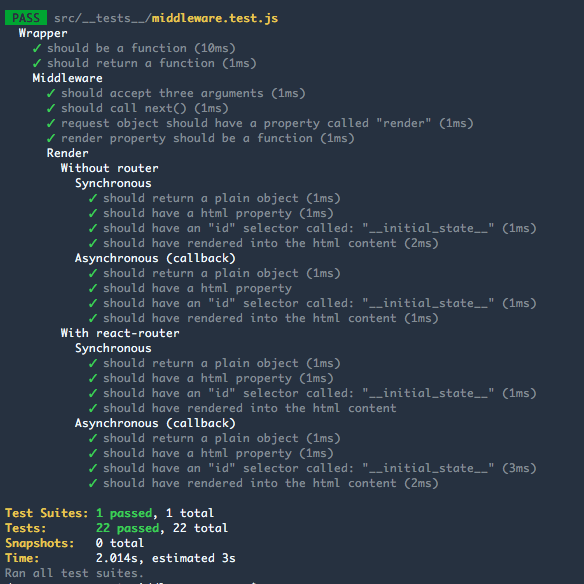
:+1:
See examples folder
FAQs
Render react components from the server as views
We found that express-react-middleware demonstrated a not healthy version release cadence and project activity because the last version was released a year ago. It has 1 open source maintainer collaborating on the project.
Did you know?

Socket for GitHub automatically highlights issues in each pull request and monitors the health of all your open source dependencies. Discover the contents of your packages and block harmful activity before you install or update your dependencies.
Security News
CVE disclosures hit a record 48,185 in 2025, driven largely by vulnerabilities in third-party WordPress plugins.

Security News
Socket CEO Feross Aboukhadijeh joins Insecure Agents to discuss CVE remediation and why supply chain attacks require a different security approach.

Security News
Tailwind Labs laid off 75% of its engineering team after revenue dropped 80%, as LLMs redirect traffic away from documentation where developers discover paid products.