
generate-travis
Advanced tools

generate-travis - npm Package Compare versions
| sudo: false | ||
| language: node_js | ||
| node_js: | ||
| - "6" | ||
| - "5" | ||
| - "4" | ||
| - "0.12" | ||
| - "0.10" | ||
| matrix: | ||
| fast_finish: true | ||
| allow_failures: | ||
| - node_js: "4" | ||
| - node_js: "0.10" | ||
| - node_js: "0.12" |
+10
-10
@@ -7,12 +7,12 @@ 'use strict'; | ||
| module.exports = function(app) { | ||
| // returns false if `app` is not an instance of Generate, or `generate-travis` is already registered | ||
| // returns false if `app` if generator is already registered | ||
| if (!isValid(app, 'generate-travis')) return; | ||
| /** | ||
| * Generates a `.travis.yml` file in the current working directory. | ||
| * Generate a `.travis.yml` file to the current working directory. | ||
| * | ||
| * ```sh | ||
| * $ gen travis:travis | ||
| * $ gen travis | ||
| * ``` | ||
| * @name travis:travis | ||
| * @name travis | ||
| * @api public | ||
@@ -22,6 +22,6 @@ */ | ||
| app.task('travis', { silent: true }, function(cb) { | ||
| return app.src('travis.yml', {cwd: path.resolve(__dirname, 'templates')}) | ||
| return app.src('_travis.yml', {cwd: path.resolve(__dirname, 'templates')}) | ||
| .pipe(app.dest(function(file) { | ||
| file.basename = '.travis.yml'; | ||
| return app.options.dest || app.cwd; | ||
| return app.cwd; | ||
| })); | ||
@@ -31,3 +31,4 @@ }); | ||
| /** | ||
| * Alias to enable running the [travis](#travis) task with the following command: | ||
| * The default task is an alias that enables Generate's CLI to run the [travis](#travis) | ||
| * task with the following command: | ||
| * | ||
@@ -37,7 +38,6 @@ * ```sh | ||
| * ``` | ||
| * @name travis:default | ||
| * @api public | ||
| * @name default | ||
| */ | ||
| app.task('default', { silent: true }, ['travis']); | ||
| app.task('default', ['travis']); | ||
| }; |
+38
-9
| { | ||
| "name": "generate-travis", | ||
| "description": "Generate a .travis.yml file to the cwd or specified directory. Install globally and run with generate's CLI, or use as a component in your own generator.", | ||
| "version": "0.1.3", | ||
| "version": "0.2.0", | ||
| "homepage": "https://github.com/generate/generate-travis", | ||
@@ -15,2 +15,4 @@ "author": "Jon Schlinkert (https://github.com/jonschlinkert)", | ||
| "index.js", | ||
| "LICENSE", | ||
| "README.md", | ||
| "templates" | ||
@@ -26,17 +28,44 @@ ], | ||
| "dependencies": { | ||
| "is-valid-app": "^0.1.1" | ||
| "is-valid-app": "^0.2.0" | ||
| }, | ||
| "devDependencies": { | ||
| "delete": "^0.3.2", | ||
| "generate": "^0.7.3", | ||
| "generate": "^0.9.8", | ||
| "gulp-format-md": "^0.1.9", | ||
| "mocha": "^2.4.5", | ||
| "npm-install-global": "^0.1.1" | ||
| "mocha": "^2.5.3", | ||
| "npm-install-global": "^0.1.2" | ||
| }, | ||
| "keywords": [ | ||
| "boilerplate", | ||
| "build", | ||
| "cli", | ||
| "cli-app", | ||
| "command-line", | ||
| "create", | ||
| "dev", | ||
| "development", | ||
| "framework", | ||
| "front", | ||
| "frontend", | ||
| "generate", | ||
| "generate-generator", | ||
| "generate-plugin", | ||
| "generategenerator", | ||
| "generateplugin", | ||
| "generator", | ||
| "init", | ||
| "initialize", | ||
| "new", | ||
| "plugin", | ||
| "travis" | ||
| "project", | ||
| "projects", | ||
| "scaffold", | ||
| "scaffolder", | ||
| "scaffolding", | ||
| "template", | ||
| "templates", | ||
| "travis", | ||
| "webapp", | ||
| "yeoman", | ||
| "yo" | ||
| ], | ||
@@ -56,2 +85,3 @@ "verb": { | ||
| "generate-file", | ||
| "generate-package", | ||
| "generate-git" | ||
@@ -64,6 +94,5 @@ ] | ||
| "verb-readme-generator", | ||
| "gulp", | ||
| "assemble", | ||
| "base", | ||
| "assemble", | ||
| "verb-generate-readme" | ||
| "gulp" | ||
| ], | ||
@@ -70,0 +99,0 @@ "lint": { |
+50
-99
@@ -1,99 +0,60 @@ | ||
| # generate-travis [](https://www.npmjs.com/package/generate-travis) [](https://npmjs.org/package/generate-travis) [](https://travis-ci.org/generate/generate-travis) | ||
| <p align="center"> | ||
| <a href="https://github.com/generate/generate"> | ||
| <img height="150" width="150" src="https://raw.githubusercontent.com/generate/generate/master/docs/logo.png"> | ||
| </a> | ||
| </p> | ||
| Generate a .travis.yml file to the cwd or specified directory. Install globally and run with generate's CLI, or use as a component in your own generator. | ||
| ## What is generate? | ||
| # generate-travis | ||
| Generate is a command line tool and developer framework for scaffolding out new GitHub projects using [generators](https://github.com/generate/generate/blob/master/docs/generators.md) and [tasks](https://github.com/generate/generate/blob/master/docs/tasks.md). Answers to prompts and the user's environment can be used to determine the templates, directories, files and contents to build. Support for [gulp](http://gulpjs.com), [base](https://github.com/node-base/base) and [assemble](https://github.com/assemble/assemble) plugins, and much more. | ||
| [](https://www.npmjs.com/package/generate-travis) [](https://npmjs.org/package/generate-travis) [](https://travis-ci.org/generate/generate-travis) | ||
| For more information about Generate: | ||
|  | ||
| * Visit the [generate project](https://github.com/generate/generate) | ||
| * Visit the [generate documentation](https://github.com/generate/generate/blob/master/docs/) | ||
| * Find [generators on npm](https://www.npmjs.com/browse/keyword/generate-generator) (help us [author generators](https://github.com/generate/generate/blob/master/docs/micro-generators.md)) | ||
| ## What is "Generate"? | ||
| ## tldr | ||
| Generate is a command line tool and developer framework for scaffolding out new GitHub projects using [generators](https://github.com/generate/generate/blob/master/docs/generators.md) and [tasks](https://github.com/generate/generate/blob/master/docs/tasks.md). | ||
| **Install generate** | ||
| Answers to prompts and the user's environment can be used to determine the templates, directories, files and contents to build. Support for [gulp](http://gulpjs.com), [base](https://github.com/node-base/base) and [assemble](https://github.com/assemble/assemble) plugins, and much more. | ||
| To use [generate](https://github.com/generate/generate) from the command line, it must first be installed globally with npm: | ||
| **For more information**: | ||
| ```sh | ||
| $ npm install --global generate | ||
| ``` | ||
| * Visit the [generate project](https://github.com/generate/generate/) | ||
| * Visit the [generate documentation](https://github.com/generate/generate/blob/master/docs/) | ||
| * Find [generators on npm](https://www.npmjs.com/browse/keyword/generate-generator) (help us [author generators](https://github.com/generate/generate/blob/master/docs/micro-generators.md)) | ||
| **Install `generate-travis`** | ||
| ## Getting started | ||
| Next, install this generator: | ||
| ### Install | ||
| ```sh | ||
| $ npm install --global generate-travis | ||
| ``` | ||
| **Run** | ||
| You should now be able to run this generator with the following command: | ||
| ```sh | ||
| $ gen travis | ||
| ``` | ||
| ## CLI | ||
| **Installing the CLI** | ||
| To run the `travis` generator from the command line, you'll need to install [generate](https://github.com/generate/generate) globally first. You can that now with the following command: | ||
| To run the `travis` generator from the command line, you'll need to install [Generate](https://github.com/generate/generate) globally first. You can do that now with the following command: | ||
| ```sh | ||
| $ npm install generate --global | ||
| $ npm install --global generate | ||
| ``` | ||
| This adds the `gen` command to your system path, allowing it to be run from any directory. Visit the [generate](https://github.com/generate/generate) project and documentation to learn more. | ||
| This adds the `gen` command to your system path, allowing it to be run from any directory. | ||
| **Run the `travis` generator from the command line** | ||
| **Install generate-travis** | ||
| Once both [generate](https://github.com/generate/generate) and `generate-travis` are installed globally, you can run the generator with the following command: | ||
| Install this module with the following command: | ||
| ```sh | ||
| $ gen travis | ||
| $ npm install --global generate-travis | ||
| ``` | ||
| ### [travis:travis](generator.js#L20) | ||
| ### Usage | ||
| Generates a `.travis.yml` file in the current working directory. | ||
| Run this generator's `default` [task](https://github.com/generate/generate/blob/master/docs/tasks.md#default) with the following command: | ||
| **Example** | ||
| ```sh | ||
| $ gen travis:travis | ||
| ``` | ||
| ### [travis:default](generator.js#L38) | ||
| Alias to enable running the [travis](#travis) task with the following command: | ||
| **Example** | ||
| ```sh | ||
| $ gen travis | ||
| ``` | ||
| ## CLI | ||
| **What you should see in the terminal** | ||
| **Help** | ||
| Get general help and a menu of available commands: | ||
| ```sh | ||
| $ gen help | ||
| ``` | ||
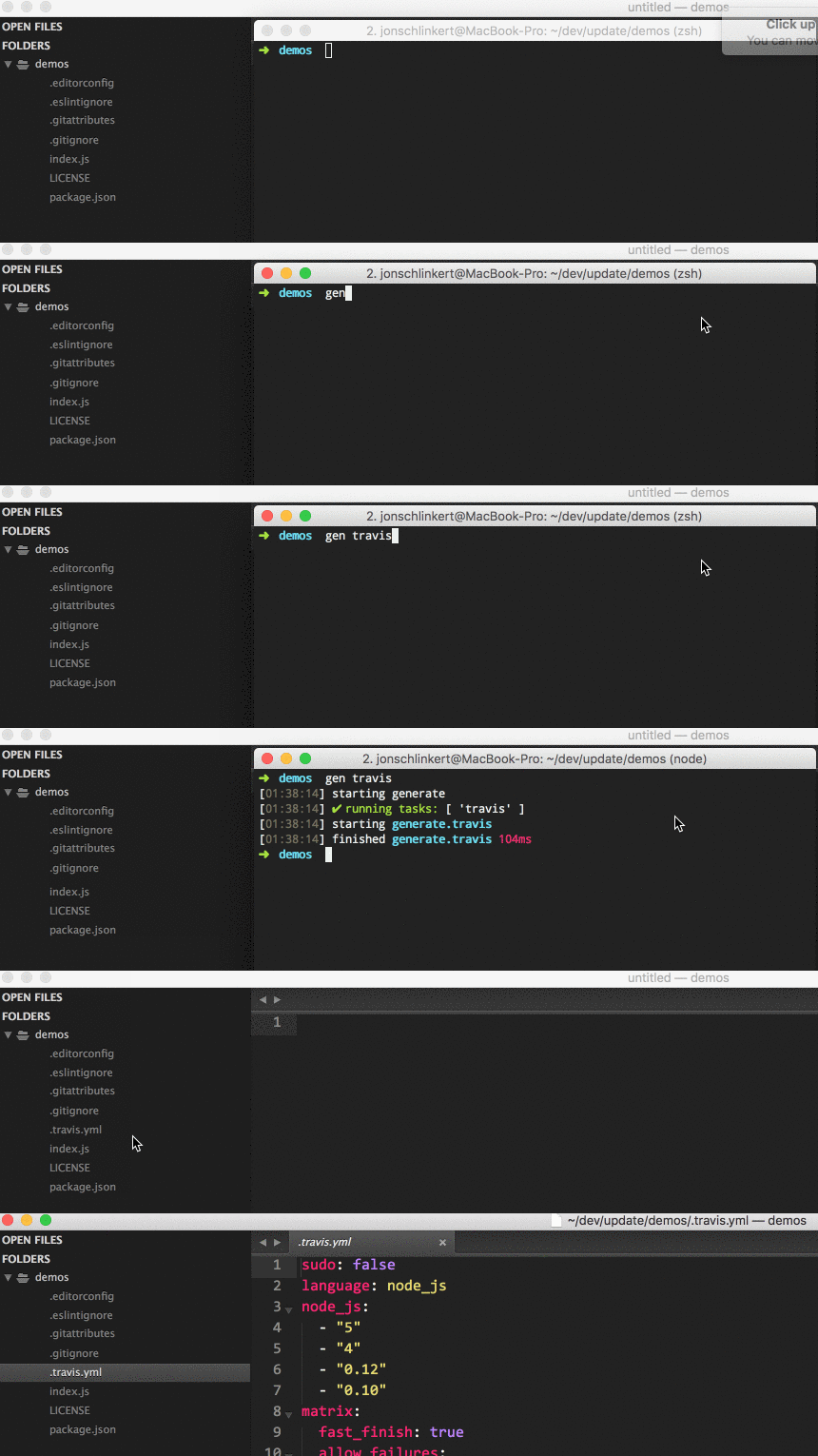
| **Running the `travis` generator** | ||
| Once both [generate](https://github.com/generate/generate) and `generate-travis` are installed globally, you can run the generator with the following command: | ||
| ```sh | ||
| $ gen travis | ||
| ``` | ||
| If completed successfully, you should see both `starting` and `finished` events in the terminal, like the following: | ||
@@ -109,38 +70,25 @@ | ||
| ## API | ||
| ### Help | ||
| ### Install locally | ||
| To see a general help menu and available commands for Generate's CLI, run: | ||
| If you want to use `generate-travis` as a plugin or sub-generator to extend the features and settings in your own generator, you must first install it locally: | ||
| Install with [npm](https://www.npmjs.com/): | ||
| ```sh | ||
| $ npm install --save generate-travis | ||
| $ gen help | ||
| ``` | ||
| ### Use as a plugin | ||
| ## Tasks | ||
| Use as a [plugin](https://github.com/generate/generate/blob/master/docs/plugins.md) if you want to extend your own generator with the features, settings and tasks of `generate-travis`, as if they were created on your generator: | ||
| All available tasks. | ||
| ```js | ||
| module.exports = function(app) { | ||
| app.use(require('generate-travis')); | ||
| }; | ||
| ``` | ||
| ### [travis](generator.js#L20) | ||
| Visit Generate's [plugin docs](https://github.com/generate/generate/blob/master/docs/plugins.md) to learn more about plugins. | ||
| Generate a `.travis.yml` file to the current working directory. | ||
| ### Use as a sub-generator | ||
| **Example** | ||
| Use as a [sub-generator](https://github.com/generate/generate/blob/master/docs/generators.md) if you want to add `generate-travis` to a _namespace_ in your generator: | ||
| ```js | ||
| module.exports = function(app) { | ||
| // register the generate-travis with whatever name you want | ||
| app.register('foo', require('generate-travis')); | ||
| }; | ||
| ```sh | ||
| $ gen travis | ||
| ``` | ||
| Visit Generate's [sub-generator docs](https://github.com/generate/generate/blob/master/docs/sub-generators.md) to learn more about sub-generators. | ||
| Visit Generate's [documentation for tasks](https://github.com/generate/generate/blob/master/docs/tasks.md). | ||
@@ -153,17 +101,20 @@ ## About | ||
| * [generate-git](https://www.npmjs.com/package/generate-git): Generator for initializing a git repository and adding first commit. | [homepage](https://github.com/generate/generate-git "Generator for initializing a git repository and adding first commit.") | ||
| * [generate-package](https://www.npmjs.com/package/generate-package): Generate] a package.json from a pre-defined or user-defined template. This generator can be used from… [more](https://github.com/generate/generate-package) | [homepage](https://github.com/generate/generate-package "[Generate] a package.json from a pre-defined or user-defined template. This generator can be used from the command line when globally installed, or as a plugin or sub-generator in your own generator.") | ||
| * [generate](https://www.npmjs.com/package/generate): Command line tool and developer framework for scaffolding out new GitHub projects. Generate offers the… [more](https://github.com/generate/generate) | [homepage](https://github.com/generate/generate "Command line tool and developer framework for scaffolding out new GitHub projects. Generate offers the robustness and configurability of Yeoman, the expressiveness and simplicity of Slush, and more powerful flow control and composability than either.") | ||
| ### Contributing | ||
| ### Community | ||
| Pull requests and stars are always welcome. For bugs and feature requests, [please create an issue](../../issues/new). | ||
| Are you using [Generate](https://github.com/generate/generate) in your project? Have you published a [generator](https://github.com/generate/generate/blob/master/docs/generators.md) and want to share your project with the world? | ||
| ### Building docs | ||
| Here are some suggestions! | ||
| _(This document was generated by [verb-generate-readme](https://github.com/verbose/verb-generate-readme) (a [verb](https://github.com/verbose/verb) generator), please don't edit the readme directly. Any changes to the readme must be made in [.verb.md](.verb.md).)_ | ||
| * If you get like Generate and want to tweet about it, please feel free to mention `@generatejs` or use the `#generatejs` hashtag | ||
| * Show your love by starring [Generate](https://github.com/generate/generate) and `generate-travis` | ||
| * Get implementation help on [StackOverflow](http://stackoverflow.com/questions/tagged/generate) (please use the `generatejs` tag in questions) | ||
| * **Gitter** Discuss Generate with us on [Gitter](https://gitter.im/generate/generate) | ||
| * If you publish an generator, thank you! To make your project as discoverable as possible, please add the keyword `generategenerator` to package.json. | ||
| To generate the readme and API documentation with [verb](https://github.com/verbose/verb): | ||
| ### Contributing | ||
| ```sh | ||
| $ npm install -g verb verb-generate-readme && verb | ||
| ``` | ||
| Pull requests and stars are always welcome. For bugs and feature requests, [please create an issue](../../issues/new). | ||
@@ -192,2 +143,2 @@ ### Running tests | ||
| _This file was generated by [verb](https://github.com/verbose/verb), v0.9.0, on July 16, 2016._ | ||
| _This file was generated by [verb-generate-readme](https://github.com/verbose/verb-generate-readme), v0.1.28, on July 28, 2016._ |
| sudo: false | ||
| language: node_js | ||
| node_js: | ||
| - "6" | ||
| - "5" | ||
| - "4" | ||
| - "0.12" | ||
| - "0.10" | ||
| matrix: | ||
| fast_finish: true | ||
| allow_failures: | ||
| - node_js: "4" | ||
| - node_js: "0.10" | ||
| - node_js: "0.12" |
Fixed alerts
New author
Supply chain riskA new npm collaborator published a version of the package for the first time. New collaborators are usually benign additions to a project, but do indicate a change to the security surface area of a package.
Found 1 instance in 1 package
Improved metrics
- Number of medium supply chain risk alerts
0
-100%Worsened metrics
- Total package byte prevSize
11001
-1.93%- Number of lines in readme file
141
-25.79%Dependency changes
+ Added
is-valid-app@0.2.1(transitive)+ Added
is-valid-instance@0.2.0(transitive)- Removed
is-valid-app@0.1.2(transitive)- Removed
is-valid-instance@0.1.0(transitive)Updated
is-valid-app@^0.2.0