google-sheets-node





A lightweight wrapper around the official Google Sheets API that makes it easy to read and write rows. It's written in TypeScript and uses async/await to handle requests to Google's API.
Usage
The library only supports interacting with rows in Google Sheets. Not with columns or individual cells.
When fetching rows, the library will map your data to Javascript objects. When inserting new rows, you can also use objects.
Authentication
Follow step 1 of the official "Node.js Quickstart": https://developers.google.com/sheets/api/quickstart/nodejs. This will walk you through enabling the Sheets API and creating credentials (JSON file).
Afterwards set the environment variable GOOGLE_APPLICATION_CREDENTIALS so that it contains the path to your credentials file. Could be something like this:
export GOOGLE_APPLICATION_CREDENTIALS=/path/to/my/credentials.json
Other methods of authenticating are currently not supported.
This library assumes that the first row in your spreadsheet is used as a header.
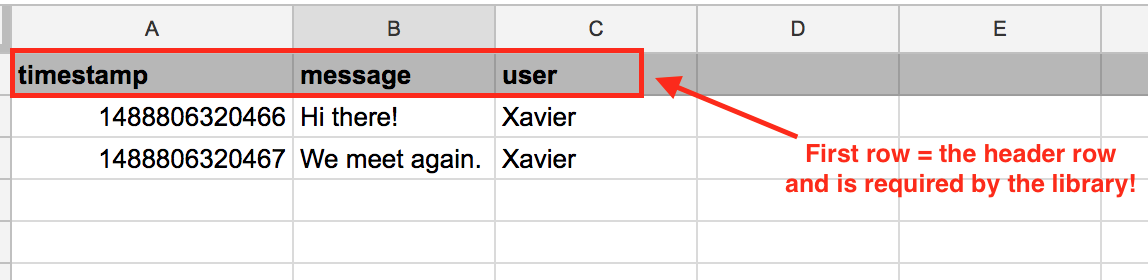
The header row is used to transform your rows to Javascript objects. Try to keep the values in the header simple (no spaces, no special characters, ...) The library will convert your titles to camelCase, so be aware of this. For example: Time posted will be converted to timePosted.
Getting rows
This will map your rows to objects, using the first row of your spreadsheet as header (see "Header row"):
let sheet = new GoogleSheet({
sheetId: "XXXXXXXXXX-XXXXXXXXX-XXXXXXXX",
range: "'Sheet 1'!A:C"
});
let data = await sheet.getRows();
console.log(data);
For example, this spreadsheet:
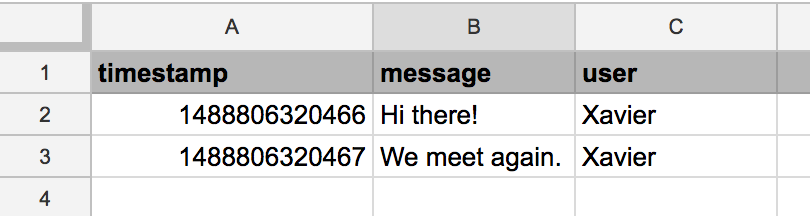
Will be mapped to this:
[
    { timestamp: '1488806320466', message: 'Hi there!', user: 'Xavier' },
    { timestamp: '1488806320467', message: 'We meet again.', user: 'Xavier' }
]
Writing new rows
To write new rows you have to construct an array of objects, much like the output of getRows().
Each object will be inserted as a row:
let sheet = new GoogleSheet({
sheetId: "XXXXXXXXXX-XXXXXXXXX-XXXXXXXX",
range: "'Sheet 1'!A:C"
});
let data = [
{
timestamp: Date.now(),
message: 'Another message',
user: 'Peter'
},
{
timestamp: Date.now(),
message: 'Awesome work!',
user: 'Simon'
}
]
await sheet.appendRows(data);
Note: the order of the fields doesn't matter. The library will match your data with the header row and insert it in the correct columns.
Warning: the library will throw an error if your data contain a property that isn't in the header row. However, you can omit rows (they will be empty).
Contributing & License
Feel free to fork this library, improve it or create issues and pull requests.





