Grapesjs Component Code Editor
A plugin that allows you to edit the code of a component that is selected on the canvas
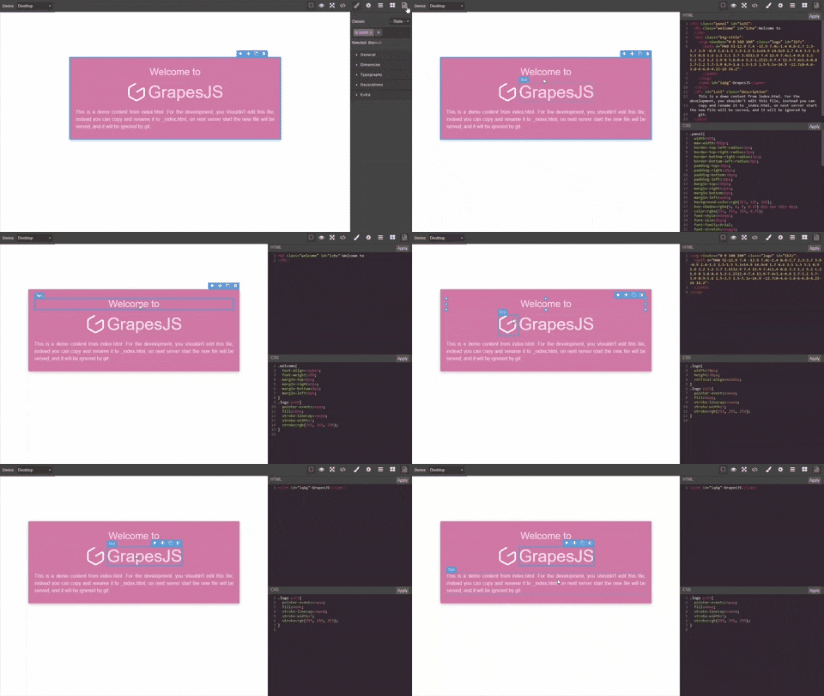
DEMO
Recommended-use grapesje-parser-postcss with this plugin to avoid issues with styles as the default parser is inconsistent and will add a lot of extra rules to your css, more explained here
HTML
<link href="https://unpkg.com/grapesjs/dist/css/grapes.min.css" rel="stylesheet">
<script src="https://unpkg.com/grapesjs"></script>
<link href="https://unpkg.com/grapesjs-component-code-editor/dist/grapesjs-component-code-editor.min.css" rel="stylesheet">
<script src="https://unpkg.com/grapesjs-component-code-editor"></script>

<div id="gjs"></div>
JS
const editor = grapesjs.init({
container: '#gjs',
height: '100%',
fromElement: true,
storageManager: false,
panels: {
defaults: [
{
buttons: [
{
attributes: { title: 'Open Code' },
className: 'fa fa-code',
command: 'open-code',
id: 'open-code'
}
],
id: 'views'
}
]
},
plugins: ['grapesjs-component-code-editor'],
});
CSS
body, html {
  margin: 0;
  height: 100%;
}
Summary
- Plugin name:
grapesjs-component-code-editor
- Commands
open-code - opens code editor in right panelcode-editor-object - get CodeEditor objectcode-editor-constructor - get CodeEditor constructor
Options
panelId | views-container | Id of panel to append code editor. |
appendTo | .gjs-pn-views-container | Append code editor to an element not views-container (class or id). |
openState | { pn: '35%', cv: '65%' } | Determine width of views panel (pn) and canvas (cv) in the open state. |
closedtate | { pn: '15%', cv: '85%' } | Determine width of views panel (pn) and canvas (cv) in the closed state. |
codeViewOptions | {} | Code view/editor options. (more info) |
preserveWidth | false | Stop resizing openState and closedState. Preserve views panel and canvas sizes. |
clearData | false | Remove all gjs-data attributes from the component. |
editJs | false | Lets you edit component scripts allowScripts must be set to true. |
cleanCssBtn | true | Used to remove css from the Selector Manager. |
htmlBtnText | Apply | Save HTML button text. |
cssBtnText | Apply | Save CSS button text. |
cleanCssBtnText | Delete | Clean HTML button text. |
Tip-grapesjs-script-editor is better suited for editing scripts instead of using editJs, reason being editJs will inject scripts as separate components onto the canvas which often interferes with the main editor. grapesjs-script-editor avoids this by injecting scripts directly into a component therefore avoiding the use of allowScripts.
cleanCssBtn-When you delete a selector in the code-editor it is still in the Selector Manager therefore it will still affect the component after saving, this button removes the selector from both the code-editor and Selector Manager. Only valid css rules can be removed eg .class{ color: blue }
Download
- CDN
https://unpkg.com/grapesjs-component-code-editor
- NPM
npm i grapesjs-component-code-editor
- GIT
git clone https://github.com/ju99ernaut/grapesjs-component-code-editor.git
Usage
Directly in the browser
<link href="https://unpkg.com/grapesjs/dist/css/grapes.min.css" rel="stylesheet"/>
<script src="https://unpkg.com/grapesjs"></script>
<link href="./dist/grapesjs-component-code-editor.min.css" rel="stylesheet">
<script src="./dist/grapesjs-component-code-editor.min.js"></script>
<div id="gjs"></div>
<script type="text/javascript">
var editor = grapesjs.init({
container: '#gjs',
panels: { }
plugins: ['grapesjs-component-code-editor'],
pluginsOpts: {
'grapesjs-component-code-editor': { }
}
});
</script>
Modern javascript
import grapesjs from 'grapesjs';
import plugin from 'grapesjs-component-code-editor';
import 'grapesjs/dist/css/grapes.min.css';
import 'grapesjs-component-code-editor/dist/grapesjs-component-code-editor.min.css';
const editor = grapesjs.init({
container : '#gjs',
plugins: [plugin],
pluginsOpts: {
[plugin]: { }
}
plugins: [
editor => plugin(editor, { }),
],
});
Adding after editor initialization
const pn = editor.Panels;
const panelViews = pn.addPanel({
id: 'views'
});
panelViews.get('buttons').add([{
attributes: {
title: 'Open Code'
},
className: 'fa fa-file-code-o',
command: 'open-code',
togglable: false,
id: 'open-code'
}]);
Development
Clone the repository
$ git clone https://github.com/ju99ernaut/grapesjs-component-code-editor.git
$ cd grapesjs-component-code-editor
Install dependencies
$ npm i
Build css
$ npm run build:css
Start the dev server
$ npm start
Build the source
$ npm run build
License
MIT






