



Demo: npm run dev (this project)
basic:
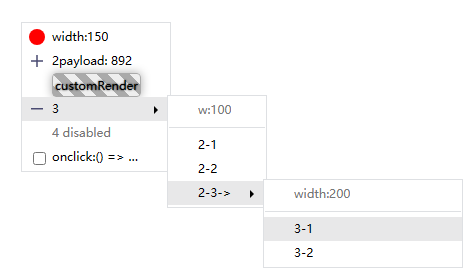
special situation:

Brief introduction
- Native js right-click menu encapsulation. It can also be used for the onclick event to open the menu.
- The default style is completed by inserting the style tag through js, paying attention to the class namespace.
- Only the most basic styles are provided.
- TypeScript ✔
- default z-index = 5000;
- Dark mode support ✔
- Gitee
- 中文🇨🇳
Usage
npm i ja-contextmenu
import ContextMenu from 'ja-contextmenu';
const contextMenu = new ContextMenu();
const menuOption = {
items:[
{ label:'go', onclick(e, payload){...} }
]
};
const menu = contextMenu.create(menuOption);
window.addEventListener('contextmenu', e => { menu.show(e, payload) });
const menu2 = contextMenu.createAsync(menuOption);
window.addEventListener('click', e => { menu2().show(e, payload) });
import '../styles/dark.css';
const darkMenu = contextMenu.create({
class: 'dark',
items:[
{ label:'Dark Mode', onclick(e, payload){...} }
]
});
Attention
Please delete the "^"before the version number of ja-contextmenu in package.json after installation to prevent the unexpected automatic update of npm.
(eg: "ja-contextmenu":"^1.3.0" => "ja-contextmenu":"1.3.0")
Limited energy, there is no guarantee that the use mode will not be changed when the small version is updated.
Feature Log
Example
import ContextMenu, { h } from 'ja-contextmenu';
const contextMenu = new ContextMenu({
width: 200,
fixMenuWhenScroll: false,
hideMenuWhenScroll: true
});
const menuOption = {
items: [
{
label: 'menu1',
icon: './assets/images/ico.png',
class: 'customClass',
tip: 'tip1',
show: true,
disabled: false,
onclick(e, payload) {
console.log('menu1 click', payload);
},
},
{ type: '---' },
{
label: payload => 'menu2',
icon: payload => 'icon href2',
arrowIcon: payload => h('div', '>'),
class: payload => 'class2',
tip: payload => 'tip2',
show: payload => true,
disabled: payload => true
children: {
width: 120,
items: [
{
label: 'sub menu1',
onclick: (e, payload) => {
console.log('sub menu1 click', payload)
}
},{
class: 'li-class-name',
customItem: document.createElement('div')
},{
customItem: h('div',[
h('span', {
textContent: 'hello',
style:{
fontWeight:'bolder',
cssText: 'font-size:14px;'
},
className:'class-name',
}),
h('span.class-name#id',' world')
])
}
]
}
},
],
}
let menu = contextMenu.create(menuOption);
document.body.oncontextmenu = (e) => {
let payload = 'payload data: callback when click items';
menu.show(e, payload);
};
someButton.onclick = (e) => {
e.position = ['left','top'];
menu.show(e);
}
new ContextMenu(option: ContextMenuOption);
| width: number | 200 | Menu width |
| fixMenuWhenScroll: boolean | false | Is the menu fixed when scrolling(hideMenuWhenScroll=false) |
| hideMenuWhenScroll: boolean | true | Whether to close the menu when scrolling. |
| arrowIcon: MenuItemOption['arrowIcon'] | -- | Custom all sub menu's arrow,created by this contextMenu instance. |
Create a menu and return a MenuWrapper object.
| width?: number | 200 | Menu width. If the submenu is not configured, the width of the parent menu will be inherited. |
| class?: string|(payload)=>string | -- | Menu ul class |
| arrowIcon: MenuItemOption['arrowIcon'] | -- | this menu's arrow right icon (will inherit parent's menu's arrowIcon) |
items: MenuItemOption | -- | List configuration item |
| icon?: string|HTMLElement|(payload)=>string|HTMLElement | -- | icon url |
| arrowIcon:HTMLElement | (payload) => HTMLElement | -- | this items's arrow right icon |
| class?: string|(payload)=>string | -- | Menu item 'li' class |
| label?: string|(payload)=>string | -- | Item text |
| tip?: string|(payload)=>string | -- | Prompt text to the right of menu item |
| show?: boolean|(payload)=>boolean | true | Whether to show |
| disabled?: boolean|(payload)=>boolean | false | Whether to disabled |
type?: MenuItemType | -- | value '---' | 'hr' => <hr> split line |
customItem?: HTMLElement | -- | Custom Menu Item |
| onclick?: function(event, payload):boolean | -- | Click the event callback, and the parameter payload is the parameter passed in when calling the showMenu. return true does not close the menu after clicking. |
children?: MenuOption | -- | Submenu configuration |
const menu:MenuWrapper = contextMenu.create<Payload>(...)
1.show(pos: { x: number, y: number, position: [PanelPositionEnum, PanelPositionEnum] }, payload?: any): {position: [PanelPositionEnum, PanelPositionEnum]}
Show menu
- pos:
PointerEvent | MouseEvent | T extends { x: number, y: number }
- x: number
- y: number
- position: [PanelPositionEnum, PanelPositionEnum] x轴和y轴展示位置
- payload: Return in the onclick callback of the click menu.
- return: position: x position, y position.
2.hide()
3.destroy()
4.calcPosition(pos: { x: number, y: number, position: [PanelPositionEnum, PanelPositionEnum] }): { x: number, y: number, position: [PanelPositionEnum, PanelPositionEnum] }
Calculate the position of the menu, return the position of the menu and the position of the menu relative to the document.
PanelPositionEnum
enum PanelPositionEnum {
  TOP = 'top',
  BOTTOM = 'bottom',
  LEFT = 'left',
  RIGHT = 'right',
}
Typescript Demo
import ContextMenu from 'ja-contextmenu';
const contextMenu = new ContextMenu();
const menu = contextMenu.create<number | undefined>({
width: 100,
items: [
{
label: 'label',
onclick(e, payload:number) {
console.log(payload);
},
},
],
});
menu.show({x: 100,y:100}, 1)
menu.show({x: 100,y:100})
About Project
- demo: npm run dev
Demo code in /test folder
- build prod: npm run bd
- src/utils/h.ts => document.createElement()





