


Security News
Feross on TBPN: How North Korea Hijacked Axios
Socket CEO Feross Aboukhadijeh breaks down how North Korea hijacked Axios and what it means for the future of software supply chain security.
By Sarah Gooding - Apr 08, 2026
Puppeteer Report is another library for converting HTML to PDF using puppeteer, adding support of custom header, footer, and pagination.
Puppeteer has a very limited ability to customize the default header, footer, and pagination, however, it is the best tool available to convert HTML to PDF (supports the last version of CSS/HTML/JavaScript and fully Unicode characters) and make it possible to create fantastic reports using hundred of JavaScript/HTML/CSS tools, libraries, and templates.
Puppeteer Report adding support of customizing header, footer, and pagination to puppeteer. Also, it will let you use JavaScript code to apply customization in the converting process.
Puppeteer Report use puppeteer and pdf-lib under the hood to create a final PDF.
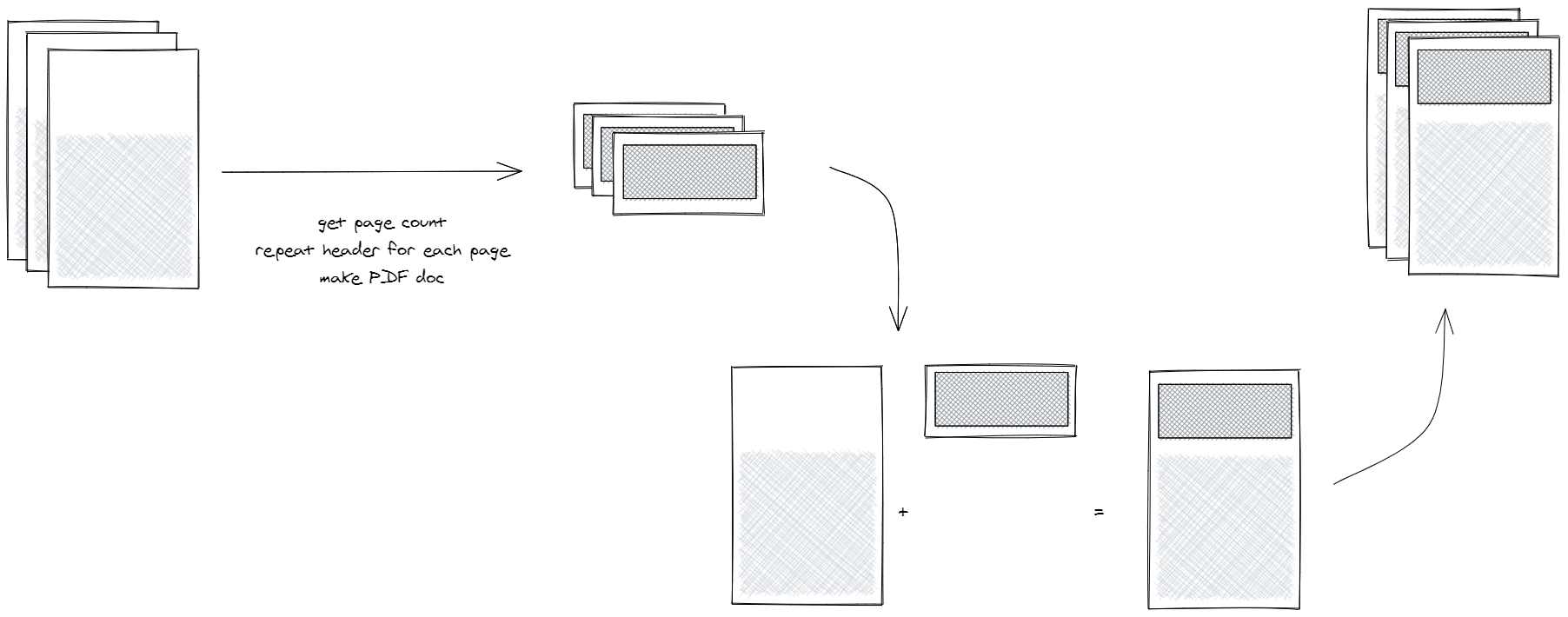
To support headers or footers, Puppeteer Report creates two PDF files. The first one is the HTML content without header and footer. And the second one is header and footer repeated based upon original content PDF pages' number, then it merges them together.
Using npm
npm i puppeteer-report
or yarn
yarn add puppeteer-report
The Puppeteer Report provides two methods to convert html to pdf, both accept an option object to customize the output pdf.
The full documentation of options object is available in the puppeteer doc
This package requires puppeteer or puppeteer-core (for chrome-aws-lambda you can go with puppeteer-core) and you need to install it manually by the below commands.
The Puppeteer Report version 3.0.0 supports both puppeteer and puppeteer-core from version 7.0.1 until the last version.
npm i --save puppeteer
yarn add puppeteer

** OR

npm i --save puppeteer-core
yarn add puppeteer-core
The pdf method accept 3 arguments. the first argument is puppeteer browser object and the second one is path to HTML in the local file system and the last one is the puppeteer PDF options object. the method returns the byte array. if you specify a path in the options object the output PDF will be saved in that path.
import report from "puppeteer-report";
import puppeteer from "puppeteer";

const browser = await puppeteer.launch({
  args: ["--no-sandbox", "--disable-setuid-sandbox", "--disable-dev-shm-usage"],
});

try {
  // you must use full path `home/puppeteer/index.hmtl`
  const file = path.join(__dirname, "index.html");
  await report.pdf(browser, file, {
    path: "report.pdf",
    format: "a4",
    margin: {
      bottom: "10mm",
      left: "10mm",
      right: "10mm",
      top: "10mm",
    },
  });
} finally {
  await browser.close();
}
The pdfPage method accepts a puppeteer page instance and an options object. this method lets you customize the page and even use it on none static pages. the method returns the byte array. if you specify a path in the options object the output PDF will be saved in that path.
import report from "puppeteer-report";
import puppeteer from "puppeteer";

const browser = await puppeteer.launch({
  args: ["--no-sandbox", "--disable-setuid-sandbox", "--disable-dev-shm-usage"],
});

try {
  const page = await browser.newPage();

  // you can use static files only with a full path
  // and `file:///` prefix like `file:///home/puppeteer/index.html`
  // or a website address
  await page.goto("https://google.com");

  await report.pdfPage(page, {
    path: "report.pdf",
    format: "a4",
    margin: {
      bottom: "10mm",
      left: "10mm",
      right: "10mm",
      top: "10mm",
    },
  });
} finally {
  await browser.close();
}
With Puppeteer Report you can customize the output pdf with custom HTML elements.
Add id="header" to the root header element in the HTML file.
<div id="header">
  <h1>Header</h1>
</div>
Add id="footer" to the root footer element in the HTML file.
<div id="footer">
  <h1>Footer</h1>
</div>
Add pageNumber class name to an element inside the header or footer in order to show the current page number inside that element.
<div id="footer">
  <h1>Footer</h1>
  Page: <span class="pageNumber"></span>
</div>
Add totalPages class name to an element inside the header or footer in order to show the total page number inside that element.
<div id="footer">
  <h1>Footer</h1>
  TotalPage: <span class="totalPages"></span>
</div>
Add title class name to an element inside the header or footer in order to show the document title (HTML title tag <title>X</title>) inside that element.
<div id="header">
  <h1 class="title"></h1>
  <h2>Header</h2>
</div>
Page number, total pages, and title only can be used in header or/and footer.
Styles for header/footer need to be defined in the head of the document, e.g.
<html>
  <head>
    <style>
      #header {
        color: red;
      }
      #footer {
        color: blue;
      }
    </style>
  </head>
  <body>
    <div id="header">foo</div>
    bar
    <div id="footer">baz</div>
  </body>
</html>
You can add onChange event handler on the header or footer elements to manipulate pagination, header or footer.
<div id="header" onchange="onChange(this)">
  <h1>Header</h1>
  <span class="pageNumber" />/<span class="totalPages" />
</div>
<script>
    function onChange(element) {
        const pageNumberElement = element.getElementsByClassName('pageNumber')[0];
        if (pageNumberElement.textContent === '2') {
            pageNumberElement.style.color = 'red'
        }
    }
</script>
Clone the repo and run these commands to install dependencies and build the package.
npm i
npm run build
Then, with this command you can run examples:
npm run example {example-folder-name}
For instance, to run basicWithJs example, you can run this command, and then the PDF result will create in the examples\basicWithJs directory.
npm run example basicWithJs
1. What about other programming languages?
This package includes a bundle.js file that opens a door to port it to every programming language with a puppeteer package. For instance, I implemented the C# port of the Puppeteer Report here:
FAQs
jikji
We found that jikji demonstrated a not healthy version release cadence and project activity because the last version was released a year ago. It has 1 open source maintainer collaborating on the project.
Did you know?

Socket for GitHub automatically highlights issues in each pull request and monitors the health of all your open source dependencies. Discover the contents of your packages and block harmful activity before you install or update your dependencies.
Security News
Socket CEO Feross Aboukhadijeh breaks down how North Korea hijacked Axios and what it means for the future of software supply chain security.

Security News
OpenSSF has issued a high-severity advisory warning open source developers of an active Slack-based campaign using impersonation to deliver malware.

Research
/Security News
Malicious packages published to npm, PyPI, Go Modules, crates.io, and Packagist impersonate developer tooling to fetch staged malware, steal credentials and wallets, and enable remote access.