JMockver
Run a mock server with JSON files, create a single JSON file to simulate a server response.
JMockver is a command-line tool that helps developers work independently by simulating server responses. Very useful to start a mock server in some minutes, without need to write any code, only need to know the responses structure and set it in a JSON file.
You have total control to set any response body, sleep time to simulate response time, change response headers, HTTP status code and more.
How to use?
- Install JMockver with
npm i jmockver -D
- Generate a JMockver file example (need install jmockver previously).
npx jmockver-gen
- Run mock server with
npx jmockver
Edit the generated example file with your routes and responses. When edit the file and save, the changes are automatically reflected in the mock server.
Enter here to see JMockver files examples https://github.com/dadadev88/jmockver/tree/master/examples.
You can create scripts in your package.json to run mock server and generate files easily.
{
"scripts": {
"mock": "jmockver", // Run with --help to see all arguments
"mock-gen": "jmockver-gen" // Run with --help to see all arguments
}
}
After run JMockver, you can see all readed JMockver files with routes detail.
[JMockver] 🧰 Running JMockver with default arguments. Run with --help to see all arguments
[JMockver] 🔎 Searching JSON mock files in "jmockver" dir

[JMockver] 🗂️  Routes in 505213-jmockver-example.json file
[JMockver]      🚦 Creating mock /api/v1/users - GET
[JMockver]      🚦 Creating mock /api/v1/users - POST
[JMockver]      🚦 Creating mock /api/v1/users/100 - GET
[JMockver]      🚦 Creating mock /api/v1/users/100 - PUT

[JMockver] 🗂️  Routes in 821989-jmockver-example.json file
[JMockver]      🚦 Creating mock /api/v1/products - GET
[JMockver]      🚦 Creating mock /api/v1/products - POST
[JMockver]      🚦 Creating mock /api/v1/products/100 - GET
[JMockver]      🚦 Creating mock /api/v1/products/100 - PUT

[JMockver] ✅ Mock server running on http://localhost:3000
[JMockver] 👁️ See all routes in http://localhost:3000/jmockver/routes
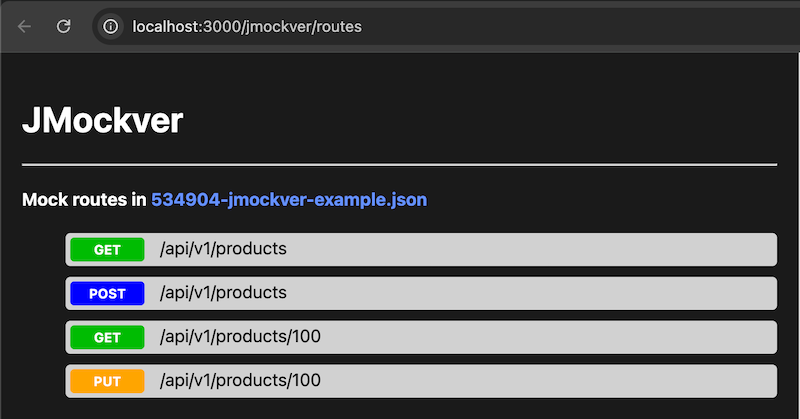
Also, you can see all routes into a Web UI in /jmockver/routes. This looks like this:
If exists an error to serve a route, you will see a message like this:
[JMockver]      ❌ JMockverResponseIdNotMatchedError: Response with code RESP00 not found on "/api/v1/products - POST" route
[JMockver]      ❌ JMockverRouteAlreadyExistsError: Route "/api/v1/products - POST" already exists on "505213-jmockver-example.json" file
[JMockver]      ❌ JMockverStatusCodeNotValidError: Status code 600 is not valid, in "/api/v1/products - POST" route





