#js-logging



A powerful, feature rich and customizable logging library for node.js and any browser with a console.
This library is based on baryon's node.js logging library tracer. It has no dependencies, predefined settings and its default log levels are
compliant with RFC 5424.
###Example Logs
See here for some js-logging output in the console of your browser. It should be similar to
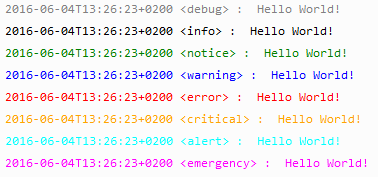
On the server side (e.g. nodejs) an example looks like this
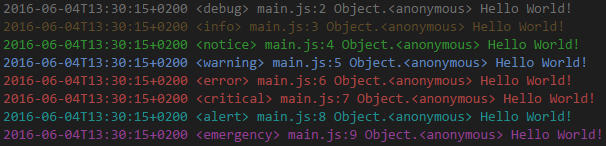
###Node.js Example
npm install js-logging
let logger1 = require('js-logging').console();
logger1.debug('Hello World!');
let Logging = require('js-logging');
let logger2 = new Logging();
logger2.debug('Hello World!');
Current version should work with Node.js version 6.0 and above.
###Browser Example
<script src='js-logging.browser.js'></script>
<script>
let logger1 = Logging.colorConsole();
logger1.debug('Hello World!');
let logger2 = new Logging();
logger2.debug('Hello World!');
<script>
Color version works with chrome and firefox, at least.
###Features
- print log messages with timstamp, file name, method name, line number, path or call stack
- simple color support for node.js
- individual color support for chrome and firefox
- customized date/timestamp format and output format
- supports user-defined logging levels
- add easily any transport
- support filter functions
- no dependency
- predefined settings
- production ready with minimal performance overhead
- es6 module
###Usage node.js
One can define a new object of the Logging class
let Logging = require('js-logging');
let logger = new Logging([options]);
logger.debug('Hello World!');
or can use a predefined function
let logger = require('js-logging').console([options]);
logger.debug('Hello World!');
let logger = require('js-logging').colorConsole([options]);
logger.debug('Hello World!');
let conf = {
filters: {
debug: 'white',
info: 'yellow',
notice: 'green',
warning: 'blue',
error: 'red',
critical: 'red',
alert: 'cyan',
emergency: 'magenta'
}
};
let logger = require('js-logging').console(conf);
logger.debug('Hello World!');
let Logging = require('js-logging');
let logger = new Logging(conf);
logger.debug('Hello World!');
let logger = require('../js-logging.umd.js').dailyFile([options]);
logger.debug('Hello World!');
###Usage browser
See the browser example above. The default color setting is slightly different from the node.js setting.
let conf = {
	filters: {
		debug: 'Gray',
		info: 'Black',
		notice: 'Green',
		warning: 'Blue',
		error: 'Red',
		critical: 'Orange',
		alert: 'Cyan',
		emergency: 'Magenta'
    }
};
Of course there is no predefined function dailyFile!
###Options
The following options can be set by the use of the Logging class or any predefined function (console, colorConsole, dailyFile)
let defaultOptions = {
format: "${timestamp} <${title}> ${file}:${line} ${method} ${message}",
dateformat: "isoDateTime",
preprocess: function (data) {
},
transport: function (data) {
console.log(data.output);
},
filters: [],
level: 'debug',
methods: ['debug', 'info', 'notice', 'warning', 'error', 'critical', 'alert', 'emergency'],
stackIndex: 0
};
There are additional options, if one uses the predefined function dailyFile
let defaultOptions = {
path: '.',
filename: 'js-logging',
filenameDateFormat: 'yyyymmdd',
pathFormat: '${path}/${filename}${filenameDateFormat}.log',
lineEnding: '\r\n'
}
###Data object
var data = {
timestamp:
title:
level:
message:
file:
line:
pos:
path:
method:
stack:
};
###Logging level
One can set the (initial) logging level either as method name or as number (index).
The initial logging level is responsible for the created transports. No transport is set for logging levels below the initial level.
let logger = require('js-logging').console({level: 'warning'});
logger.debug('Hello World!');
logger.warning('Hello World!');
It is possible to change the level at any time.
logger.setLevel('critical');
logger.debug('Hello World!');
logger.warning('Hello World!');
logger.critical('Hello World!');
A level above the maximum will result in no output messages and is equivalent to closing the logger.
logger.close();
logger.debug('Hello World!');
logger.warning('Hello World!');
logger.emergency('Hello World!');
An invalid log level string will result in log level 0
logger.setLevel('unknownLevel');
###Examples
Take a look at the examples directory for many different examples.
###Production and Development
Close the logger at anytime (or set the initial level very high) to get production ready with minimal performance overhead (see the example performance.js).
###Supported browsers
Any browser with a console and at least Chrome and Firefox for simple color support.
###References
This small javascript component uses or is based on other javascript projects and code snippets:
Licence
MIT





