JSON Editor
An html text editor for json inputs, with auto indentation and syntax highlight, both on the fly while typing. If this doesn't sound good enough:
- NO libraries, frameworks or transpilers required.
- It works with vanilla HTML / JS and it doesn't have any dependency.
- Easy integration, as it's a single javascript file. Available as a node package as well.
- FULL styling control with CSS.
Just add in your document:
<json-editor></json-editor>
to render this:

How to install
Setup for vanilla HTML / JS
Just take the file json-editor.js file. Then, add it to your application as usual.
<script src="json-editor.js" />
Setup for Node
First, add the package to your project.
npm install native-json-editor --save
Second and last, add the package to the files for which you will use it.
require('native-json-editor')
How to use it
After the setup, you will have 1 new HTML tag available to use: json-editor.
<json-editor>
Defines a new editor, similar to a vanilla textarea.
Attributes
value: You can initialise the editor with some json, just add your json as a STRING using this value.indent: The number of "spaces" used in the indentation, default is 3.
For clarity, consider the following example:
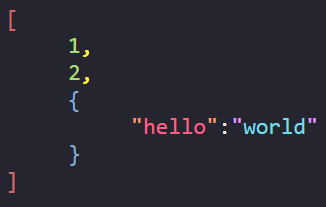
<json-editor value='[ 1, 2, {"hello":"world"} ]' indent="5"></json-editor>
That will render:
API
To control the editor programmatically, you can use the following getters and setters:
string_value: Gets/Sets the editor content as a string. Example:
const value = editor.string_value
editor.string_value = '{ "other": "stuff" }'
json_value: Gets/Sets the editor content as data. Example:
const value = editor.json_value
editor.json_value = { "other": "stuff" }
value: Value is just an alias for string_value, with no difference but the name. I recommend to use the prefixed getters and setters for clarity, but it's on you.
const value = editor.value
editor.value = '{ "other": "stuff" }'
Styling
To customize the style, we just need some CSS. As example we can create a "light theme" version of the editor just with:
.light {
background: #FFF;
border: 1px solid black;
}
.light::part(braces) { color: #00b2e8 }
.light::part(brackets) { color: #d26a6a }
.light::part(colon) { color: #000000 }
.light::part(comma) { color: #000000 }
.light::part(string) { color: #7c0d29; background: rgb(224, 213, 151) }
.light::part(string_quotes) { color: #112ba1 }
.light::part(key) { color: #1d0bbe; background: #20f5ff; }
.light::part(key_quotes) { color: #ff2032 }
.light::part(value) { border: 1px solid #000 }
.light::part(number) { color: #ef33b0 }
.light::part(null) { color: #21d6ff; background: #000; }
.light::part(true) { color: #ffd6d6; background: #000; }
.light::part(false) { color: #d6ffd6; background: #000; }
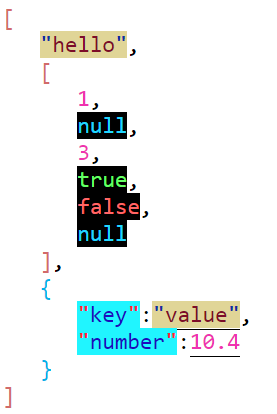
<json-editor class="light"></json-editor>
the above will result in: