kbar
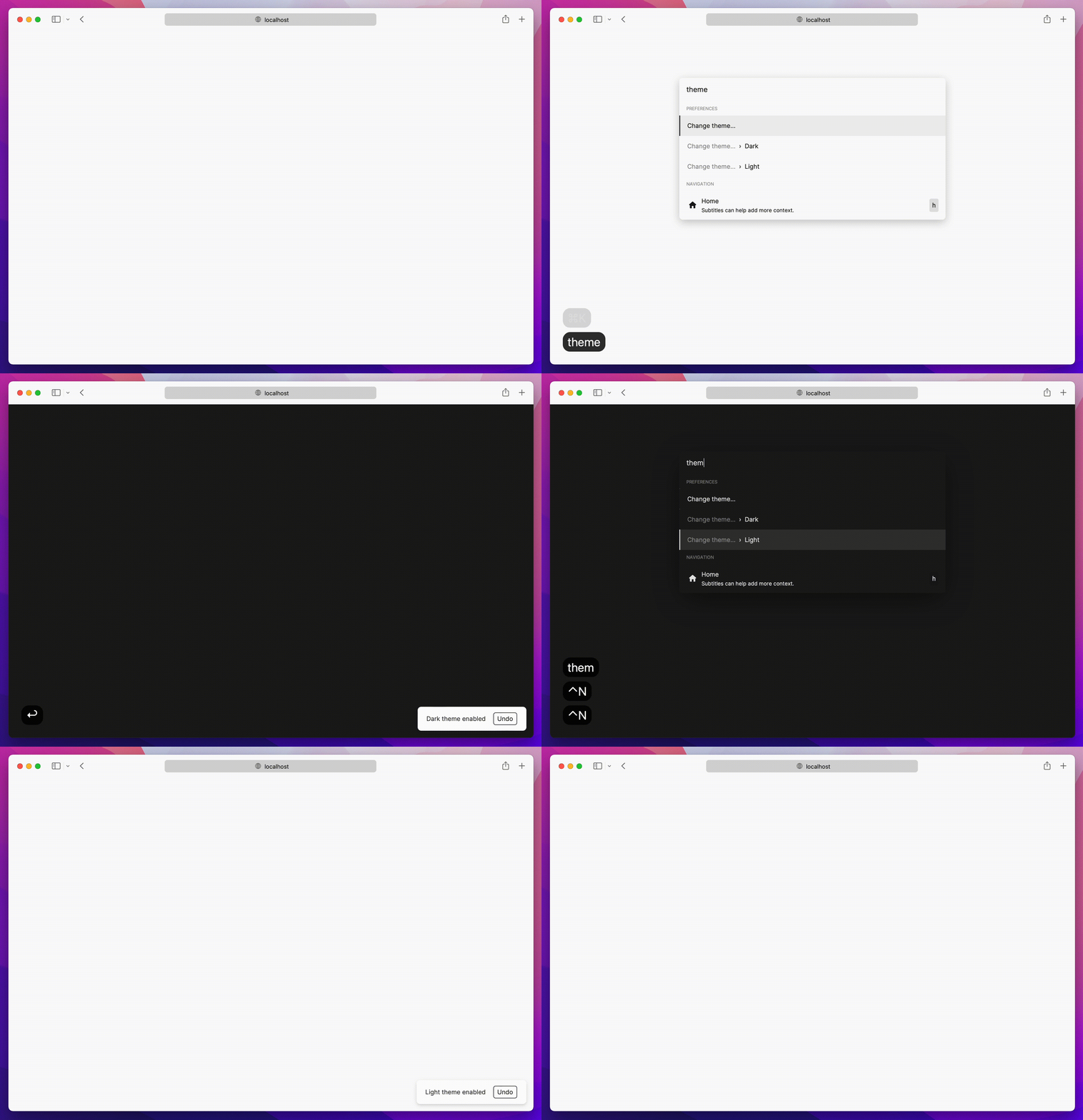
kbar is a simple plug-n-play React component to add a fast, portable, and extensible command + k (command palette) interface to your site.
Background
Command + k interfaces are used to create a web experience where any type of action users would be able to do via clicking can be done through a command menu.
With macOS's Spotlight and Linear's command + k experience in mind, kbar aims to be a simple
abstraction to add a fast and extensible command + k menu to your site.
Features
- Built in animations and fully customizable components
- Keyboard navigation support; e.g. control + n or control + p for the navigation wizards
- Keyboard shortcuts support for registering keystrokes to specific actions; e.g. hit t
for Twitter, hit ? to immediate bring up documentation search
- Nested actions enable creation of rich navigation experiences; e.g. hit backspace to navigate to
the previous action
- Performance as a first class priority; tens of thousands of actions? No problem.
- History management; easily add undo and redo to each action
- Built in screen reader support
- A simple data structure which enables anyone to easily build their own custom components
Usage
Have a fully functioning command menu for your site in minutes. First, install kbar.
npm install kbar
There is a single provider which you will wrap your app around; you do not have to wrap your
entire app; however, there are no performance implications by doing so.
import { KBarProvider } from "kbar";
function MyApp() {
return (
<KBarProvider>
// ...
</KBarProvider>
);
}
Let's add a few default actions. Actions are the core of kbar – an action define what to execute
when a user selects it.
  const actions = [
    {
      id: "blog",
      name: "Blog",
      shortcut: ["b"],
      keywords: "writing words",
      perform: () => (window.location.pathname = "blog"),
    },
    {
      id: "contact",
      name: "Contact",
      shortcut: ["c"],
      keywords: "email",
      perform: () => (window.location.pathname = "contact"),
    },
  ]

  return (
    <KBarProvider actions={actions}>
      // ...
    </KBarProvider>
  );
}
Next, we will pull in the provided UI components from kbar:
import {
KBarProvider,
KBarPortal,
KBarPositioner,
KBarAnimator,
KBarSearch,
useMatches,
NO_GROUP
} from "kbar";
return (
<KBarProvider actions={actions}>
<KBarPortal> // Renders the content outside the root node
<KBarPositioner> // Centers the content
<KBarAnimator> // Handles the show/hide and height animations
<KBarSearch /> // Search input
</KBarAnimator>
</KBarPositioner>
</KBarPortal>
<MyApp />
</KBarProvider>;
);
}
At this point hitting cmd+k (macOS) or ctrl+k (Linux/Windows) will animate in a search input and nothing more.
kbar provides a few utilities to render a performant list of search results.
useMatches at its core returns a flattened list of results and group name based on the current
search query; i.e. ["Section name", Action, Action, "Another section name", Action, Action]KBarResults renders a performant virtualized list of these results
Combine the two utilities to create a powerful search interface:
import {
KBarResults,
useMatches,
NO_GROUP,
} from "kbar";
<RenderResults />;
function RenderResults() {
const { results } = useMatches();
return (
<KBarResults
items={results}
onRender={({ item, active }) =>
typeof item === "string" ? (
<div>{item}</div>
) : (
<div
style={{
background: active ? "#eee" : "transparent",
}}
>
{item.name}
</div>
)
}
/>
);
}
Hit cmd+k (macOS) or ctrl+k (Linux/Windows) and you should see a primitive command menu. kbar allows you to have full control over all
aspects of your command menu – refer to the docs to get
an understanding of further capabilities. Looking forward to see what you build.
Used by
Listed are some of the various usages of kbar in the wild – check them out! Create a PR to add your
site below.
Contributing to kbar
Contributions are welcome!
New features
Please open a new issue so we can discuss prior to moving
forward.
Bug fixes
Please open a new Pull Request for the given bug fix.
Nits and spelling mistakes
Please open a new issue for things like spelling mistakes
and README tweaks – we will group the issues together and tackle them as a group. Please do not
create a PR for it!





