What is this ?
This project is an extension to the original leader-line project https://github.com/anseki/leader-line v1.0.7.
Why using it ?
The original LeaderLine class lacks:
| parent option | The original leaderline class always inserts the line svg element in body. In some cases, inserting the line in a specific element is required. |
| element property | The LeaderLine instance lacks the element property, that points to the line's svg element in the DOM |
| scroll positioning | If you create a line using the original class and then drag one of its connected elements (start/end) to the end of its parent's offset, causing the parent to become scrollable, the positioning of the line becomes incorrect |
| absolute positioning | When you create a line and append it to a draggable element, making the draggable element the parent node of the line SVG element in the DOM, the positioning of the line becomes incorrect if you subsequently drag that element |
What's new ?
This library tackles all the issues mentioned above and provides more options and properties to the LeaderLine instance :
| parent | where to insert the line element, default to document.body in <1.2.0 and to the line's end element parentNode in >=1.2.0 |
| minGridLength | The minimun line length (default to 40). Only applied to grid-pathed lines [>=1.6.0] |
| element | SVG Element | The line svg element |
| removed | boolean | Indicates whether the line was removed (line.remove was called) or not [>=1.5.0] |
| standalone | boolean | Indicates whether the line is directly instantiated or not (ex: belongs to a LinkerLineChain instance) [>=1.5.0] |
Changes :
- pointAnchor, areaAnchor, mouseHoverAnchor are renamed to PointAnchor, AreaAnchor, MouseHoverAnchor.
- CaptionLabel and PathLabel are merged into Label. The Label has an option named "on" that takes as a value either "path" or "element".
- animation object "timing" property is renamed to "easing".
- dash "len" property is renamed to "length".
Illustration
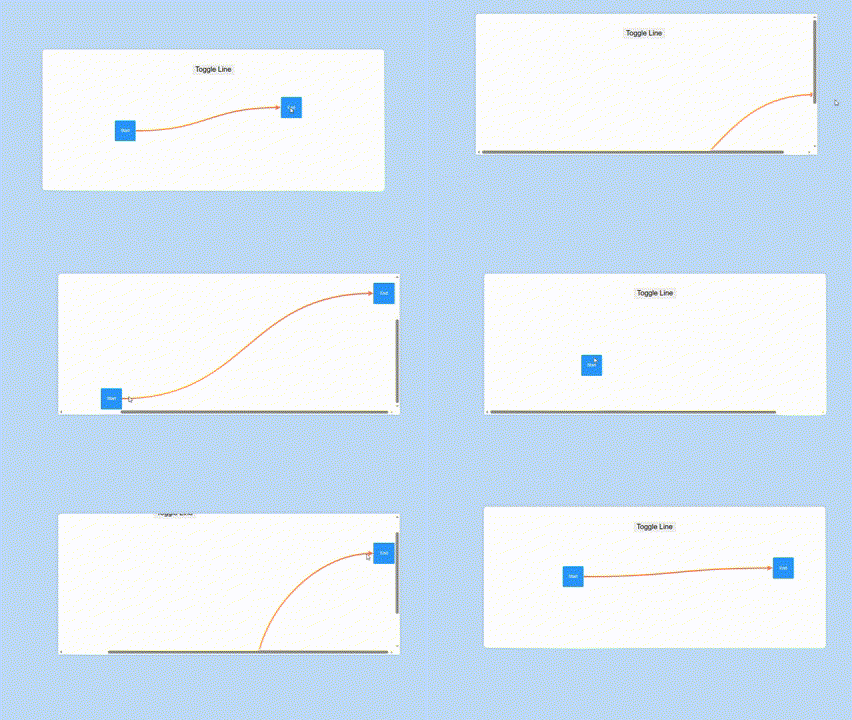
Check source code.
How to use it ?
Just install the package using npm or any package manager of your choice :
npm install --save linkerline
And then use it in your code as follows :
import LinkerLine from "linkerline";

const line=new LinkerLine({
    //...OriginalClassProps,
    parent:HTMLElement,// this is the new parent option
    start:HTMLElement,
    end:HTMLElement,
});
//line.element => returns the line svg element
Version 1.5.0 add-ons
| removeAll() | void | removes all standalone lines at once |
| getLineChain(line:LinkerLine) | LinkerLineChain | null | returns the LinkerLineChain instance the line belongs to if any |
LinkerLine Chain [1.3.0]
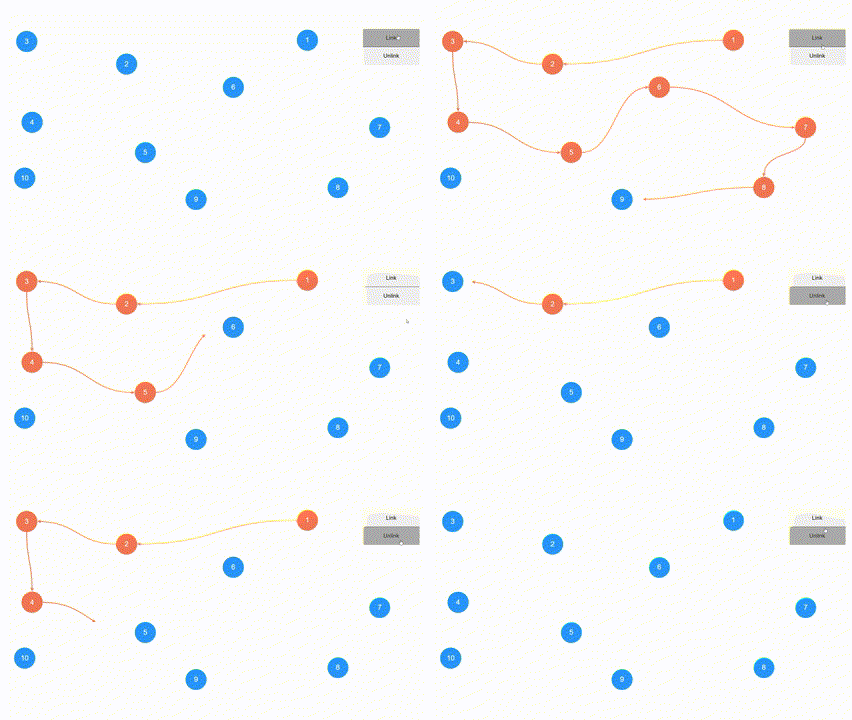
new LinKerLine.Chain(nodes,options):LinkerLineChain;
| nodes | HTMLElement[] | The chain nodes |
| options | object | The chain options |
Chain Options :
| linkingDuration | number | The line draw animation duration, default to 500 |
| linked | boolean | specifies if the chain is initially linked or not, default to false |
| lineOptions | LinkerLineOptions | The line options |
| onLinkChange | (context : object) : void | Called on each node-to-node connection change |
onLinkChange Context :
| line | LinkerLine | The connection line |
| startNode | HTMLElement | Same as line.start |
| endNode | HTMLElement | Same as line.end |
| nodesLinked | boolean | Indicates whether the nodes are linked or unlinked |
| hopIndex | number | The hop index [>=1.4.0] |
LinkerLineChain:
| nodes | HTMLElement[] | gets the chain target nodes |
| lines | LinkerLine[] | gets the chain lines |
| linked | boolean | true if all nodes are fully linked, false otherwise |
| partiallyLinked | boolean | true if at least one line is visible, false otherwise |
| link | () : void | links the chain nodes |
| unlink | () : void | unlinks the chain nodes |
| pushNode | (node:HTMLElement) : void | appends a new node to the end of the chain |
| unshiftNode | (node:HTMLElement) : void | adds a new node at the start of the chain |
Additional properties are added to nodes:
| outLine | LinkerLine | undefined | The linkerline instance exiting the node |
| inLine | LinkerLine | undefined | The linkerline instance entering the node |
Illustration code :
const chain=new LinkerLine.Chain(nodes,{
    onLinkChange:({line,startNode,endNode,nodesLinked})=>{
        const color=nodesLinked?line.color:null;
        startNode.style.backgroundColor=color;
        endNode.style.backgroundColor=color;
    },
});
linkbtn.onclick=()=>{
    chain.link();
};
unlinkbtn.onclick=()=>{
    chain.unlink();
}
positionAll [1.2.0]
A new static method LinkerLine.positionAll() : void that updates all the lines'positions at once.
Custom Plugs [1.1.0]
It allows defining custom plugs via the static method LinkerLine.definePlug( options : object ).
| name | string (required) | plug name |
| shape | enum "rect","ellipse" | defines a plug via a shape |
| svg | string | (color:string,weight:string)=>string | defines a plug via an svg string |
| src | string | defines a plug via an url or base64 string |
| width | number | sets the plug base width |
| height | number | sets the plug base height |
| margin | number | margin between the plug and the start/end element |
| rotatable | boolean | indicates whether the plug should have a fixed orientation or rotate accordingly |
LinkerLine.definePlug({
    name:"star",
    svg:(color,weight)=>`
        <svg xmlns="http://www.w3.org/2000/svg" width="24" height="24" viewBox="0 0 24 24" fill="${color}" stroke-width="${weight}" stroke-linecap="round" stroke-linejoin="round">
            <path d="M8.243 7.34l-6.38 .925l-.113 .023a1 1 0 0 0 -.44 1.684l4.622 4.499l-1.09 6.355l-.013 .11a1 1 0 0 0 1.464 .944l5.706 -3l5.693 3l.1 .046a1 1 0 0 0 1.352 -1.1l-1.091 -6.355l4.624 -4.5l.078 -.085a1 1 0 0 0 -.633 -1.62l-6.38 -.926l-2.852 -5.78a1 1 0 0 0 -1.794 0l-2.853 5.78z"/>
        </svg>
    `,
    width:20,
    height:20,
    rotatable:false,
});

const line=new LinkerLine({
    parent:linkerlineview,
    color:"#73f5fa",
    size:3,
    startPlug:"star",
    endPlug:"star",
});
For svgs, when a function is specified, the color and the weight params will respectively make sure that the plug will match the line color (or start/endPlugColor if specified) and thickness.





